You tried OrbStack at home and liked it. It is quick, the window is tidy, and docker just works. Then you wanted it on your work laptop, and found it needs a licence there. This post is for that moment. It goes through the free or low-cost ways to get a similar setup on a Mac, and for each one says what you keep and what you lose compared with OrbStack.
If you only want a ranked list of every Docker Desktop alternative, read Docker Desktop alternatives compared. If you want a close, measured comparison of OrbStack with one other tool, read Kiri vs OrbStack. This post is about leaving OrbStack, and why you might need to.
New to some of the terms? Our container basics explain them: image layers, registries, runc, and containerd vs Docker.
What OrbStack’s licence says
OrbStack’s price page says it is “Always free for personal use”. The Pro plan is $8 per user per month, billed yearly ($96 a year), for business and commercial use (pricing).
The licence page spells out who must pay. “Freelance, business, and commercial users” need a licence for each user, and that includes work for non-profit or government bodies, and anyone earning over $10,000 a year from work done with OrbStack (licensing). A new install starts with a 30-day Pro trial that allows commercial use. After it ends, the app falls back to the free personal plan. A licence covers one user on up to five devices they own or mainly operate. Students in classes don’t need one.
So the question isn’t whether OrbStack is good. It is whether your employer will buy it. If they will, $96 a year is small next to your hourly cost, and you can stop reading. If they won’t, or the approval takes months, the options below are free at work, though Docker Desktop is free only under a company-size limit.
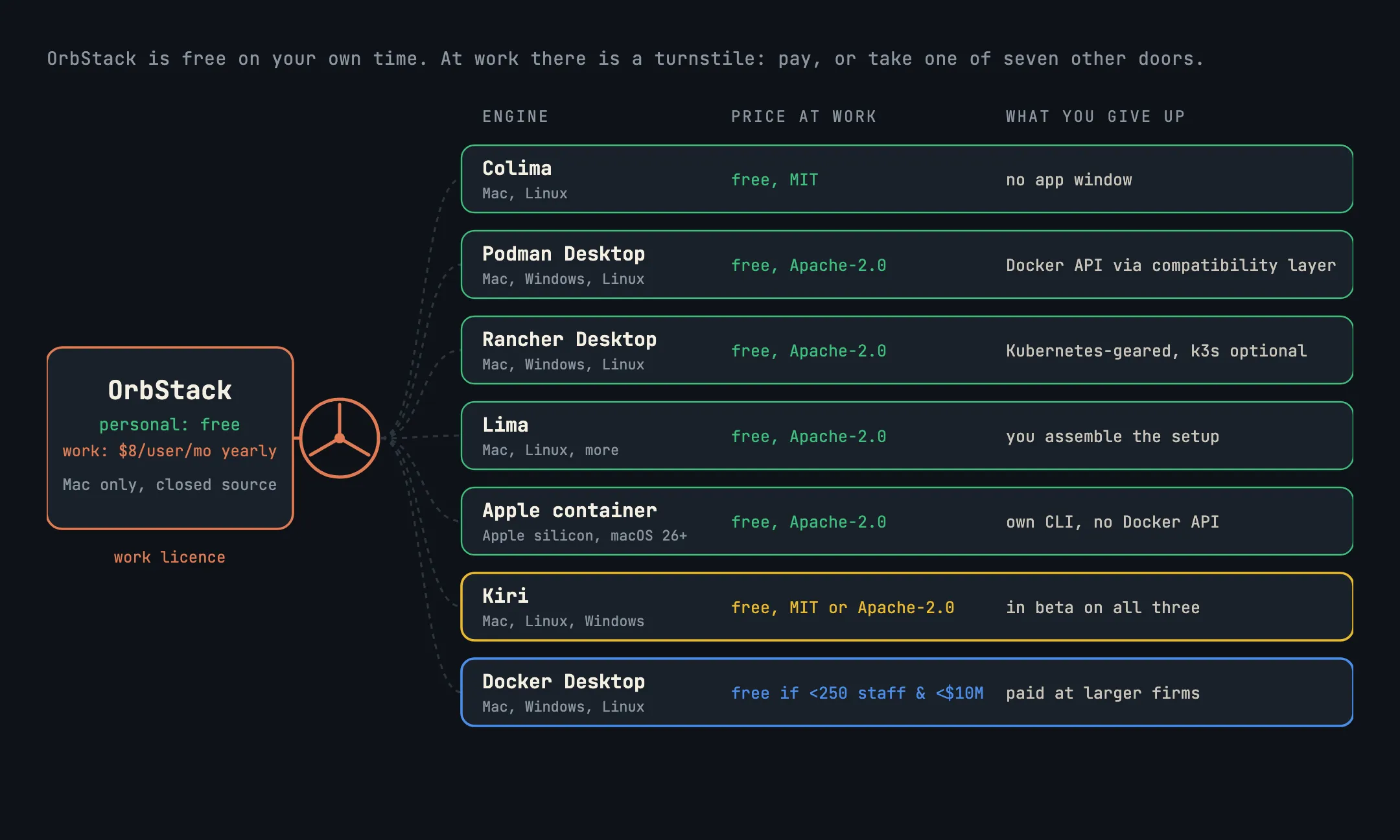
What you are replacing
OrbStack is a Mac app that runs “an unmodified Docker engine” in its own tuned Linux VM (FAQ). What you probably use day to day is:
- the
dockerCLI and Compose, working as they do on Docker Desktop; - fast start and a light idle footprint;
- fast file sharing and names like
web.orb.local; - Linux machines, a single-node Kubernetes cluster, and a window to see it all.
Every tool below except Apple’s container gives you the first item, though Podman uses a compatibility layer and Lima leaves the wiring to you. They differ on the rest.
Colima
Colima is “Containers on Lima”, MIT-licensed, for Intel and Apple silicon Macs and Linux. It starts a Linux VM and runs Docker’s engine in it. Kubernetes is optional with --kubernetes. On Apple silicon you can use Apple’s Virtualization framework and Rosetta (--vm-type=vz --vz-rosetta) so amd64 images run quickly.
brew install colima docker docker-compose
mkdir -p ~/.docker/cli-plugins
ln -sfn "$(brew --prefix)/opt/docker-compose/bin/docker-compose" ~/.docker/cli-plugins/docker-compose
colima start --vm-type vz --vz-rosetta
docker compose up -d
Keep: the same Docker engine, so everything behaves the way it did on OrbStack. Free at any company. Intel Mac support. In Kiri’s own benchmark it read bind mounts faster than OrbStack (5,235 MB/s against 3,240 MB/s).
Lose: the app. Colima is a command-line tool with “sensible defaults”, not a window. You install the docker and Compose clients yourself. Colima has no window, so you also don’t get the extras OrbStack builds around the engine. On Intel Macs, leave out --vz-rosetta, which needs Apple silicon.
Best for: people who live in the terminal and want the closest free match to OrbStack’s engine.
Podman and Podman Desktop
Podman Desktop is a desktop app for Mac, Windows and Linux, and a CNCF sandbox project. It sits on Podman, a daemonless engine. On a Mac, Podman runs containers in a VM it manages with podman machine (docs).
Keep: an app window, which Colima doesn’t have. Free at work. The same tool on Windows and Linux. Rootless containers and pods are first-class ideas.
Lose: exact Docker behaviour. Podman’s API has “a compatibility layer” for Docker clients next to its own native API (docs). That covers most docker and Compose use, but a tool that leans on an API call Podman handles differently can need adjusting. Podman Desktop has a section on migrating from Docker for the Docker CLI alias and DOCKER_HOST.
Best for: teams that want a non-Docker engine, or a free GUI.
Rancher Desktop
Rancher Desktop is an app for Mac (Intel and Apple silicon), Windows and Linux. You pick the engine: Moby, which gives you the Docker CLI, or containerd with nerdctl. Kubernetes is built in through k3s, and you can choose its version.
Keep: an app window, Docker’s engine if you pick Moby, and a different Kubernetes story from OrbStack’s built-in cluster, since you choose the Kubernetes version.
Lose: simplicity if you only run Compose, since its interface and defaults are geared to Kubernetes (you can turn Kubernetes off in preferences). Setting your engine to containerd means using nerdctl instead of docker.
Best for: days spent on Helm charts and kubectl.
Lima, used directly
Lima is the VM tool under Colima. It is Apache-2.0 and a CNCF incubating project. It offers “automatic file sharing and port forwarding”, and ships templates: limactl start template:docker for Docker, and template:k8s for Kubernetes.
Keep: control. You choose the template, the VM size and the engine, including containerd with nerdctl or Podman.
Lose: convenience. Nothing is set up for you, you maintain the config, and you wire up the Docker context to the VM’s socket yourself. Colima does that work for you.
Best for: people who want to own the setup, or who need an unusual guest.
Apple’s container tool
Apple publishes container, an open-source (Apache-2.0) command-line tool written in Swift for Apple silicon. Its README describes Linux containers as “lightweight virtual machines on your Mac”, and its technical overview says it runs “a lightweight VM for each container that you create”. It works with standard OCI images from registries.
Keep: a free, first-party option with strong isolation, since each container has its own VM. Containers get their own IP addresses from a vmnet network.
Lose: a lot of OrbStack’s drop-in feel. It needs Apple silicon and is built for macOS 26 or later. It can run on macOS 15, but the docs say “we don’t recommend that configuration”, and on macOS 15 containers can’t talk to each other. The project says it is under active development and that some features may change. It has its own CLI rather than the Docker Engine API, so your docker CLI, Compose files and tools like Testcontainers won’t point at it the way they do at OrbStack.
Best for: trying Apple’s direction on a new Mac, not replacing OrbStack for a team today.
Docker Desktop, if your company is small
Docker’s own app is free at some companies. Under the Docker Desktop licence, small businesses qualify with “fewer than 250 employees AND less than $10 million in annual revenue”. Personal use, education and non-commercial open source are free too. Larger companies need a paid plan, and the pricing page lists Business at $24 per user per month on yearly billing (Pro, at $9, is for individuals). For the details, see Docker Desktop licence in 2026.
Keep: the reference Docker experience, Mac, Windows and Linux, and Kubernetes.
Lose: lightness and bind-mount speed compared with OrbStack. If you left Docker Desktop for OrbStack in the first place, you left for a reason; why Docker Desktop is slow on a Mac covers it. And if your company is over the limits, it is just another licence to buy.
Best for: small companies who want no surprises, and who can’t switch tools at all.
Kiri
We make Kiri, so weigh this section accordingly. Kiri is an open-source container runtime for Mac (Apple silicon and Intel), Linux and Windows, in beta on all three. It is dual-licensed MIT or Apache-2.0, with no seat count. On a Mac it runs one small Linux VM, but with its own daemon and an agent in place of Docker’s engine, and it serves the Docker Engine API on ~/.kiri/run/docker.sock. The app brings the docker CLI, Compose and buildx.
Keep: an app window, the Docker API, Compose, amd64 images on Apple silicon, names with HTTPS (web.kiri.local), a single-node Kubernetes cluster, your Mac’s SSH agent forwarded into containers, Linux machines with kiri machine, and USB passthrough in beta. Speed, too: in Kiri’s benchmark, docker run --rm alpine true took 22 ms on Kiri and 279 ms on OrbStack (medians, one Mac, both at 2 CPUs and 8 GB, 2 November 2026). Full numbers and method are on the benchmarks page.
Lose: maturity, first. Kiri is in beta on all three platforms; OrbStack is a finished product. Finder files at ~/Kiri are read-only, containers on the Mac are reached through published ports (-p) or .kiri.local names, and Kiri refuses --gpus and any network driver but bridge (network docs). USB webcams and audio devices don’t stream yet. OrbStack was ahead in that benchmark on bind-mount reads (3,240 against 1,724 MB/s) and new HTTP connections (2,389 against 1,892 a second).
If you are moving over, kiri import orbstack copies images, volumes and containers, and changes nothing in OrbStack (moving guide).
Side by side
| Platforms | Price at work | Docker API and Compose | App window | Kubernetes | |
|---|---|---|---|---|---|
| OrbStack | Mac | $8 per user per month, billed yearly | Unmodified Docker engine | Yes | Single-node, built in |
| Colima | Mac, Linux | Free (MIT) | Docker’s engine | No | k3s, opt-in |
| Podman Desktop | Mac, Windows, Linux | Free | Docker compatibility layer | Yes | Via Kind or Minikube |
| Rancher Desktop | Mac, Windows, Linux | Free | Moby, or containerd with nerdctl | Yes | k3s, built in |
| Lima | Mac, Linux and more | Free (Apache-2.0) | Docker template, set up by you | No | k8s template |
| Apple container | Apple silicon Mac | Free (Apache-2.0) | Own CLI, no Docker API | No | No |
| Docker Desktop | Mac, Windows, Linux | Free if under 250 staff and $10M | The reference | Yes | Yes |
| Kiri | Mac, Linux, Windows (all beta) | Free (MIT or Apache-2.0) | Docker Engine API, served by Kiri’s own daemon | Yes (not on ARM Linux or kiri-lite) |
Single-node k3s |
Prices and licences are sourced in the sections above. Kubernetes for Colima and Lima is opt-in through Colima’s README and Lima’s templates; Podman Desktop runs Kubernetes through Kind or Minikube (Podman Desktop docs).
Which should you use?
- You want OrbStack’s engine behaviour, and are happy in a terminal: Colima.
- You want a free window and don’t mind a non-Docker engine: Podman Desktop.
- You work mostly in Kubernetes: Rancher Desktop.
- You want to build the setup yourself: Lima.
- You want to see where Apple is heading: Apple’s
container, alongside another tool. - Your company is under 250 people and $10 million in revenue: Docker Desktop is free for you, though it is the heavy one.
- You want the OrbStack feel, free at work, and the same tool on Windows and Linux: Kiri, knowing it’s in beta.
Whatever you pick, you can try it without removing OrbStack. Colima, OrbStack, Docker Desktop and Kiri each register their own Docker context, so docker context use colima and docker context use orbstack switch between them. With Lima or Podman, you point DOCKER_HOST or a context you create at their socket. Two engines can’t publish the same host port at once, so stop a container in one before you start it in the other. Switch from Docker Desktop covers moving a whole setup, and Docker Compose on a Mac without Docker Desktop covers Compose.
Your Compose files and Dockerfiles carry over to any Docker-API tool unchanged. What lives inside OrbStack’s VM (images, volumes, containers) does not, so re-pull images and copy volumes you care about before you uninstall.
In short
- OrbStack is free for personal use. Work use needs Pro, $8 per user per month billed yearly, with a 30-day trial.
- Colima is the closest free match to its engine, without a window. Podman Desktop gives you a window on Podman’s engine; Rancher Desktop gives you one with a choice of Moby or containerd, plus built-in k3s.
- Lima is the build-it-yourself base under Colima. Apple’s
containeris free and runs each container in its own VM, but needs Apple silicon, is built for macOS 26 or later, and has no Docker API. - Docker Desktop is free under 250 employees and $10 million in revenue.
- Kiri is free at any size and fast to start containers, but it is in beta and trails OrbStack on bind-mount reads and new HTTP connections.