Part of our container basics: image layers · registries · runc · Kubernetes
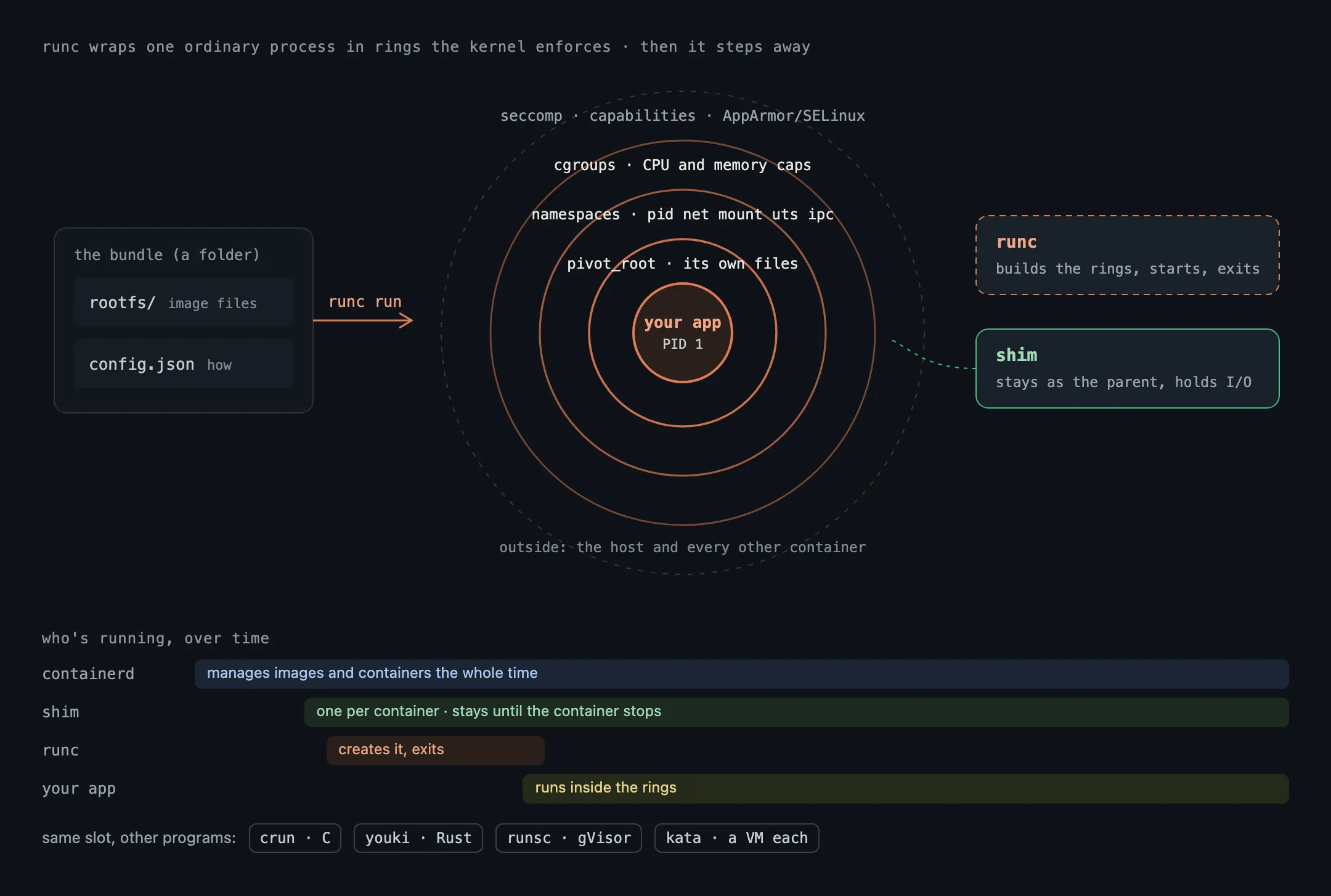
Whether you type docker run, deploy to Kubernetes or use nerdctl, the request travels down through several programs, and on most Linux machines the last one is runc. It’s the program that turns an ordinary process into a container. Everything above it (containerd, Docker Engine, the kubelet) is management; runc is where the container is actually made.
What runc is
runc is a small command-line tool, written in Go, that creates and runs containers according to the OCI Runtime Specification, the open standard for what “run this container” means. Docker wrote it in 2015 from its own internal code (libcontainer) and gave it to the Open Container Initiative, which still maintains it. It’s called a low-level runtime: it knows nothing about images, registries or networks. It does one thing.
What runc does
Given a container to start, runc asks the Linux kernel for the pieces that make a container:
- Namespaces, so the process gets its own view of the system: its own process list (it sees itself as PID 1), its own network stack, its own mounts and hostname.
- Cgroups, which cap how much CPU, memory and other resources it can use.
- A root filesystem: it switches the process into the container’s files (
pivot_root), so the host’s files are out of sight. - Restrictions: it drops Linux capabilities, applies a seccomp filter that blocks risky system calls, and sets up AppArmor or SELinux if configured.
Then it starts your program inside all of that, and runc itself exits. The container keeps running without it. In a containerd setup, a small shim process stays behind as the container’s parent, holding its input and output and reporting when it stops.
What runc needs: a bundle
runc doesn’t take an image name. It takes a bundle: a folder containing
rootfs/, the container’s files, already unpacked (the image’s layers, stacked); andconfig.json, which describes the process to run and every namespace, mount, limit and restriction above.
Turning an image from a registry into a bundle is containerd’s job. runc only runs what it’s given.
Run a container with nothing but runc
On a Linux machine with runc installed, you can do containerd’s job by hand. This is the example from runc’s own README, using Docker only to get some files:
mkdir -p mycontainer/rootfs
docker export $(docker create busybox) | tar -C mycontainer/rootfs -xf -

cd mycontainer
runc spec              # writes a default config.json
sudo runc run demo     # you're now in a shell inside the container
Inside, ps shows only the shell and ps itself, and hostname says runc. No daemon is involved, no network is set up (config.json gives it an empty network namespace), and when you exit the shell the container is gone.
Other runtimes that fill the same slot
Because the interface is a standard, runc can be swapped out:
- crun: the same job, written in C. Faster to start and lighter on memory; the default on Fedora and in Podman on many distributions.
- youki: the same job, written in Rust.
- runsc (gVisor): puts a kernel written in user space between the container and the host kernel, so the container’s system calls never reach the host kernel directly.
- Kata Containers: starts each container inside a small virtual machine with its own kernel.
The last two trade some speed for a much stronger wall, which matters when the code inside isn’t trusted. Our post on container isolation compares them.
Why runc’s security matters
Every container on the machine is started by runc, so a bug in it can break the wall between container and host. That has happened: CVE-2019-5736 let a malicious container overwrite the runc binary on the host, and the “Leaky Vessels” bug, CVE-2024-21626, let a container reach the host’s filesystem through a leaked file descriptor. Keep runc updated along with containerd and Docker; it’s easy to forget because you never run it yourself.
In short
- runc is the low-level runtime: it creates the namespaces, cgroups and restrictions, starts the process, and exits.
- It takes a bundle (unpacked files plus
config.json), not an image. - containerd and Docker prepare the bundle; runc runs it.
- crun, youki, gVisor and Kata can take its place.
Next in the basics: the system that decides where all these containers run, Kubernetes.