Part of our container basics: image layers · registries · runc · Kubernetes
docker run starts a container on one machine, once. If the machine dies, so does the container. If you need ten copies, you start ten. If you ship a new version, you stop and start them yourself. Kubernetes does those jobs for you, across many machines. It’s a container orchestrator: you tell it what you want running, and it keeps making it so.
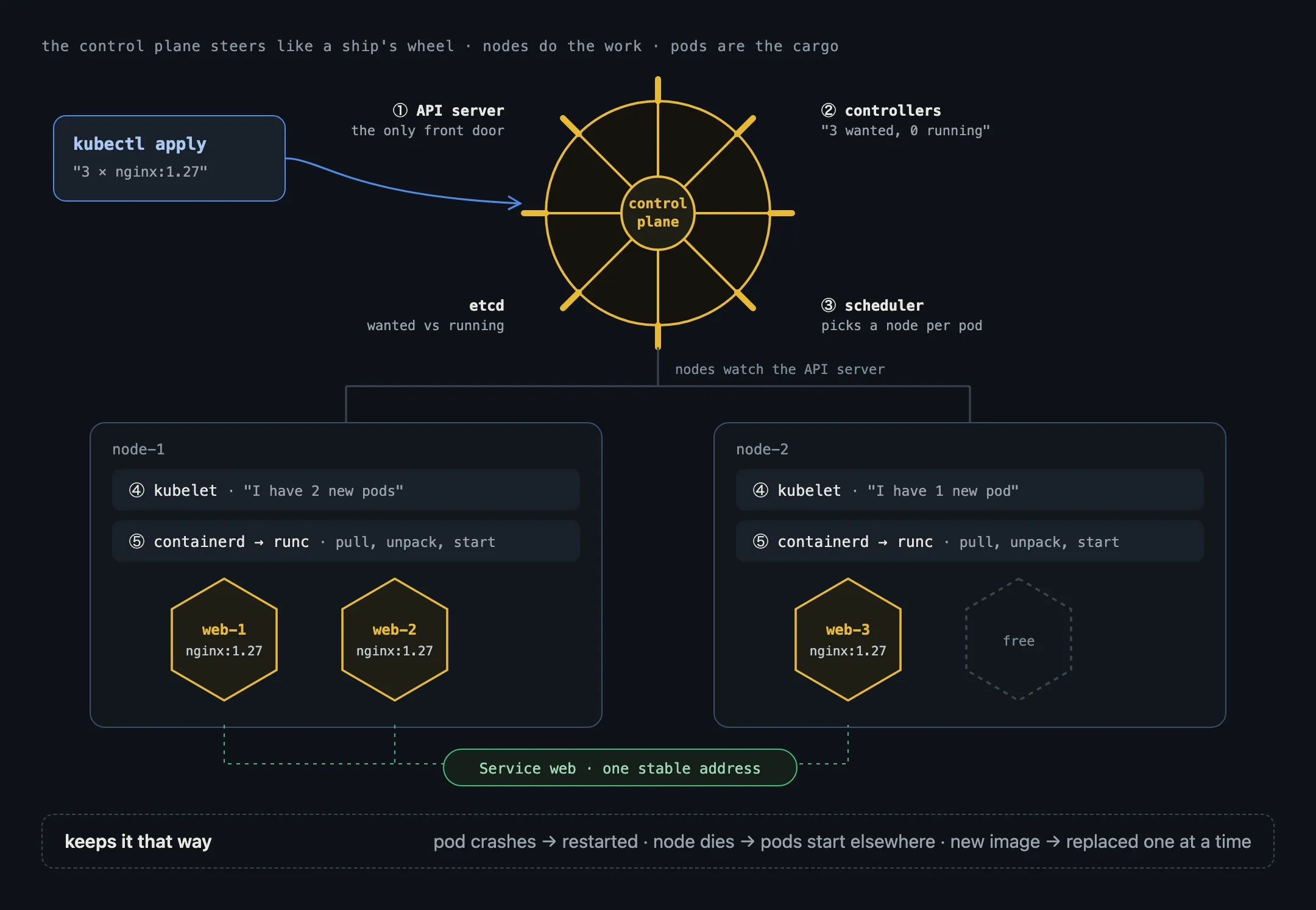
You describe the result, not the steps
With Kubernetes you don’t say “start three containers”. You write down the state you want, usually in YAML, and hand it over:
apiVersion: apps/v1
kind: Deployment
metadata:
  name: web
spec:
  replicas: 3
  selector:
    matchLabels: { app: web }
  template:
    metadata:
      labels: { app: web }
    spec:
      containers:
        - name: web
          image: nginx:1.27
          ports: [{ containerPort: 80 }]
kubectl apply -f web.yaml sends this to the cluster. From then on, Kubernetes compares what you asked for (three copies of nginx:1.27) with what is actually running, and fixes any difference. A container crashes: it’s restarted. A machine dies: its copies are started on other machines. You change the image to nginx:1.28: the copies are replaced one at a time, so the site stays up. These comparing-and-fixing programs are called controllers, and they’re the core idea of Kubernetes.
The pieces of a cluster
A cluster has two kinds of machines.
The control plane makes the decisions:
- kube-apiserver: the front door.
kubectl, the controllers and every node talk only to it. - etcd: the database holding the desired and current state of everything.
- kube-scheduler: picks a node for each new pod, based on free CPU and memory and any rules you set.
- kube-controller-manager: runs the built-in controllers, such as the one that keeps a Deployment at three copies.
The worker nodes run your containers:
- kubelet: an agent on every node. It watches the API server for pods assigned to its node and makes sure they’re running.
- A container runtime, usually containerd or CRI-O, which the kubelet drives through the Container Runtime Interface (CRI).
- kube-proxy, or a replacement such as Cilium: routes traffic for Services to the right pods.
Pods: why Kubernetes doesn’t run containers directly
The smallest thing Kubernetes runs is a pod: one or more containers that always run together on the same node. Containers in a pod share a network namespace, so they reach each other on localhost and share one IP address, and they can share volumes. Most pods hold one container; extra ones are helpers, such as a proxy or a log shipper (a “sidecar”).
Pods are disposable. When one is replaced it gets a new IP, so you don’t connect to pods directly. A Service gives a set of pods one stable name and address (web.default.svc) and spreads traffic across whichever pods exist right now. An Ingress or a Gateway brings traffic in from outside the cluster.
From kubectl to a running process
Here’s the whole path for that Deployment, top to bottom:
kubectl applysends the Deployment to the API server, which stores it in etcd.- A controller sees it wants three pods and creates three pod records.
- The scheduler assigns each pod to a node.
- On each node, the kubelet sees its new pod and asks containerd, through the CRI, to create it.
- containerd pulls
nginx:1.27from the registry, unpacks its layers, and hands the result to runc, which starts the process.
Steps 4 and 5 are the same machinery Docker uses on your laptop, minus Docker. Our post on containerd and Docker explains why that is, and why docker ps shows nothing on a Kubernetes node.
When you need it, and when you don’t
Kubernetes earns its complexity when you run many services, across several machines, that must stay up through crashes and deploys. For one app on one server, Docker Compose or a managed service is often enough. Managed Kubernetes (Amazon EKS, Google GKE, Azure AKS and others) runs the control plane for you, which removes a large part of the work but not the need to understand the pieces above.
In short
- Kubernetes runs containers across many machines and keeps them in the state you declared.
- The control plane (API server, etcd, scheduler, controllers) decides; kubelets on each node do.
- It runs pods, not bare containers; Services give pods a stable address.
- Under the kubelet sit the same containerd and runc that sit under Docker.