Part of our container basics: image layers · registries · runc · Kubernetes
A container registry is a server that stores images and hands them out. Docker Hub is the best known; GitHub Container Registry (ghcr.io), Amazon ECR, Google Artifact Registry, Azure Container Registry, Harbor and Quay are others. They all speak the same protocol, the OCI Distribution Specification, so any client can pull from any of them.
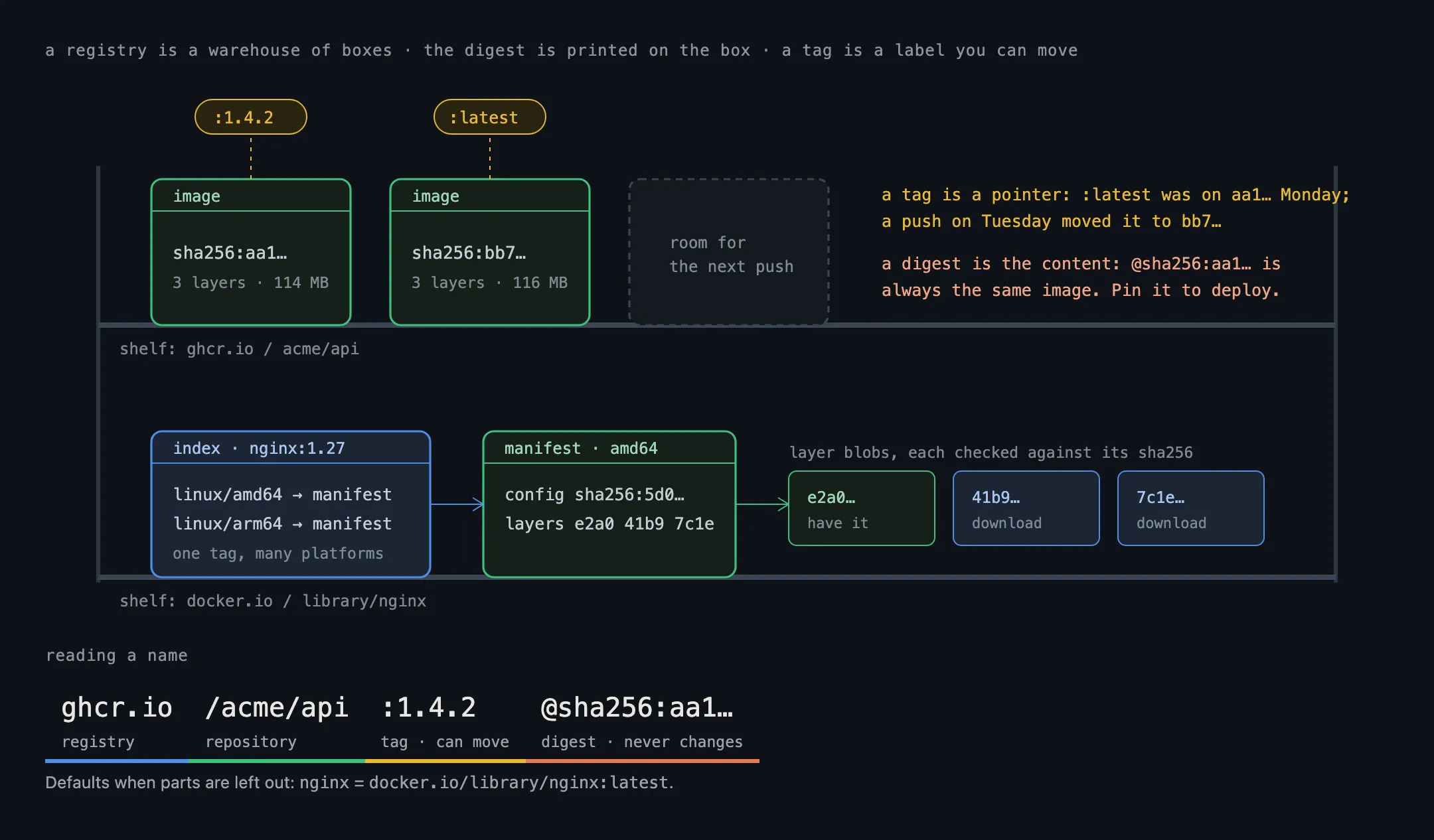
Reading an image name
A full image name has up to four parts:
ghcr.io / acme/api : 1.4.2 @sha256:9f2c…
registry repository tag digest- Registry: the server. Leave it out and Docker assumes Docker Hub (
docker.io). - Repository: the image’s name within that registry. Docker Hub’s official images live under
library/, songinxreally meansdocker.io/library/nginx. - Tag: a human-friendly label such as
1.4.2orlatest. Leave it out and you getlatest. - Digest: the SHA-256 hash of the image’s manifest. It names one exact image and can never point at anything else.
What a pull really does
An image is a manifest, a config and a stack of layers, each named by its digest. A pull fetches them in that order:
- Ask for the manifest of
nginx:1.27. For images built for several platforms, the first answer is an index: a list of manifests, one per platform (linux/amd64,linux/arm64, …). The client picks the one for its machine. - Read the manifest, which lists the config and the layers by digest.
- Download what’s missing. Every layer the machine already has, from another image with the same base, is skipped. The rest download in parallel; that’s the progress bars you see.
- Check every hash. Each downloaded piece must match its digest, so a corrupted or tampered layer is rejected.
A push works the same way in reverse: upload the layers the registry doesn’t have yet, then the manifest.
Tags move, digests don’t
A tag is just a pointer, and whoever pushes to the repository can move it. nginx:1.27 will point at a newer build when a security fix lands, and latest changes all the time. That’s convenient for getting fixes, and a problem for knowing what you run: two servers that pulled myapp:latest a day apart can be running different code.
A digest is fixed. To run exactly the image you tested, pin by digest:
image: ghcr.io/acme/api:1.4.2@sha256:9f2c…With both, the tag tells people what it is and the digest decides what gets pulled. Tools like Renovate and Dependabot can update the pinned digests for you.
Things that bite in practice
- Rate limits. Docker Hub limits how many pulls an anonymous or free account can make. Busy CI systems and clusters hit it. A pull-through cache (a mirror in your own network, such as Harbor or a cloud registry’s cache feature) fixes this and makes pulls faster.
- Credentials. Private registries need a login. Locally it’s stored in
~/.docker/config.json; in Kubernetes, in an image pull secret. Treat both like passwords: a registry token often allows pushing as well as pulling. - Trust. Anyone can publish an image on a public registry, including look-alike names of popular ones. Prefer official or verified publishers, scan what you pull, and verify signatures where the publisher provides them (for example with Sigstore’s
cosign). - Secrets in layers. Anything baked into a layer is readable by everyone who can pull the image, even if a later layer deleted it. See image layers.
In short
- A registry stores images as content-addressed pieces: manifests, configs and layers.
registry/repository:tag@digest; Docker Hub andlatestare the defaults when parts are left out.- A pull fetches the manifest, then only the layers you don’t already have, and checks every hash.
- Tags can be moved; digests can’t. Pin by digest for anything you deploy.
Next in the basics: what turns an image into a running process, runc.