An AI agent that writes code also runs it. It installs packages, calls MCP tools, and executes scripts it generated a minute ago. Nobody reviewed any of that code. Most teams put the agent in a Docker container and call it a sandbox.
A container helps. But it was built to package software, not to hold code that is trying to get out. This post explains what a container really isolates, what the stronger options are, what each one costs, and the layer most setups forget: the network.
Why this matters now
Three things an agent does every day run code you didn’t write:
- Package installs.
npm installruns each package’s install scripts with your permissions. One poisoned dependency, anywhere in the tree, runs on the first install. - MCP tool calls. Each MCP server is a program, often started with
npx, that runs as you. We covered this in Run your MCP servers in a box. - Generated scripts. The agent writes a shell script from text it read in an issue, a README or a web page. If that text was written by an attacker, so was the script. See the AGENTS.md downloads attack.
So the question is not whether hostile code will run near your agent. It’s what that code can reach when it does.
What a container really is
A container is an ordinary Linux process with two kinds of limits on it:
- Namespaces change what the process can see: its own process list, its own filesystem root, its own network interfaces, its own user IDs.
- Cgroups limit how much it can use: memory, CPU, number of processes.
That’s all. There is no second kernel. Every container on a machine makes system calls into the same host kernel, which exposes a few hundred system calls and millions of lines of code. If one of them has an exploitable bug, a process inside the container can use it to take over the kernel, and with it the host and every other container on it.
This is not theoretical. Dirty Pipe (CVE-2022-0847) let an unprivileged process overwrite files it could only read. Researchers at Palo Alto Networks showed a container using it to change files in neighbouring containers, and reported building an image that breaks out to the host when it runs. Container runtimes have their own bugs too: CVE-2019-5736 let a malicious container overwrite the host’s runc binary, and CVE-2024-21626 leaked a host file descriptor into new containers.
A container limits what well-behaved code sees. It does not reliably stop code that is looking for a way out.
The isolation ladder
You can make the boundary stronger in steps. Each rung shrinks what hostile code can touch, and each costs something in startup time, overhead or compatibility.
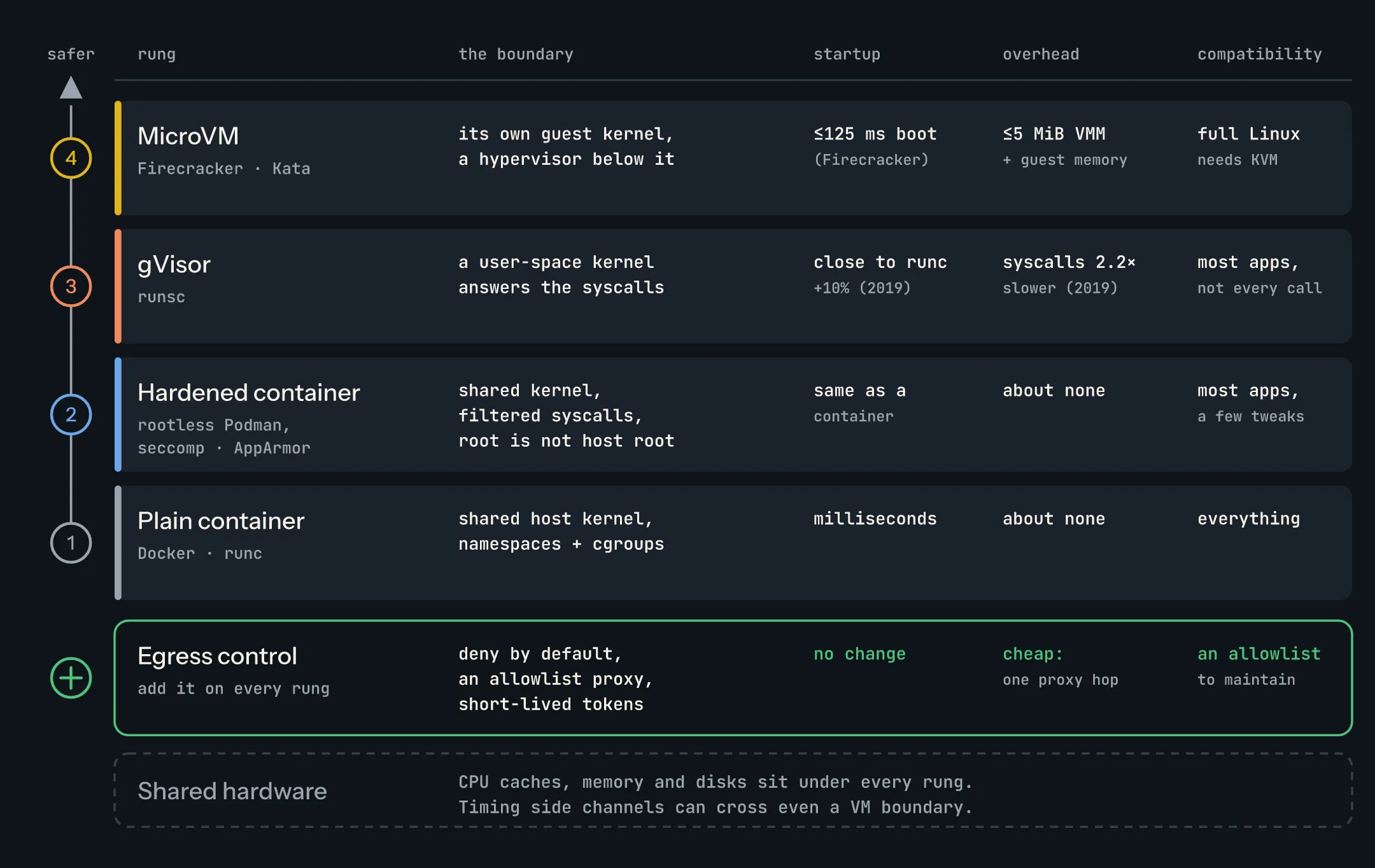
1. Plain containers
docker run with the defaults. Docker already applies a default seccomp profile that blocks around 44 of the 300-plus system calls, and drops most capabilities. That’s better than nothing.
- Boundary: the shared host kernel.
- Startup: milliseconds.
- Overhead: close to none. It’s a normal process.
- Compatibility: everything that runs on Linux.
The common mistakes push this rung lower still: --privileged, mounting /var/run/docker.sock, mounting your home folder, or running as root inside with no user namespace. Any one of these can hand the host to whatever runs inside.
2. Hardened containers: rootless Podman, seccomp, AppArmor
Same kernel, fewer ways to reach it.
- Rootless. Rootless Podman runs the whole container engine as your user. Root inside the container maps to an unprivileged user on the host, so an escape lands as you, not as root.
- Tighter seccomp. A custom profile that allows only the system calls the workload needs. Each call you remove is kernel code an attacker can’t reach.
- AppArmor or SELinux. A mandatory access control policy on top: which files the process may read and write, whatever its user ID.
- The flags that cost nothing:
--cap-drop=ALL,--security-opt no-new-privileges,--read-only,--pids-limit.
Costs: startup and overhead are the same as a plain container. Compatibility is “most apps, a few tweaks”: some images expect to run as root, bind low ports, or use a system call you filtered out. You’ll find those in testing.
The limit: the kernel is still shared. A bug in an allowed system call is still a way out.
3. gVisor: a kernel in user space
gVisor puts its own kernel, called the Sentry and written in Go, between the container and the host. The application’s system calls go to the Sentry, which implements Linux’s behaviour itself. The Sentry then uses only a small, filtered set of host system calls. To escape, an attacker has to break the Sentry first, then get through a much narrower door into the host kernel.
It plugs into Docker and Kubernetes as the runsc runtime, so switching is a flag: docker run --runtime=runsc.
Costs:
- Overhead. Every system call takes a detour. A 2019 study, The True Cost of Containing, measured simple system calls at least 2.2× slower than runc, small file reads 11× slower, and opening and closing files on an external tmpfs 216× slower. gVisor has improved a lot since then, including the systrap platform in 2023, so treat those as the shape of the cost, not today’s numbers. Syscall-heavy and I/O-heavy work, like
npm installor a big build, still pays the most. - Startup. Close to a normal container. In the same study, setup and teardown took 1.117 s for gVisor against 1.014 s for runc.
- Compatibility. gVisor implements most of Linux, not all of it. Check its compatibility list for anything unusual: some system calls,
/procfiles and device access aren’t there.
4. MicroVMs: Firecracker and Kata
A microVM gives each workload its own kernel, with hardware virtualization (KVM) underneath. Code that fully takes over the guest kernel has taken over a small VM. To reach the host it must then break the hypervisor, which has a much smaller interface than a Linux kernel.
- Firecracker, from AWS, runs Lambda and Fargate. Its project page says it boots in under 125 ms with under 5 MiB of memory overhead per microVM, and can create up to 150 microVMs per second per host. The design is in the NSDI 2020 paper.
- Kata Containers wraps a VM (Firecracker, Cloud Hypervisor or QEMU) behind the normal container interface, so Kubernetes can run a pod in a VM through a RuntimeClass.
Costs:
- Startup: tens to hundreds of milliseconds instead of a few. Fine for an agent task, noticeable if you start thousands per minute.
- Memory: the VMM is small, but each guest needs its own kernel and page cache. Density drops compared with containers.
- Compatibility: a full Linux kernel, so almost anything runs. The catch is the host: you need KVM, which means bare metal or a cloud instance with nested virtualization.
This is why many hosted agent sandboxes and code-execution services run on microVMs.
The OpenAI lesson: even VMs share hardware
On 23 October, OpenAI published how it secures the environments it trains and evaluates models in. They run restricted containers inside microVMs, with network and cloud controls around those. Then they had teams of their own model agents try to break out.
Two findings matter for everyone else:
- The VMs were not the last word. Agents chained bugs into microVM escapes. OpenAI says the fixes touched Kata Containers, gVisor, Docker’s syscall filters and the Linux kernel.
- No network didn’t mean no communication. OpenAI put agents in separate microVMs on shared host machines and asked them to exchange synthetic secrets with no network connection and no shared writable files. They did it through the CPU cache. One agent evicted chosen data from the cache; the other timed how long it took to reload it. Fast reads and slow reads became ones and zeros. Other tests found channels through shared storage, competition for CPU time, and a shared TLS certificate cache.
None of this is new physics. Spectre showed in 2018 that CPUs leak data through cache timing. L1TF, also called Foreshadow, let a guest VM read memory belonging to the host or other guests on the same core, which is why the Linux kernel’s L1TF guidance talks about disabling SMT for untrusted guests. Cross-VM cache attacks go back further: Ristenpart and others placed VMs next to their targets on EC2 in 2009, and Flush+Reload recovered encryption keys across VMs in 2014.
What follows from this:
- Isolation is layered, not binary. Each layer makes an escape harder and slower. None makes it impossible.
- Separate what must stay separate onto separate hardware. For workloads with real secrets, don’t share a host, or at least a CPU core, with untrusted code. Firecracker’s production host setup covers SMT, kernel mitigations and the rest.
- Assume a breach and limit what it can do. Which brings us to the network.
Network egress: the forgotten layer
Most real damage from a compromised agent comes out over the network: stolen tokens sent to an attacker’s server, source code uploaded, a second-stage payload downloaded. Every rung of the ladder leaves the network wide open by default.
Three controls, in order of value:
- Deny by default. No outbound traffic unless something allows it. For a task that needs no network, use
--network none. Most agent tasks need a little, which is why the next one matters. - An egress proxy with an allowlist. Send all traffic through one proxy that permits only named hosts: your package registry, your Git host, the model API. Block everything else, including raw IP addresses and direct DNS to the outside, both common ways around filters. You also get a log of every place the agent tried to reach.
- Short-lived, scoped tokens. Give the agent a token that can do one job, for one repository, for one hour. Better still, keep the real credential in the proxy and have it add the header on the way out, so the agent never holds a secret worth stealing.
OpenAI’s report is a good warning here too. Its agents found ways out through the narrow connections that were allowed, such as metrics and logging services, and by tricking internal services into fetching outside URLs. An allowlist is only as good as the hosts on it. Any service that will fetch a URL for you is a way out.
A setup to copy
Local development
- Run the agent in a container or VM, not on your laptop’s user account. Mount only the project folder.
- No home folder, no
~/.ssh, no~/.aws. If it needs Git, forward an SSH agent socket or pass one scoped token. - Rootless engine where you can.
--cap-drop=ALL --security-opt no-new-privileges. - Turn the agent’s own sandbox on if it has one.
- Network: allow the package registry, your Git host and the model API through a proxy. Block the rest.
CI
- One fresh, disposable runner per job. Nothing carries over between jobs.
- Install dependencies in a separate step with lockfiles and pinned digests, then run the agent’s steps with the network locked down.
- Use your CI’s OIDC to get short-lived cloud credentials, scoped to that job. No long-lived secrets in environment variables.
- Never run an agent job on a runner that also holds deploy keys.
Production agent workloads
- One microVM per task or per tenant (Firecracker or Kata), or gVisor where you can’t get KVM and the workload isn’t I/O-heavy.
- Hardened container inside the VM too. Layers stack.
- Untrusted tenants on dedicated hosts, or at least not sharing a CPU core with sensitive work.
- Deny-by-default egress through a proxy that logs every request and injects credentials.
- Per-task tokens that expire when the task does.
- Resource limits on CPU, memory, disk and run time, and a way to kill a task from outside.
Where Kiri fits
Kiri is the container runtime we build. On a Mac, every container runs inside one lightweight Linux VM, so code that escapes a container lands in that VM, not on your Mac. Containers get Docker’s default capabilities and a default seccomp filter. Even privileged containers can’t open vsock or io_uring, the two ways they could otherwise reach the Mac side directly. The security docs explain each boundary.
Two limits, plainly. All containers share that one VM’s kernel, so containers are not VM-isolated from each other. And on a Linux host there’s no VM at all: containers share the host kernel, like Docker. Kiri also doesn’t filter outbound traffic. Use --network none or an egress proxy, as above.
Further reading
- Securing our frontier model training environment, OpenAI, 23 Oct 2026
- The True Cost of Containing: A gVisor Case Study, Young and others, HotCloud 2019
- Firecracker: Lightweight Virtualization for Serverless Applications, Agache and others, NSDI 2020
- gVisor security model
- Docker seccomp profiles and rootless Podman
- Spectre and Meltdown, and L1TF in the Linux kernel docs
- Hey, You, Get Off of My Cloud, Ristenpart and others, CCS 2009
- Flush+Reload, Yarom and Falkner, USENIX Security 2014