MCP servers are how coding agents get tools: GitHub, a database, a browser, your files. Adding one is a line in a config file, usually something like npx some-mcp-server. That line starts a program on your machine, as you.
What that program can reach
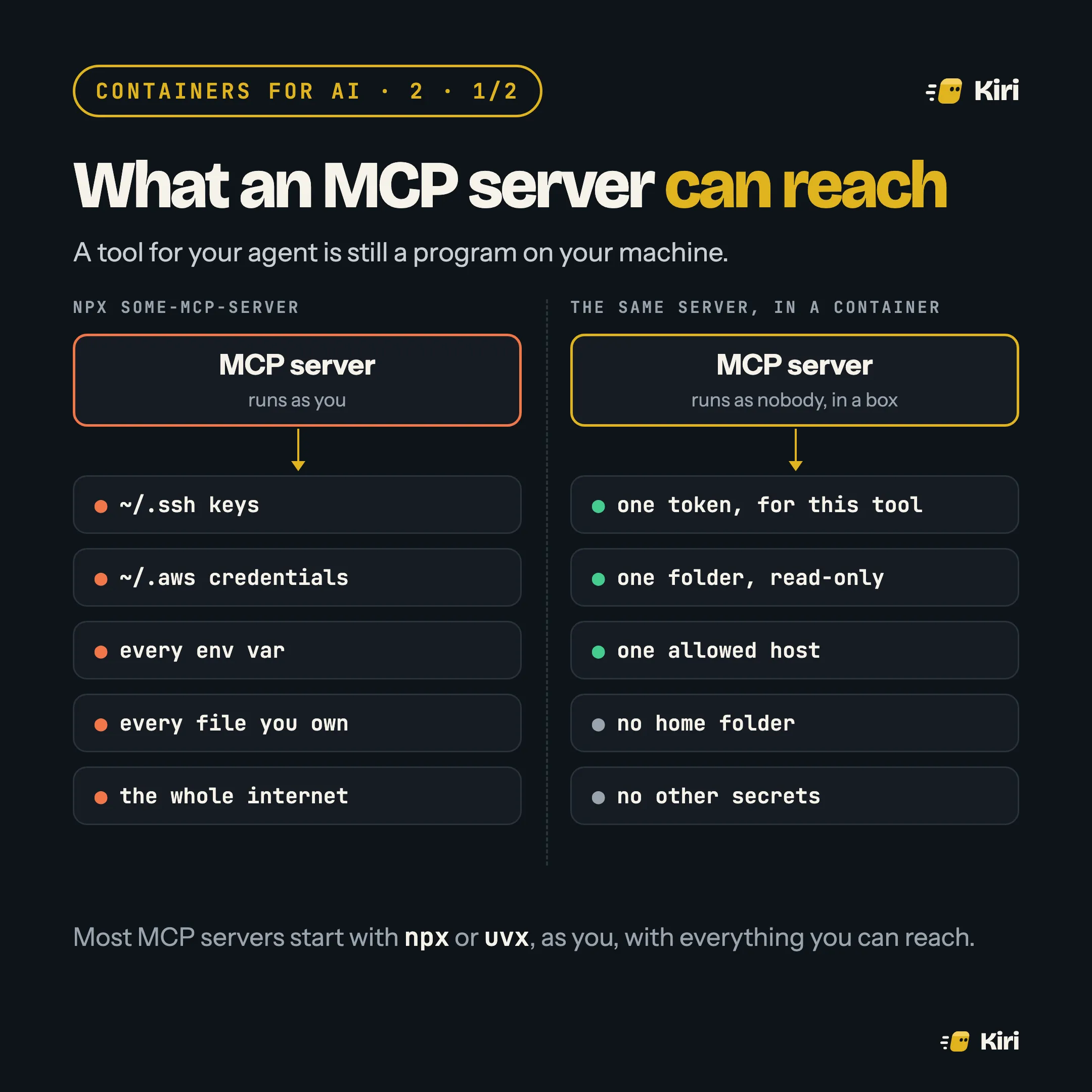
An MCP server started with npx or uvx runs with your user’s permissions. It can read your SSH keys and cloud credentials, see every environment variable the agent was started with, read any file you can, and connect anywhere on the internet. It needs none of that to list your GitHub issues.
This has already gone wrong. In September 2025, a popular npm package called postmark-mcp, which let agents send email, shipped an update that quietly blind-copied every message to an outside address. Researchers at Koi Security spotted it, and the package was pulled from npm. A flaw in mcp-remote, a widely used helper, let a malicious server run commands on the developer’s machine (CVE-2025-6514, rated 9.6). Dozens more MCP vulnerabilities were reported in the first half of 2026.
Boxing one server by hand
Most MCP clients only need a command that speaks MCP over standard input and output. docker run -i is such a command. Here is GitHub’s official server in Claude Code’s .mcp.json:
{
  "mcpServers": {
    "github": {
      "command": "docker",
      "args": [
        "run", "-i", "--rm",
        "--read-only", "--cap-drop=ALL",
        "--security-opt", "no-new-privileges",
        "--memory", "512m",
        "-e", "GITHUB_PERSONAL_ACCESS_TOKEN",
        "ghcr.io/github/github-mcp-server"
      ],
      "env": { "GITHUB_PERSONAL_ACCESS_TOKEN": "${GITHUB_TOKEN}" }
    }
  }
}
What each part buys you:
-i --rm: talk over stdin and stdout, and throw the container away when the session ends.- No
-vmounts: the server can’t see your home folder. If it needs files, mount one folder, read-only:-v "$PWD/docs:/docs:ro". -ewith one name: the container gets that one token, not your whole environment.--read-only --cap-drop=ALL --security-opt no-new-privileges: it can’t modify its own image or gain privileges.--network nonefor servers that work only on local files, such as a filesystem or SQLite server.
Pin the image by digest (ghcr.io/github/github-mcp-server@sha256:…), so an update reaches you only when you choose it. That alone would have stopped a postmark-mcp-style update.
Many servers: a gateway
Once you have five servers, five blocks of docker run flags get unwieldy. A gateway is one MCP server that fronts all the others. Your client connects to it once. It starts each real server in its own container when a tool is first called, hands each one only its own secret, and logs every call.
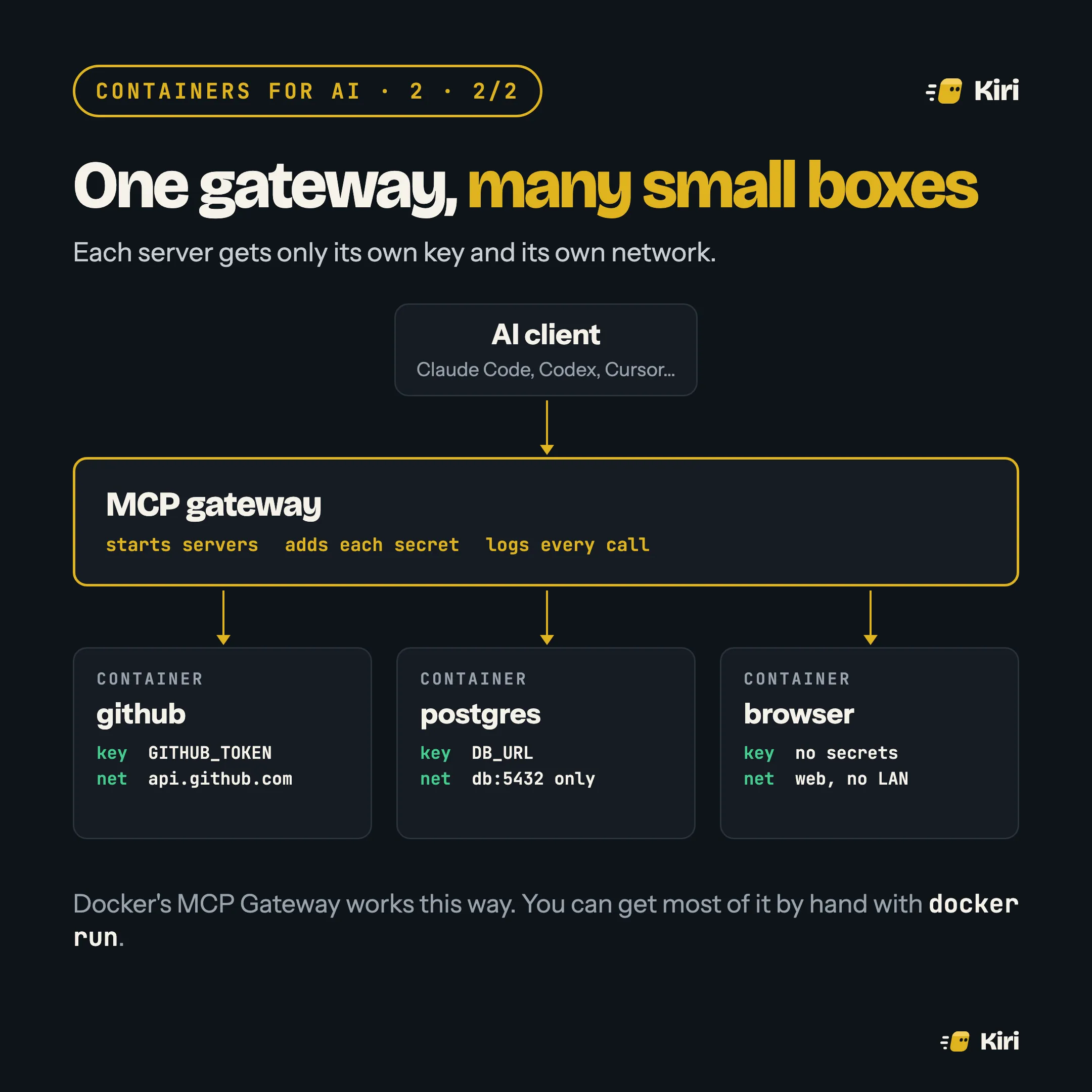
Docker’s MCP Gateway works this way: secrets are set with docker mcp secret set and injected only into the container that needs them. The log matters as much as the isolation. When an agent does something odd, you can see which tool it called, with what.
What the box doesn’t fix
A container limits what a server can reach. It doesn’t limit what the server is allowed to do with the access you gave it. A GitHub token that can delete repositories still can, from inside a container. So:
- Give each server the smallest token that works: a fine-grained, read-only token for a server that only reads issues.
- Treat tool output as untrusted text. A server that fetches web pages or issues can hand your agent instructions written by a stranger. That is a prompt-injection problem, and no container solves it on its own.