Almost every AI workload you run in a container wants a GPU: serving a model with vLLM, fine-tuning with PyTorch, running llama.cpp. But a container is just a process with a fenced-off view of the machine, and nothing about that view includes a graphics card. So how does the card get in?
Two halves of a driver
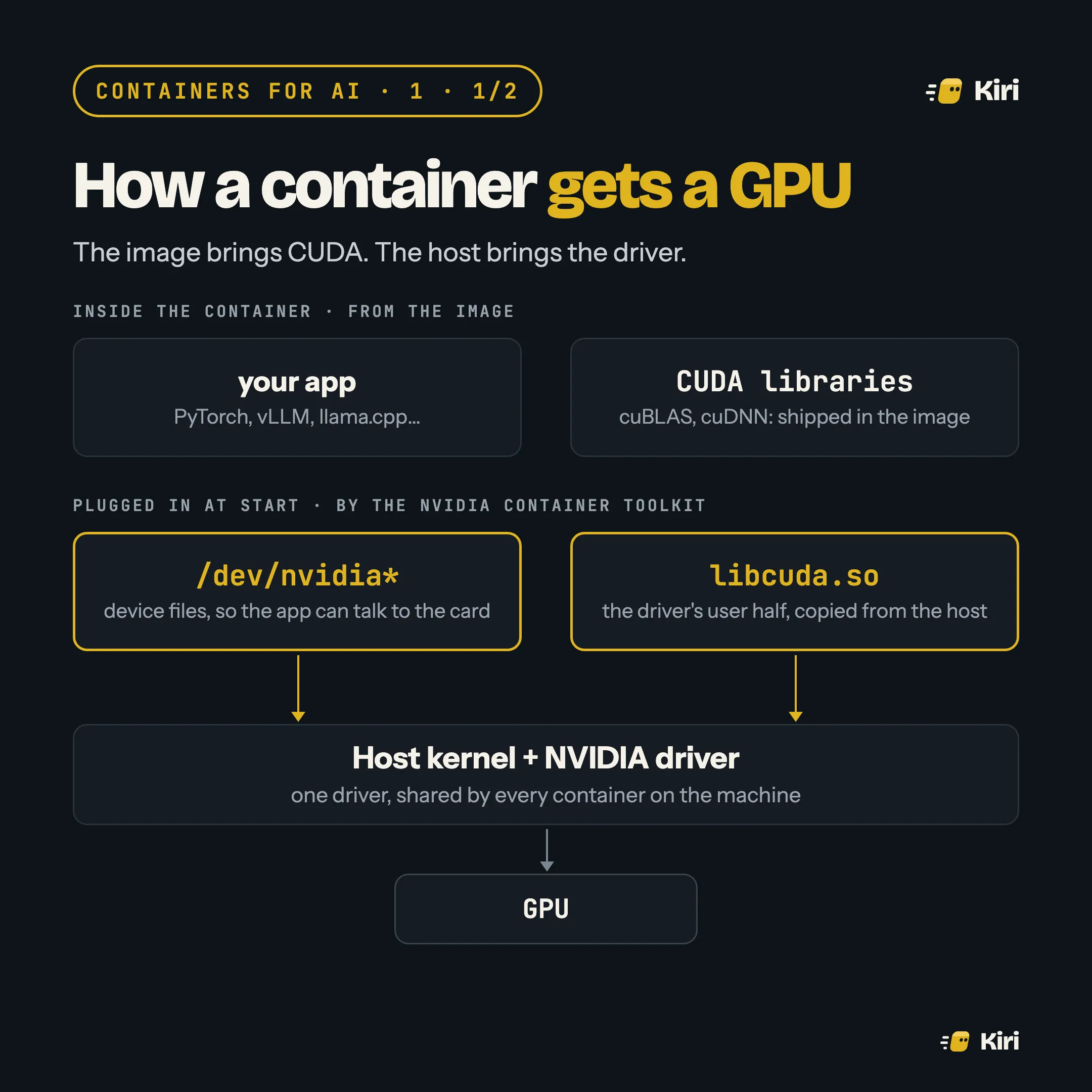
A GPU driver comes in two halves. One half lives in the host’s kernel. The other is a user-space library, libcuda.so, that programs load to talk to it. The two must come from the same driver release.
That rules out putting the driver in the image. The image can’t know which driver the host runs. So the work is split:
- The image brings CUDA: the toolkit libraries your framework was built against, such as cuBLAS and cuDNN.
- The host brings the driver. When the container starts, the NVIDIA Container Toolkit adds the device files (
/dev/nvidia*) and mounts the host’s copy oflibcuda.sointo it.
You ask for this with one flag:
docker run --rm --gpus all nvidia/cuda:12.6.3-base-ubuntu24.04 nvidia-smiIf that prints your card, the plumbing works. Newer setups describe the same devices and files in a CDI spec, a small file that Docker, Podman and containerd can all read, so the runtime doesn’t need NVIDIA-specific code.
The version rule
Because the driver comes from the host, the host sets the ceiling. An image built for a newer CUDA than the host driver supports fails at start-up, usually with “CUDA driver version is insufficient”. nvidia-smi on the host shows the highest CUDA version its driver supports. Pick images at or below it.
This is why the same image can work on your workstation and fail on a cloud node: different machines, different drivers.
The part that runs as root
The toolkit is the piece that reaches into the host to wire each container up, so it runs with the host’s privileges. Its bugs are container escapes. In July 2025, Wiz disclosed NVIDIAScape (CVE-2025-23266): an image could set one environment variable and get the toolkit’s start-up hook to load the attacker’s library, as root, on the host. Version 1.17.8 fixed it.
Two habits follow. Keep the toolkit and GPU Operator updated like you would the kernel. And don’t run images you don’t trust on a GPU host that other people’s workloads share.
Sharing one card
GPUs are expensive, so teams pack several containers onto one. There are three ways to do it, and they differ in one thing that matters: whether the tenants can see each other.
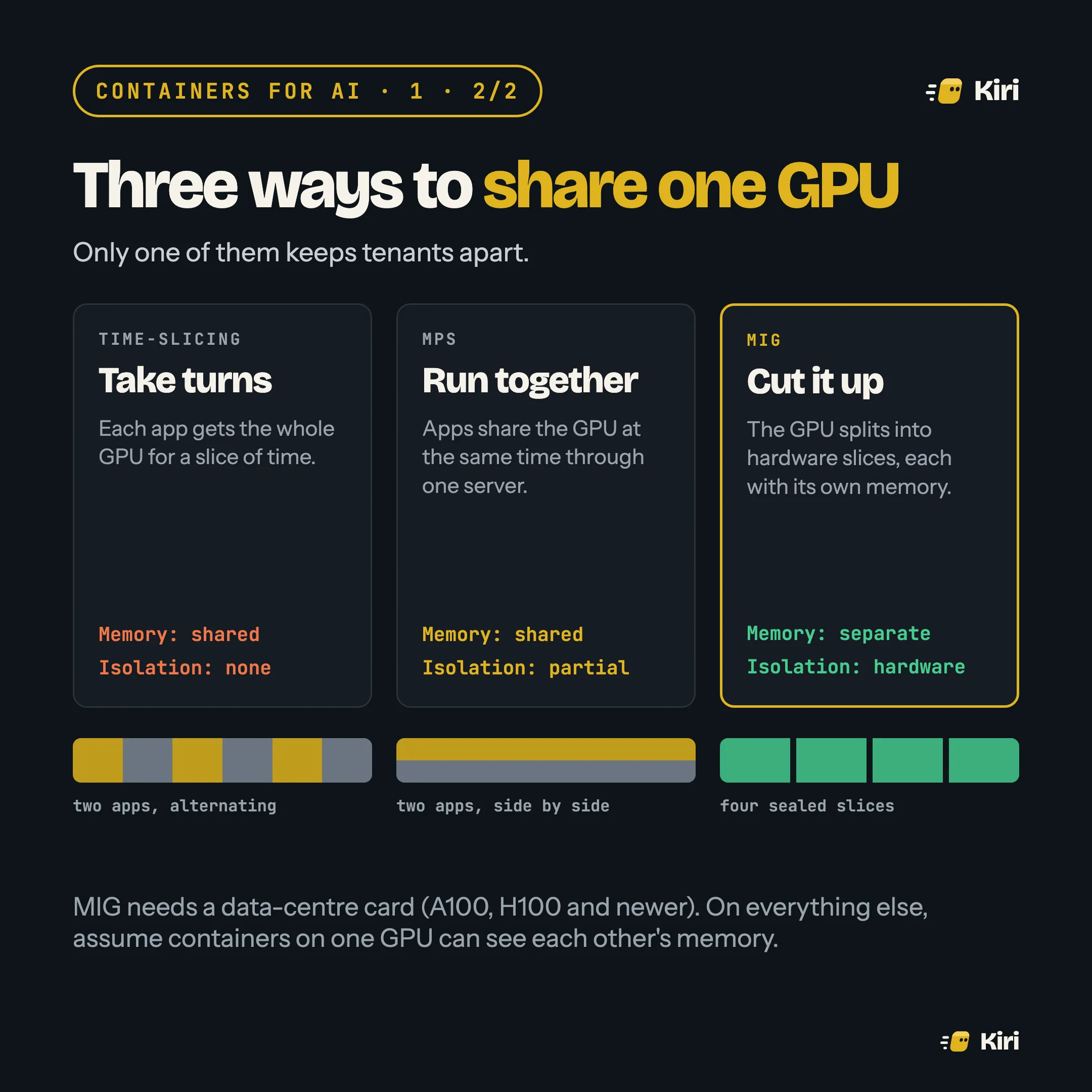
- Time-slicing gives each container the whole card in turns. Easy, but memory is shared and nothing keeps one tenant out of another’s work.
- MPS runs several processes on the card at once through one server. Better use of the GPU, still shared memory.
- MIG splits a data-centre card (A100, H100 and newer) into hardware slices, each with its own memory. It is the only one of the three you should treat as a boundary.
On Kubernetes, the device plugin hands out whole GPUs (nvidia.com/gpu: 1). Dynamic Resource Allocation, stable since Kubernetes 1.34, lets a pod ask for a GPU by its properties instead, such as memory or model. That is the path to sharing schemes like MIG without hand-labelling nodes.
And on a Mac?
There’s no NVIDIA card, and the Linux VM that every Mac container runtime uses can’t see the Apple GPU through Metal. Podman’s libkrun backend gets part of the way: it passes Vulkan compute through to the host GPU, which llama.cpp can use. One user measured it at about 40% slower than running natively, but well ahead of CPU-only. Most Mac tooling for local models runs the model on the host instead and keeps containers for everything around it.