If you’ve used Docker for years and then logged into a Kubernetes node, you’ve probably run docker ps, got “command not found”, and wondered what is running the containers. The answer is containerd. To see why that isn’t a contradiction, start with what each one is.
New to some of the terms? Our container basics explain them one at a time: image layers, registries, runc and Kubernetes.
First, what is a container?
A container is a normal program, packaged with everything it needs (its libraries, settings and files) and run in its own walled-off space on a computer. Inside, the program sees only its own files, its own processes and its own network. Outside, it shares the computer’s operating system kernel with every other container, which is why containers start in milliseconds and use far less memory than virtual machines.
The package is called an image, and it’s made of layers. You build an image once and run it anywhere as a container: your laptop, a CI runner, a server. Docker’s explainer, What is a container?, covers this with pictures.
What is Docker?
Docker is a set of tools for building, sharing and running containers. It made containers easy to use in 2013, and it’s still how most developers meet them. When people say “Docker” they usually mean several things at once:
- The
dockercommand, which you type:docker build,docker run,docker ps. - Docker Engine (
dockerd), a background service that does what those commands ask: builds images, runs containers, wires up their networks and storage. - Docker Desktop, the app for Mac and Windows that runs Docker Engine inside a small Linux virtual machine, because containers need a Linux kernel.
- Docker Hub, the public registry where images like
nginxandpostgreslive.
Docker’s own overview explains how these pieces talk to each other.
With Docker, think in layers first. Every line of a Dockerfile that changes files (RUN, COPY, ADD) adds one read-only layer on top of the ones before it. An image is that stack of layers, and a container is the same stack with one thin writable layer on top. Almost everything you notice day to day follows from this: a rebuild is fast when the early layers come from the cache, a pull is fast when the layers are already on disk, two images built on the same base share their layers instead of storing them twice, and a file deleted in a later layer is still inside the earlier one. docker history <image> lists an image’s layers and the line that made each one. Our layers post goes through it with a diagram.
What is containerd?
containerd (pronounced “container-dee”) is a container runtime: a background service whose only job is to manage containers on one machine. It downloads images from registries, stores their layers, unpacks them into a filesystem with a part called a snapshotter, and starts and stops containers. That’s all. It doesn’t build images, it doesn’t set up container networks, and it isn’t meant to be used by typing commands.
It started life inside Docker. In 2017 Docker split the core of its engine out as containerd and gave it to the Cloud Native Computing Foundation, the same foundation that looks after Kubernetes, and it graduated there in 2019. Today it runs most Kubernetes clusters, and it still runs underneath Docker. The containerd website and its getting started guide are the place to go deeper.
So what’s the difference?
They aren’t competitors. Docker is built on top of containerd. When you type docker run, Docker Engine works out the details (which network, which volumes, which ports) and then asks containerd to actually run the container.
So the real comparison is between containerd on its own and containerd with Docker’s tools on top. Docker adds what a person at a laptop needs: builds, easy networking, volumes, Compose and a friendly command. containerd on its own suits machines that run containers for someone else, like a Kubernetes node.
The stack, from your keyboard to the kernel
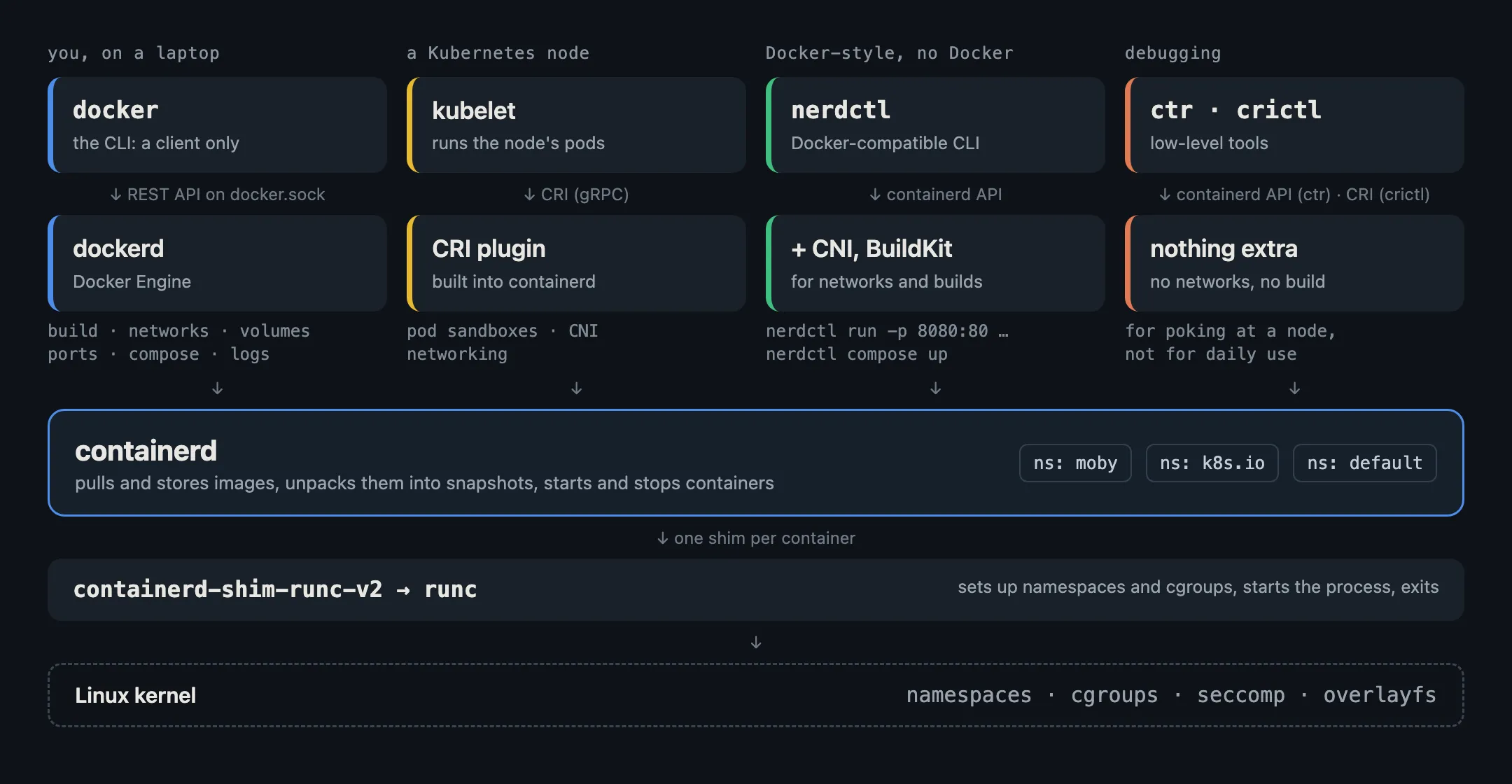
Reading from the bottom up:
- runc does the one thing that makes a process a container. It asks the Linux kernel for namespaces (its own view of processes, network and files) and cgroups (limits on CPU and memory), starts your process inside them, and exits. It knows nothing about images or registries.
- The shim (
containerd-shim-runc-v2) stays behind, one per container. It holds the container’s input and output and reports when it exits, so containerd itself can restart without killing your containers. - containerd is the manager. It pulls images from registries, stores them, unpacks them into a filesystem for each container (a “snapshot”), and starts and stops containers through the shim. It has a gRPC API, and no opinions about networking or builds.
- dockerd (Docker Engine) sits on top of containerd and adds everything that makes Docker pleasant:
docker build, networks with built-in DNS,-p 8080:80port publishing, volumes, restart policies, log drivers and Compose. dockeris just the client. Every command you type becomes an HTTP request to dockerd over/var/run/docker.sock. The CLI can even talk to a dockerd on another machine.
So “containerd vs Docker” is really “containerd vs containerd plus dockerd plus a nice CLI”.
Who uses containerd without Docker
Kubernetes. The kubelet on each node talks to a container runtime through the Container Runtime Interface (CRI). containerd ships a CRI plugin built in, so the kubelet talks to containerd directly. Kubernetes 1.24 (2022) removed dockershim, the adapter that let it drive Docker Engine, and most clusters had already moved to containerd or CRI-O by then. The Kubernetes docs list the supported container runtimes. Your images didn’t need to change: an image built with docker build is a standard OCI image, and containerd runs it the same way.
nerdctl. A command-line tool with Docker’s commands (nerdctl run, nerdctl build, nerdctl compose up) that talks to containerd with no dockerd in between. It brings its own pieces for the parts containerd leaves out: CNI plugins for networking, BuildKit for builds. It’s what Rancher Desktop and Lima use for their containerd mode.
Others. Cloud container services, CI runners and sandbox tools often build on containerd’s API directly, because it’s small, stable and doesn’t assume a developer at a laptop.
Same containerd, different namespaces
This catches nearly everyone the first time. containerd keeps separate namespaces (its own concept, not Linux namespaces), so each client’s images and containers stay apart:
| Namespace | Used by |
|---|---|
moby |
Docker Engine |
k8s.io |
Kubernetes (the CRI plugin) |
default |
ctr and nerdctl, unless told otherwise |
So on a machine running both Docker and Kubernetes, docker ps doesn’t show pods, and ctr containers ls shows nothing at all, because ctr looks in default. You have to name the namespace:
sudo ctr -n moby containers ls     # Docker's containers
sudo ctr -n k8s.io images ls       # images the kubelet pulled
sudo crictl ps                     # pods' containers, the way the kubelet sees them
The same goes for images. An image you pulled with docker pull isn’t automatically there for Kubernetes, and one loaded with ctr images import into default isn’t visible to either. Tools like kind and k3d handle this by importing into k8s.io for you.
The same task, four ways
Running an nginx container and publishing port 8080:
docker run -d --name web -p 8080:80 nginx          # Docker
nerdctl run -d --name web -p 8080:80 nginx         # nerdctl: same flags, no dockerd

sudo ctr images pull docker.io/library/nginx:latest      # ctr: pull first, full name
sudo ctr run -d docker.io/library/nginx:latest web       # runs, but with no port publishing

sudo crictl ps --name web                          # crictl: look, don't launch
ctr is a debugging tool for containerd’s developers. It needs the full image name, doesn’t set up networking, and has no idea what -p means. crictl can start pods, but only from JSON specs; on a Kubernetes node you use it to inspect what the kubelet started, not to launch things by hand.
Which one should you use?
- On your laptop, building and running apps: Docker (or Podman, or nerdctl). You want builds, networks, volumes and Compose, and containerd alone gives you none of them.
- On a Kubernetes node: let the kubelet drive containerd. Use
crictlto look around, andctr -n k8s.ioonly when you need to go a level lower. - In a product or platform that runs containers for others: containerd’s API directly is a common choice. It’s the part Docker and Kubernetes share, it’s a graduated CNCF project, and you add only the layers you need.
- To drop Docker but keep its habits: nerdctl.
One thing they share: the socket is root
Whatever sits at the top, the bottom is the same, and so is the main security rule. Access to /var/run/docker.sock or /run/containerd/containerd.sock is effectively root on the host: anyone who can reach either one can start a privileged container that mounts the host’s filesystem. Never mount either socket into a container you don’t fully trust, and that includes AI agents. Our post on container isolation covers what to use instead when the code inside isn’t yours.
In short
- runc turns a process into a container, then exits.
- containerd manages images and container lifecycles. Docker and Kubernetes both run on it.
- dockerd adds builds, networks, volumes and Compose on top of containerd.
dockeris a client that sends requests to dockerd.- They keep their containers in separate containerd namespaces, which is why each one seems not to see the other.