Kiri is a container runtime: the program that pulls images, starts containers, wires up their network and storage, and stops them again. You use it through the commands you already know (docker, docker compose, docker buildx), because Kiri serves the same Docker Engine API that Docker does. It runs on Apple silicon Macs, Linux and Windows, it’s open source under Apache-2.0 or MIT, and it’s built to be small: the host binary is about 2.2 MB.
What makes it different is what it doesn’t have. A typical Docker setup is a chain of programs (dockerd, containerd, a shim per container, then runc). Kiri replaces that chain with two programs of its own.
New to some of the terms? Our container basics explain them: image layers, registries, runc, Kubernetes.
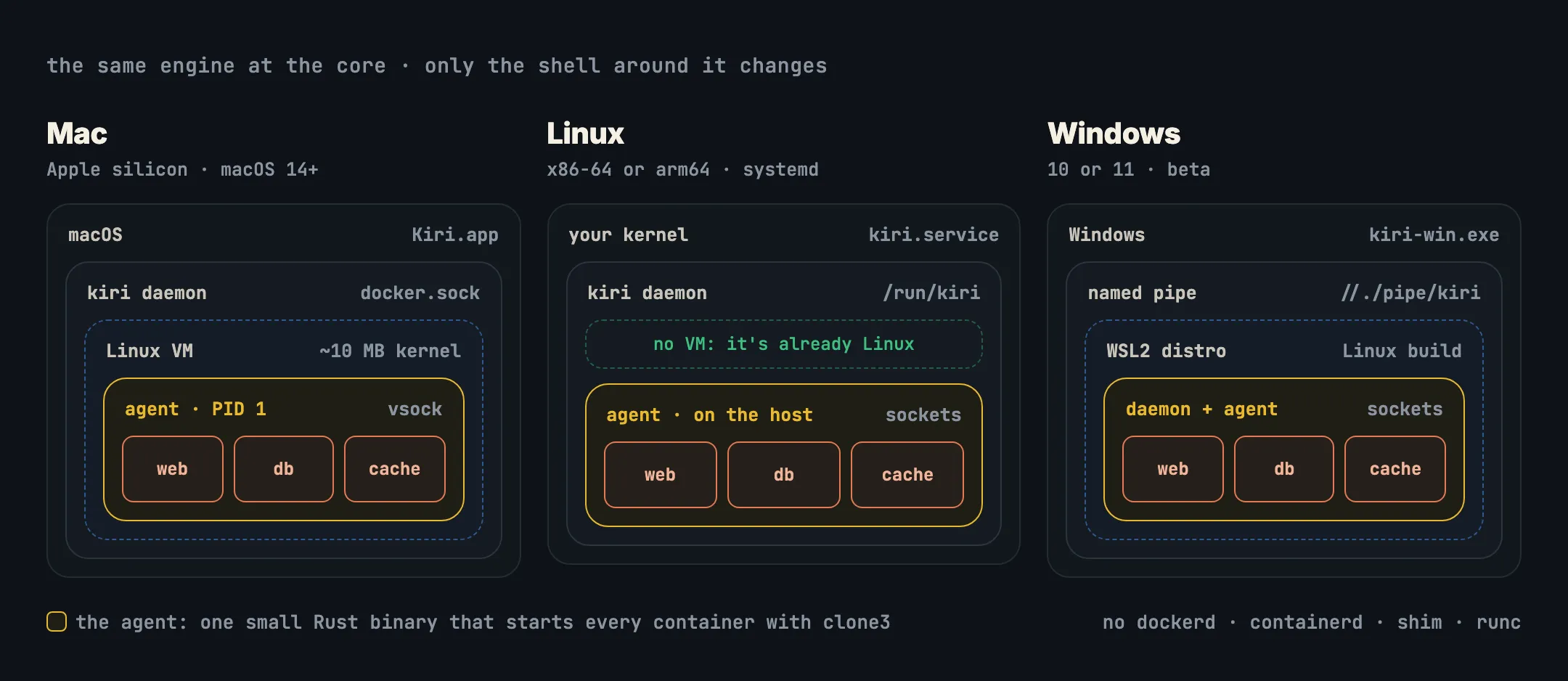
The two parts
- The daemon (
kiri daemon) is the part your tools talk to. It serves the Docker Engine API on a socket, keeps the record of every container, pulls and pushes images, and on a Mac owns the virtual machine. Kiri’s window, its menu bar item and thekiricommand are all just clients of that same socket. - The agent (
kiri-init) is a small static Rust binary that actually runs containers. It creates each one with a singleclone3system call, straight into fresh namespaces and the container’s cgroup, then sets up its files with overlayfs, drops capabilities and applies a seccomp filter. It also relays ports, answers DNS for container names, and forwards container output back to the daemon.
That’s the whole engine. Because every container process is a direct child of the agent, nothing per container is left running: no shim, no extra process on your Mac.
Where it runs
Containers need a Linux kernel. How Kiri gets one depends on your computer, and that is the only thing that changes:
- On a Mac, Kiri boots one small Linux VM with Apple’s Virtualization framework. Its kernel is about 10 MB, cut down to only what the VM needs, and it boots in about a tenth of a second (112 ms measured). The agent is PID 1 inside it, and the daemon talks to it over vsock, a direct socket between the Mac and the VM. Your Mac’s files reach containers over virtiofs, and amd64 images run through Rosetta.
- On Linux, there’s no VM: the machine already has a Linux kernel. The daemon and agent run as the systemd service
kiri.service, installed from a.debor.rpm, and talk over Unix sockets instead of vsock. - On Windows (beta), the Linux build runs inside a WSL2 distro, and
kiri-win.exeserves the API on a named pipe and carries it into WSL.
What it feels like to use
You use it like Docker:
docker context use kiri
docker run -d --name web -p 8080:80 nginx:alpine
docker compose up -d
Then a few things work that a stock Docker setup doesn’t give you:
- It gives memory back. On a Mac, the VM returns memory it isn’t using to macOS while it runs, and powers off after 60 seconds with nothing running. The next command wakes it, fast enough that you rarely notice.
- Containers have names. The
webcontainer above answers athttp://web.kiri.localhostwith no setup, and Compose services at<service>.<project>.kiri.localonce you turn local names on, with HTTPS if you want it. - Container files are in Finder, at
~/Kiri, read-only and always current. - Linux machines.
kiri machine create devgives you a long-lived Linux environment with your user and/Usersat the same path, for when you want a Linux shell rather than a container. - Kubernetes.
kiri k8s startruns a single-node k3s cluster as thekirikubectl context. - Kiri Share gives a local container a public HTTPS link, for showing someone your work.
How fast is it?
Kiri’s benchmarks time docker run --rm alpine true through the Engine API on one Apple silicon Mac, median of 30 runs: 2.55 ms. The same test took 213 ms on Docker Desktop. Through the docker CLI, which adds its own startup, Kiri took 14.2 ms. The method, the 99th percentiles and the caveats are on the benchmarks page, and the harness is public in kiri-bench.
What it isn’t
It also isn’t a sandbox for untrusted code by itself. Containers share a kernel, and on a Mac all of Kiri’s containers share one VM. That VM is a real wall between containers and your Mac, but containers inside it are kept apart from each other only by namespaces, cgroups, capabilities and seccomp, as on any Linux host. Our post on container isolation explains the difference.
In short
- Kiri is an open-source container runtime you drive with
docker, Compose and buildx. - It’s two programs: a daemon that serves the Docker Engine API, and an agent that starts each container with one
clone3. - On a Mac the agent runs in a small, fast-booting Linux VM; on Linux it runs on your kernel; on Windows, in WSL2.
- It adds memory that comes back, sleep when idle, local names, files in Finder and Linux machines.
- Get it at runkiri.com/download, and see the code on GitHub.
Next: Kiri vs Docker Desktop, or see a container start step by step in How Kiri starts a container.