On almost every Linux machine, a container is started by runc: Docker hands the request to containerd, containerd starts a shim, the shim runs runc, and runc builds the container and exits. Kiri doesn’t have any of those. Its agent does runc’s job itself, in one system call. This post follows one kiri run --rm alpine true from the keyboard to an exited process, step by step.
If runc, namespaces or cgroups are new to you, read What is runc? first: it explains the pieces a container is made of. For the big picture of Kiri, see What is Kiri?
The cast
Three programs take part. On a Mac, they are:
- The
dockerCLI.kiri runisdocker runaimed at Kiri, whatever docker context is selected. - The Kiri daemon, on the Mac. It serves the Docker Engine API on
~/.kiri/run/docker.sock, keeps container records and pulls images. - The agent (
kiri-init), a small static Rust binary that is PID 1 inside Kiri’s Linux VM. One single-threadedpoll()loop serves the daemon, reaps child processes and forwards output.
The daemon and agent talk over vsock, a socket that goes straight between a Mac and its VM with no network involved. Each message is a frame: a length, a kind and a payload. A round trip takes about 31 µs at the median.
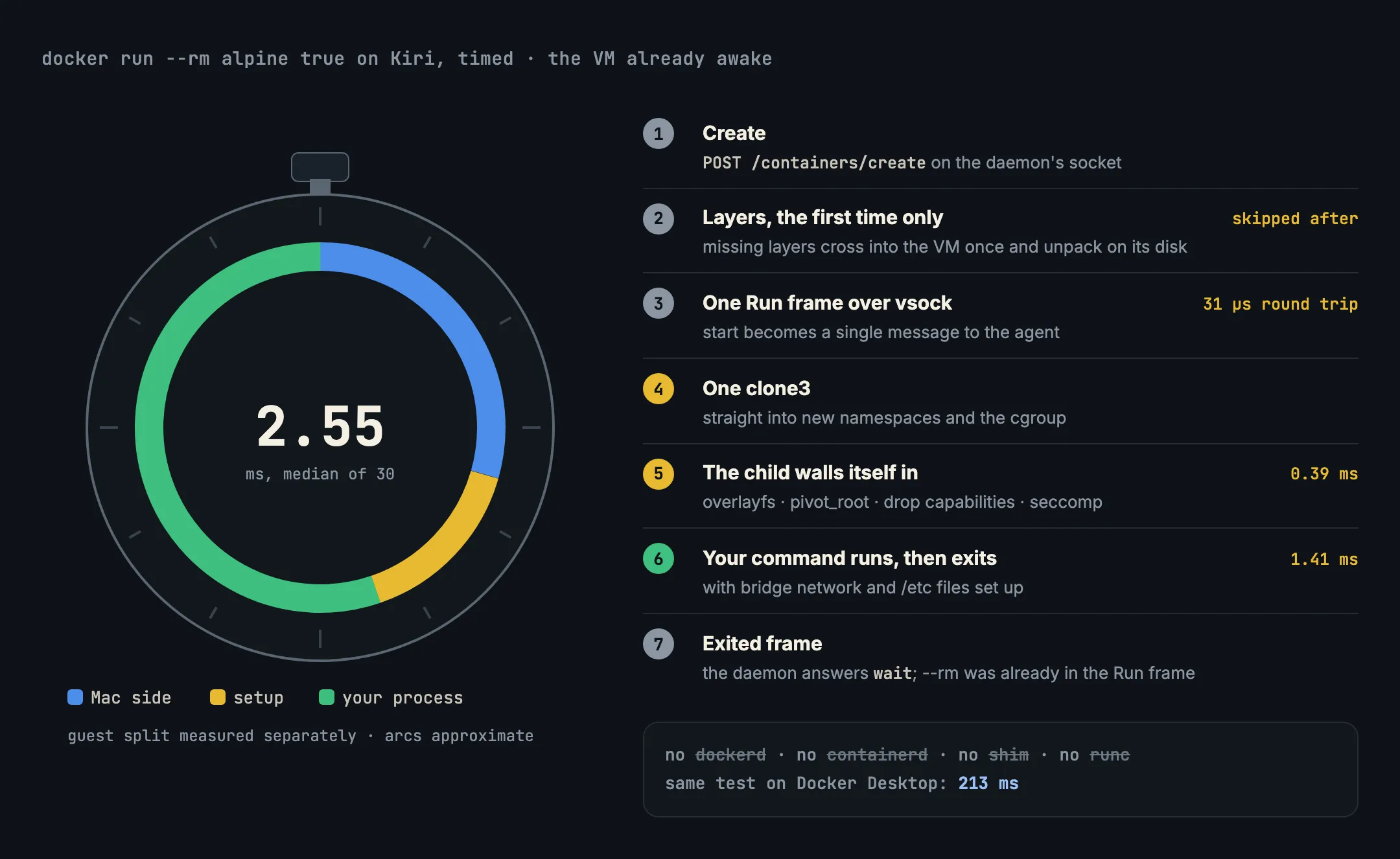
1. Create
The CLI sends POST /containers/create to the daemon’s socket, as it would to Docker. If alpine isn’t in Kiri’s image store yet, the CLI asks the daemon to pull it, and the daemon fetches it from the registry on the Mac. The daemon writes a container record and answers with an ID. No process exists yet.
2. Layers, once
The daemon asks the agent whether each of the image’s layers is already unpacked in the VM. Any that aren’t are streamed over vsock as raw bytes after a short header and unpacked onto the VM’s ext4 disk. This happens once per layer: the next container from the same image skips it entirely.
3. One Run frame
The CLI sends POST /containers/{id}/start. The daemon turns that into a single Run frame over vsock: the command, environment, mounts, limits, network and whether to remove the container when it exits.
Compare that with Docker’s path, where start goes from dockerd to containerd over gRPC, containerd launches a shim process, and the shim runs runc, which reads a config.json from a bundle folder on disk. Kiri has no bundle and no extra processes: the agent already has everything it needs in one message.
4. One clone3
This is the step runc normally does. The agent makes one clone3 call that creates the child process directly inside new namespaces (its own process IDs, mounts, network, hostname and IPC) and directly inside the container’s cgroup, using the CLONE_INTO_CGROUP flag added in Linux 5.7. Without that flag, a runtime creates the process first and then moves it into the cgroup as a separate step.
5. The child walls itself in
The new child, still running Kiri’s code, sets up its own walls before it runs anything of yours:
- it mounts overlayfs over the image’s layers, with a fresh writable layer on top;
- it calls
pivot_root, so the image’s files become/and the VM’s files are out of reach; - it drops capabilities to Docker’s default set (
CHOWN,NET_BIND_SERVICE,SETUIDand the rest), adjusted by--cap-addand--cap-drop; - it installs a seccomp filter modelled on Docker’s profile, which refuses system calls that reach outside the container’s namespaces.
The container’s network on the bridge is set up by writing rtnetlink and nf_tables messages to the kernel directly, rather than calling ip or iptables. Inside the VM, namespaces, mounts and the cgroup measured 0.39 ms.
6. Your command runs
Then the child calls execve, and it becomes true from the alpine image, as PID 1 in its own namespace. true exits at once. From namespaces to exit, including the bridged network and the generated /etc/hosts and /etc/resolv.conf, the process’s life measured 1.41 ms.
7. Exit and clean-up
The agent reaps the child, since every container process is its direct child, and sends an Exited frame with the exit code. Container output, if there were any, would have travelled as Output frames along the way. The daemon answers the CLI’s wait. Because the Run frame already said --rm, the agent deletes the container’s writable layer itself, with no extra round trip.
Nothing is left behind: no shim process waiting for the next container, nothing per container on the Mac.
What it adds up to
Kiri’s benchmarks time this exact run, docker run --rm alpine true with the VM awake, 30 runs after 5 warm-ups, through the Engine API on one Apple silicon Mac:
| Engine | Path | Median |
|---|---|---|
| Kiri | Engine API | 2.55 ms |
| Kiri | docker CLI |
14.2 ms |
| Docker Desktop | Engine API | 213 ms |
| Docker Desktop | docker CLI |
243 ms |
Most of Kiri’s CLI figure is the docker CLI itself starting up. With no network (--network none) and nothing else running, Kiri took 1.26 ms through the API. If the VM is asleep, the first command adds a cold boot, measured at 112 ms.
Try it yourself
With Kiri installed, compare engines on your own machine:
docker pull alpine
time kiri run --rm alpine true
time docker --context desktop-linux run --rm alpine true   # if Docker Desktop is installed
time includes the CLI’s own startup, so expect numbers nearer the CLI row than the API row. The benchmark harness Kiri uses is public in kiri-bench.
In short
- Docker’s path to a container is
dockerd→ containerd → shim → runc; Kiri’s is daemon → one vsock frame → agent. - The agent does runc’s job itself: one
clone3into new namespaces and the cgroup, then overlayfs,pivot_root, capabilities and seccomp. - Layers cross into the VM once;
--rmrides in the first message; no process stays behind per container. - The whole run takes 2.55 ms through the API, against 213 ms on Docker Desktop in the same benchmark.
Back to the basics: What is runc?, or see how the two engines compare overall in Kiri vs Docker Desktop.