If you searched for “Kiri Docker”, you probably want to know one thing: does Kiri replace Docker Desktop, and what do you give up if it does? Short answer: your docker commands, images and Compose files stay exactly as they are. What changes is the engine behind them. This post explains each side, then the differences, then when to pick which.
New to some of the terms? Our container basics explain them: image layers, registries, runc, and containerd vs Docker.
What Docker Desktop is
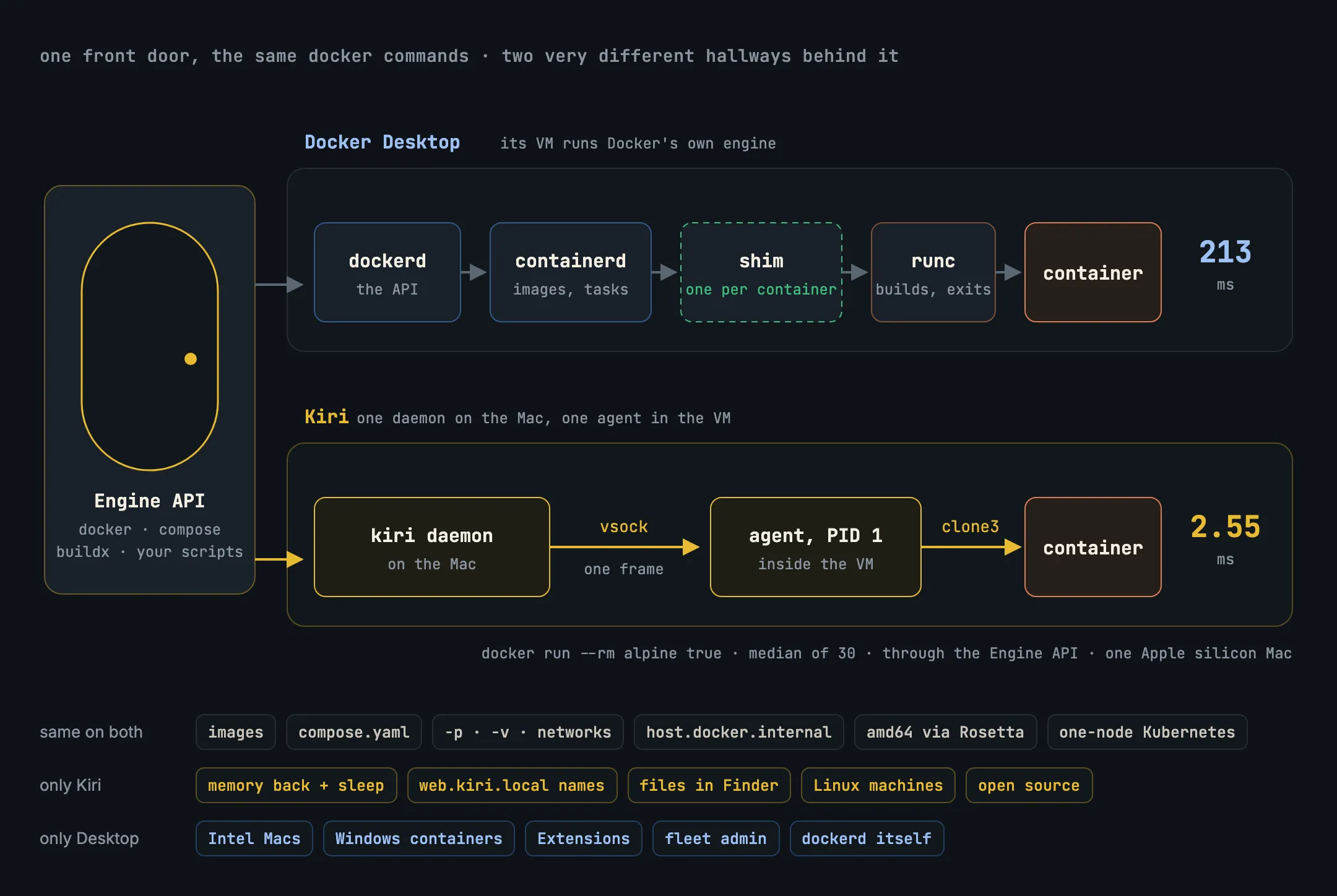
Docker Desktop is Docker, Inc.’s app for running Linux containers on a Mac or Windows PC. Containers need a Linux kernel and macOS doesn’t have one, so Docker Desktop runs a Linux virtual machine and puts Docker’s own engine inside it: dockerd (the API server), containerd (images and container lifecycle), a containerd-shim process for each running container, and runc, which actually creates each container. The docker command on your Mac talks to dockerd through a socket.
Around that engine it adds a window, Extensions, Docker’s other tools and administration features for companies that manage many installs. Larger companies need a paid subscription; check Docker’s current terms for your case.
What Kiri is
Kiri is an open-source container runtime for Apple silicon Macs, Linux and Windows. On a Mac it also runs one small Linux VM, but it doesn’t put Docker’s engine in it. Instead it has two programs of its own, both written in Rust:
- a daemon on the Mac that serves the same Docker Engine API, on
~/.kiri/run/docker.sock; and - an agent that is PID 1 inside the VM and starts each container itself, with one
clone3system call.
There is no dockerd, containerd, shim or runc anywhere in the path. The app bundles the docker CLI, Compose and buildx, so you don’t need anything else installed. We explain the whole design in What is Kiri?
What stays the same
Because both serve the Docker Engine API, almost everything you touch day to day is identical:
- Your tools.
docker,docker composeanddocker buildxwork unchanged. So do scripts and IDE plugins that talk to a Docker socket. - Your files. Dockerfiles and
compose.yamldon’t change. - The everyday features: published ports on
localhost, bind mounts of Mac folders, named volumes, user networks with DNS by name,host.docker.internal, SSH agent forwarding, amd64 images through Rosetta,docker buildthrough BuildKit, and a single-node Kubernetes cluster. - Side by side. Each engine has its own Docker context (
desktop-linuxandkiri), so you can keep both installed and switch with one command. Kiri doesn’t take over/var/run/docker.sockor your existingdockerbinary while Docker Desktop owns them.
What’s different behind the API
The picture above is the main difference. A docker run on Docker Desktop passes through four programs inside its VM before your container starts, and a shim stays running for every container. On Kiri, the daemon sends one message over vsock (a direct socket between the Mac and the VM) and the agent clones the container straight into its namespaces and cgroup.
Fewer moving parts shows up in three places:
- Speed. Kiri’s benchmarks time
docker run --rm alpine true, median of 30 runs, both engines driven by the samedockerCLI on one Apple silicon Mac. Through the Engine API: Kiri 2.55 ms, Docker Desktop 213 ms. Through thedockerCLI, which adds its own startup time: Kiri 14.2 ms, Docker Desktop 243 ms. One caveat from the same page: Docker Desktop’s VM was sharing the Mac with another busy container VM during the run. - Memory. Kiri’s VM hands memory it isn’t using back to macOS, and powers off after 60 seconds with nothing running. It boots again in about a tenth of a second (112 ms measured) on the next command. The daemon on the Mac measured 9 MB, and nothing runs per container.
- Size. The
kirihost binary is about 2.2 MB, and the VM’s Linux kernel about 10 MB.
What Kiri adds
- Names instead of ports. A container called
webanswers athttp://web.kiri.localhostwith no setup, orweb.kiri.localonce you turn names on; Compose services answer at<service>.<project>.kiri.local, with HTTPS from Kiri’s own certificate authority. - Container files in Finder at
~/Kiri, read-only and always current. - Linux machines:
kiri machine create devgives you a long-lived Linux environment with your user and/Usersat the same path. - Kiri Share, to give a local container a public HTTPS link.
- Open source: Apache-2.0 or MIT, at your option, on GitHub.
What Docker Desktop has that Kiri doesn’t
Kiri is in beta, and Docker Desktop is a mature product. Docker Desktop is the better pick if you need:
- An Intel Mac. Kiri runs on Apple silicon only, macOS 14 or later.
- Windows containers. Kiri on Windows (beta) runs Linux containers in WSL2.
- Docker’s own engine. Kiri implements the Engine API itself. A call it doesn’t support yet answers with “Kiri does not support … yet”, so you see exactly what’s missing. Today that includes network drivers other than
bridge,host,noneandcontainer:, IPv6 networks, and GPUs. - Extensions and fleet administration, or a vendor contract behind your tooling.
Which should you use?
- You’re on an Apple silicon Mac and use
docker, Compose and Kubernetes for day-to-day development: try Kiri. Your files don’t change, and switching back is one command. - You need Intel Mac support, Windows containers, Extensions, or a feature Kiri refuses today: stay on Docker Desktop.
- You’re not sure: run both for a week. They don’t interfere, apart from both wanting the same host port if two containers publish it.
In short
- Both run Linux containers in a VM and serve the Docker Engine API, so your commands and files are the same.
- Docker Desktop runs
dockerd, containerd, a shim per container and runc; Kiri runs one daemon and one agent that starts containers withclone3. - In Kiri’s benchmark, a container run took 2.55 ms on Kiri and 213 ms on Docker Desktop through the API.
- Kiri gives memory back, sleeps when idle, and adds local names, Finder access and Linux machines.
- Docker Desktop still wins on Intel Macs, Windows containers, Extensions and full
dockerdcompatibility.
Next: how Kiri starts a container without runc, step by step, in How Kiri starts a container.