Kiri is a container engine that serves the same Docker Engine API as Docker. That means you don’t learn new commands: docker run, docker compose up and docker buildx build work as they do today, and your Dockerfiles and compose.yaml files don’t change. This post walks through moving a real project over, in about five minutes.
Deciding whether to switch at all? Start with Kiri vs Docker Desktop. New to Kiri? See What is Kiri?
How docker picks an engine
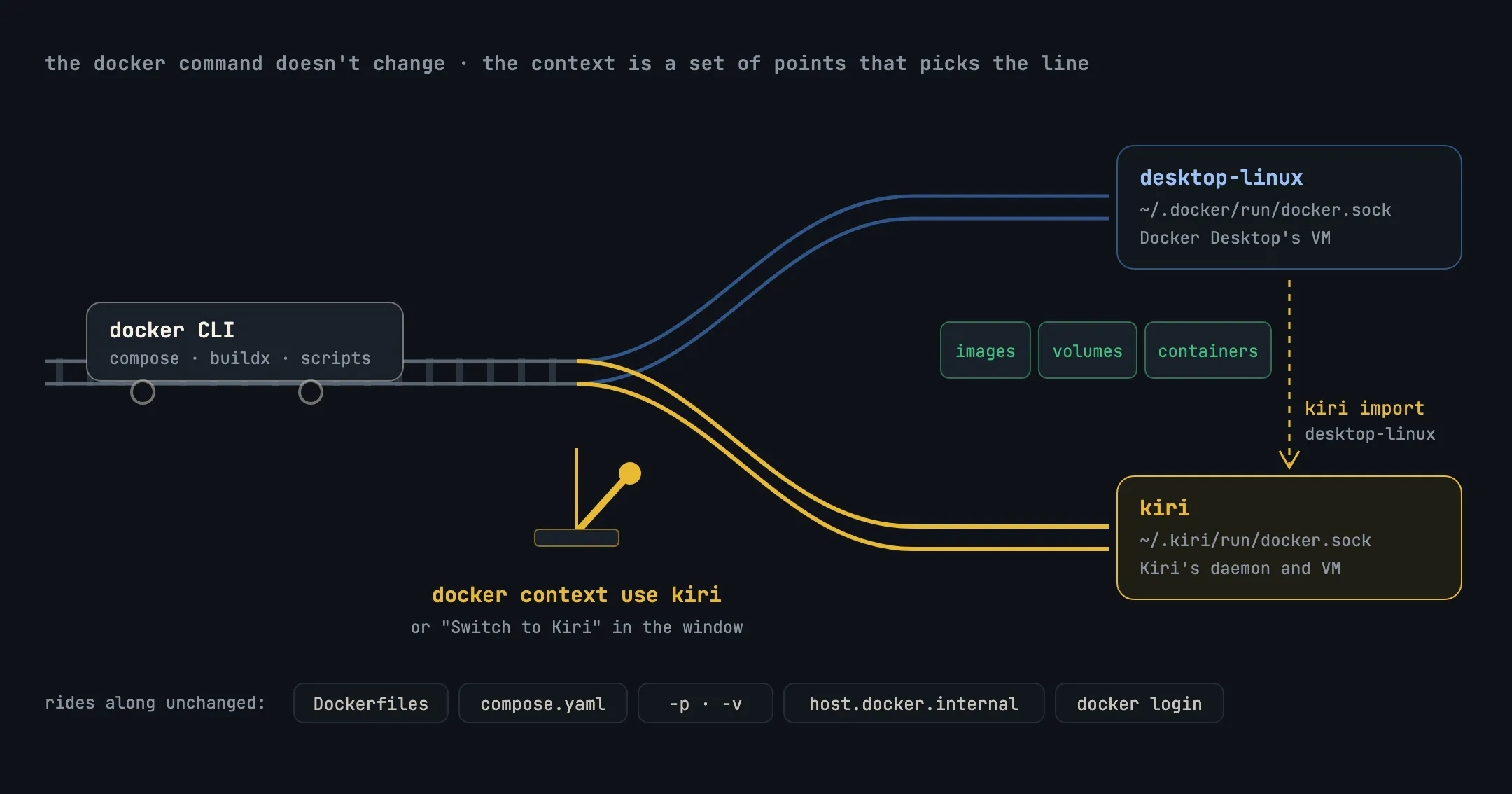
The docker command doesn’t care which engine it talks to. It reads its current context, which is mostly a socket address, and sends every request there. Docker Desktop’s context is desktop-linux, behind ~/.docker/run/docker.sock. Kiri adds one called kiri, behind ~/.kiri/run/docker.sock. Switching engines is switching contexts, like setting railway points.
1. Install Kiri
Kiri runs on Apple silicon Macs (macOS 14 or later), on Linux with systemd, and on Windows 10 or 11 (beta). Every download brings the engine plus the docker CLI, Compose and buildx, so nothing else is needed. Get it from the download page, or on a Mac or Linux machine:
curl -fsSL https://runkiri.com/install.sh | bashOn a Mac, opening Kiri the first time sets up the kiri context. If Docker Desktop or OrbStack is installed, Kiri leaves them alone: your current context doesn’t change, /var/run/docker.sock stays theirs, and Kiri’s own docker goes at the end of your PATH so the one you already have keeps priority. On a Mac with no other engine, Kiri becomes the default straight away.
2. Point docker at Kiri
docker context use kiri
docker context show   # prints: kiri
Kiri’s window can do the same: its status bar says docker → Kiri or, in amber, docker → Docker Desktop, with Switch to Kiri one click away. To go back at any time:
docker context use desktop-linuxFor a single command without switching, use docker --context kiri ps, or kiri ps, which always reaches Kiri.
3. Bring your images, volumes and containers (optional)
Your files carry over by themselves. What lives inside Docker Desktop’s VM doesn’t: images, named volumes and containers. Kiri can copy them:
kiri import desktop-linux --list   # see what would come across
kiri import desktop-linux # copy it all- Images go across with
docker savefrom Docker Desktop anddocker loadinto Kiri. - Named volumes are read by a short-lived, read-only helper container on Docker Desktop and written by another on Kiri, as a
tarstream, so file owners and permissions survive. - Containers are recreated from Docker Desktop’s
inspect(command, environment, ports, mounts, limits, networks) and arrive stopped.
Docker Desktop has to be running while it copies, and nothing in it is changed or removed. To copy one thing, name it: kiri import desktop-linux volume shop_pgdata. Note that kiri import with no source reads from OrbStack.
4. Run your Compose project
In your project folder, nothing changes:
docker compose up -d
docker compose ps
docker compose logs -f web
Kiri supports up with ports, bind mounts, named volumes, healthchecks and depends_on, including condition: service_healthy, plus down (with -v), ps, logs, exec, build and events. Services find each other by name as usual. From your Mac, each service also answers at http://<service>.<project>.kiri.local once you turn local names on, so you can stop remembering which port is which.
5. Builds
docker build and docker compose build run in BuildKit, which Kiri runs as a container and stops when idle. What you build lands straight in Kiri’s image store. If Docker Desktop is also installed, Kiri asks the first time whether to Keep building with Docker or Build with Kiri; change it later with kiri build-with kiri or in Settings → Builds.
Tools that only look at /var/run/docker.sock
Most tools respect the docker context. A few look only at /var/run/docker.sock, which stays Docker Desktop’s while it’s installed. Point them at Kiri with:
export DOCKER_HOST=unix://$HOME/.kiri/run/docker.sockWhat doesn’t work yet
Kiri covers what docker, Compose and buildx use day to day, but it isn’t Docker’s engine. Today:
- Networks:
bridge,host,none,container:<name>and your own bridge networks. Other drivers and IPv6 networks are refused. - Mounts: bind mounts, volumes and
tmpfs. Other--mounttypes, and GPUs (--gpus), are refused. - Macs: Apple silicon only.
Anything else Kiri doesn’t have answers with “Kiri does not support … yet” rather than failing silently, so you see exactly what’s missing. The full list is in Kiri’s migration guide.
In short
dockerpicks its engine by context; Kiri adds akiricontext and leaves Docker Desktop’s alone.docker context use kiriswitches;docker context use desktop-linuxswitches back.kiri import desktop-linuxcopies images, volumes and containers without touching Docker Desktop.- Compose files, Dockerfiles,
-p,-v,host.docker.internalanddocker loginall carry over unchanged. - Unsupported calls say so plainly: other network drivers, IPv6 networks, GPUs, other mount types.