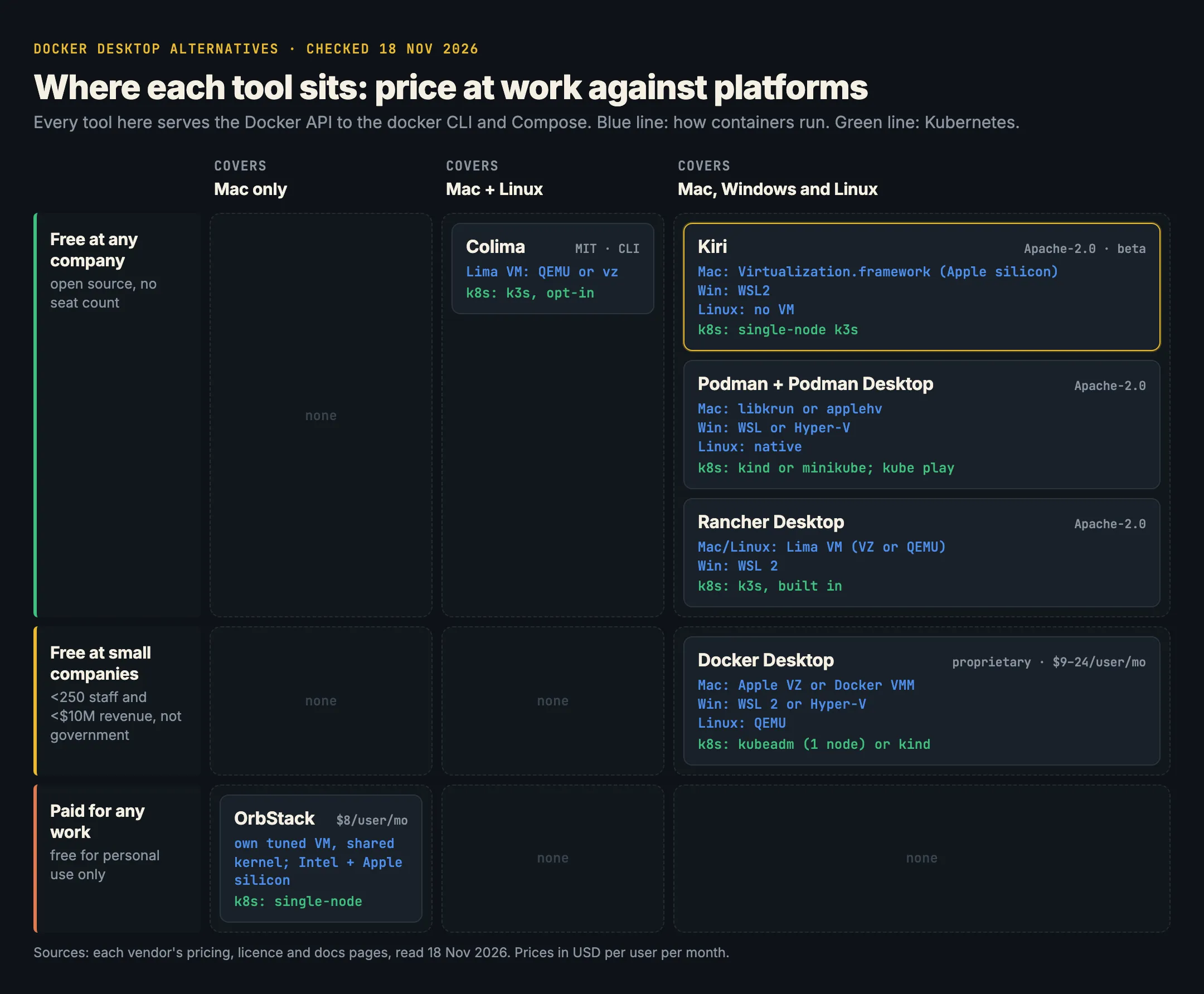
There are five serious Docker Desktop alternatives in 2026: OrbStack, Colima, Podman, Rancher Desktop and Kiri. All of them run Linux containers in a light VM on a Mac and keep the docker CLI and Compose working. The short version: OrbStack is the most polished Mac app but is paid for work; Colima is the free, minimal command-line choice; Podman suits people who want a non-Docker engine; Rancher Desktop is built around Kubernetes; Kiri is free, runs on Mac, Windows and Linux, and started containers fastest in its own published benchmark. The rest of this post gives you the facts to pick for yourself.
We make Kiri, so every claim below links its source, and we say plainly where the others win.
Why people leave Docker Desktop
Two reasons come up again and again. The first is the licence: Docker Desktop needs a paid subscription at companies with 250 or more employees or $10 million or more in revenue, from $9 to $24 per user per month. We break that down in Docker Desktop licence in 2026. The second is weight: start-up time, memory held by the VM, and slow file sharing. See why Docker Desktop is slow on a Mac for where that time goes.
On a Mac, every option has the same shape: a Linux VM (macOS has no Linux kernel), an engine inside it, and a Docker socket on the Mac. The engine, the VM, the app and the licence differ.
The five tools at a glance
| Platforms | Licence and price at work | How containers run | Kubernetes | Docker API and Compose | |
|---|---|---|---|---|---|
| OrbStack | Mac (Intel and Apple silicon), macOS 14+ | Proprietary. $8/user/month | Its own tuned VM with a shared kernel, Docker’s engine inside | Single-node, built in | Unmodified Docker engine |
| Colima | Mac (Intel and Apple silicon), Linux | MIT, free | Lima VM, QEMU or Apple’s vz | k3s, opt-in | Docker’s engine (or containerd) |
| Podman | Mac, Windows, Linux | Apache-2.0, free | podman machine VM on Mac and Windows; native on Linux |
Through kind or minikube; podman kube play |
Docker v1.40 API compatibility layer |
| Rancher Desktop | Mac, Windows, Linux | Apache-2.0, free | Lima VM (VZ or QEMU) on Mac and Linux; WSL 2 on Windows | k3s, built in | Docker’s engine (Moby) or containerd with nerdctl |
| Kiri | Mac (Apple silicon), Windows, Linux | Apache-2.0, free. Beta | Virtualization.framework on Mac; WSL2 on Windows; no VM on Linux | Single-node k3s | Kiri’s own Engine API implementation |
Each section below links its sources, all read on 18 November 2026.
OrbStack
What it is. A native Mac app that runs Docker containers and full Linux machines. OrbStack “uses a lightweight Linux virtual machine with a shared kernel”, with services “purpose-built from scratch”, and “a Docker engine runs alongside Linux machines in the OrbStack VM” (architecture).
- Platforms: Mac only, Apple silicon and Intel, macOS 14.0 or later (download).
- Licence and price: closed source. Free for personal use; “Freelance, business, and commercial users of OrbStack must purchase a license for each user” (licensing). Pro is $8 per user per month (pricing), and non-profits pay too. Installs start with a 30-day Pro trial.
- Kubernetes: “a lightweight single-node Kubernetes cluster optimized for development”, with Services reachable from the Mac and
*.k8s.orb.localdomains (docs). - Compatibility: “an unmodified Docker engine with a setup similar to Docker Desktop” (FAQ), so
docker, Compose and Dev Containers work as on Docker Desktop.
Where it wins: the most finished Mac experience here, Intel Mac support, editable container files in Finder, direct IP access to containers, USB passthrough and a Debug Shell. If you’re paying anyway and only use a Mac, it’s a strong pick.
Colima
What it is. “Container runtimes on macOS (and Linux) with minimal setup”. The name means Containers on Lima (GitHub).
- Platforms: Intel and Apple silicon Macs, and Linux.
- Licence and price: MIT, free for any use.
- How it runs: a Lima VM using QEMU or Apple’s Virtualization framework (
--vm-type vz, macOS 13+), with Rosetta for amd64 images via--vz-rosetta. The default VM has 2 CPUs, 2 GiB memory and 100 GiB disk. - Kubernetes:
colima start --kubernetesruns k3s. - Compatibility: Docker’s engine inside the VM, so the
dockerclient works “with no additional setup”. You install thedockerand Compose CLIs yourself.
brew install colima docker docker-compose
colima start --vm-type vz --vz-rosetta
docker compose up -d
Where it wins: free, scriptable, small, and familiar to anyone who likes the terminal. In Kiri’s benchmark (below) it had the fastest bind-mount reads of all four engines measured. Where it doesn’t: there’s no app window, and no Windows support.
Podman and Podman Desktop
What it is. Podman is a daemonless container engine; Podman Desktop is a GUI on top of it. Both are Apache-2.0 (podman, podman-desktop).
- Platforms: Mac, Windows and Linux.
- How it runs: on Linux, natively. On Mac and Windows,
podman machinestarts a VM. The docs list libkrun (the default) and applehv on macOS, WSL (the default) and Hyper-V on Windows, and QEMU for machines on Linux. - Kubernetes: Podman Desktop works with Kind and Minikube clusters as Kubernetes contexts (docs), and
podman kube playruns Kubernetes YAML directly as pods (docs). - Compatibility: Podman’s API includes “a compatibility layer offering support for the Docker v1.40 API” (docs). Podman Desktop can install the Compose reference implementation and point Docker tools at Podman (Compose setup).
Where it wins: rootless containers, pods as a first-class idea, and an engine that isn’t Docker’s, which some security teams prefer. Where it doesn’t: it’s Docker-compatible rather than Docker, so tools that lean on newer Docker API features or Docker-specific behaviour can need adjusting.
Rancher Desktop
What it is. A free desktop app from SUSE for running containers and Kubernetes. You choose the engine: Docker’s (Moby, with the Docker CLI) or containerd (with nerdctl). Kubernetes comes from k3s, and you can pick the version (docs).
- Platforms: macOS 13 or later on Apple silicon or Intel; Windows 11 or Windows Server 2025, with WSL installed first; and Linux (installation).
- Licence and price: Apache-2.0 (GitHub), free.
- How it runs: a Lima VM on Mac and Linux; on macOS, VZ (Virtualization.framework) is the default and QEMU is optional (emulation settings). On Windows, WSL distributions.
- Compatibility: with the Moby engine, the Docker socket and Docker Compose work as usual. With containerd, you use
nerdctlinstead.
Where it wins: Kubernetes is the centre of the app, with version switching and one-click resets. If your day is Helm charts and kubectl, start here.
Kiri
What it is. An open-source container runtime written in Rust. On a Mac it runs one small Linux VM with Apple’s Virtualization.framework, but instead of Docker’s engine it has its own daemon serving the Docker Engine API and an agent inside the VM that starts each container itself (What is Kiri?).
- Platforms: Apple silicon Macs (M1 or later) on macOS 14 or later; Windows 10 or 11, inside WSL2; and Linux, with no VM at all (install). No Intel Mac build. In beta on all three.
- Licence and price: Apache-2.0, free at any company size.
- Kubernetes:
kiri k8s startruns a single-node k3s cluster in one container, ready in about 20 seconds after the first start, as thekirikubectl context (docs). - Compatibility: the app bundles the
dockerCLI, Compose and buildx, and adds akiriDocker context.docker composeworks unchanged, including healthchecks anddepends_on(Compose docs). Because Kiri implements the API itself, a call it doesn’t support yet answers with an error saying so. Today that includes network drivers other thanbridge,host,noneandcontainer:, IPv6 networks, and GPUs.
curl -fsSL https://runkiri.com/install.sh | bash
docker context use kiri
kiri import desktop-linux   # copy images, volumes, containers from Docker Desktop
Where it wins: speed (below), sleeping when idle, one engine on all three systems, and no licence to count. Where it doesn’t: Intel Macs, Windows containers, the missing API features above, and the maturity of products that have shipped for years.
Measured speed
Kiri’s headline number is a container started and removed in 2.55 ms through the Docker API, against 213 ms for Docker Desktop (median of 30, 24 October 2026). It also publishes a four-engine benchmark on its benchmarks page, which ran on 2 November 2026 on one Apple silicon Mac, with every engine limited to the same 2 CPUs and 8 GB, the same docker CLI and the same warm images. Versions: Kiri 0.1.13, Docker Desktop 4.90.0, OrbStack 2.2.4 with Kubernetes off, and Colima 0.10.3 (vz, virtiofs). Medians:
| Measurement | Kiri | Docker Desktop | OrbStack | Colima |
|---|---|---|---|---|
docker run --rm alpine true |
22 ms | 178 ms | 279 ms | 152 ms |
docker exec … true |
15.7 ms | 47.7 ms | 32.5 ms | 36.8 ms |
| Container lifecycle through the API | 3.1 ms | 163 ms | 238 ms | 88 ms |
| Containers started in parallel | 88.9/s | 11.4/s | 8.2/s | 12.9/s |
| 200 MB out of a container (stdout) | 223 MB/s | 45 MB/s | 87 MB/s | 63 MB/s |
| Bind mount read, 1 GB | 1724 MB/s | 1354 MB/s | 3240 MB/s | 5235 MB/s |
| New HTTP connections to a published port | 1892/s | 865/s | 2389/s | 1484/s |
Read it honestly: Colima reads bind mounts about three times faster than Kiri, and OrbStack accepts more new HTTP connections. If your workload is a big source tree mounted into a container, that row matters more than container start time. Kiri led every other row. Podman and Rancher Desktop weren’t part of this run, so we have no numbers for them. On Windows, the same page has Kiri starting a container in 78 ms against Docker Desktop’s 491 ms; OrbStack and Colima don’t run there.
Which Docker Desktop alternative is best for you?
- You use only a Mac, you value polish, and your company will pay: OrbStack. It’s the most complete Mac app here and supports Intel Macs.
- You live in the terminal and want free and minimal: Colima. Pair it with a bind-mount-heavy project and you’ll like its file speed.
- You want a non-Docker engine, rootless containers or pods: Podman with Podman Desktop.
- Kubernetes is the main event: Rancher Desktop, with k3s versions you can switch from the app.
- You want free at work, a native app, Mac plus Windows and Linux on one engine, and the fastest container starts: Kiri, on an Apple silicon Mac. Read Kiri vs Docker Desktop for what changes behind the API, or start from the download page.
- You need Windows containers, an Intel Mac with vendor support, or Docker’s admin controls: stay on Docker Desktop and pay for the seats that need it.
In short
- All five keep
dockeranddocker composeworking; they differ in engine, VM, platforms and licence. - OrbStack: Mac only, proprietary, $8 per user per month for any work, very polished.
- Colima: Mac and Linux, MIT, command line only, fastest bind-mount reads in Kiri’s benchmark.
- Podman: Mac, Windows and Linux, Apache-2.0, its own engine with a Docker v1.40 compatibility layer.
- Rancher Desktop: Mac, Windows and Linux, Apache-2.0, built around k3s Kubernetes.
- Kiri: Apple silicon Mac, Windows and Linux, Apache-2.0, in beta; 2.55 ms per container start through the API, and 22 ms per
docker runagainst 152–279 ms for the others in its published benchmark, with Colima and OrbStack ahead on two rows.