Is Docker Desktop free? The Docker Desktop license makes it free for personal use, education, non-commercial open source and companies with fewer than 250 employees and less than $10 million in annual revenue. Anyone else using it for work needs a paid subscription: Docker Pro, Team or Business, from $9 to $24 per user per month on yearly billing. Government bodies always need one. Docker Engine on Linux, the docker CLI and Compose are open source and free everywhere.
This post walks through the terms as Docker publishes them today, what each plan costs, and the free ways to run containers if your company is over the line.
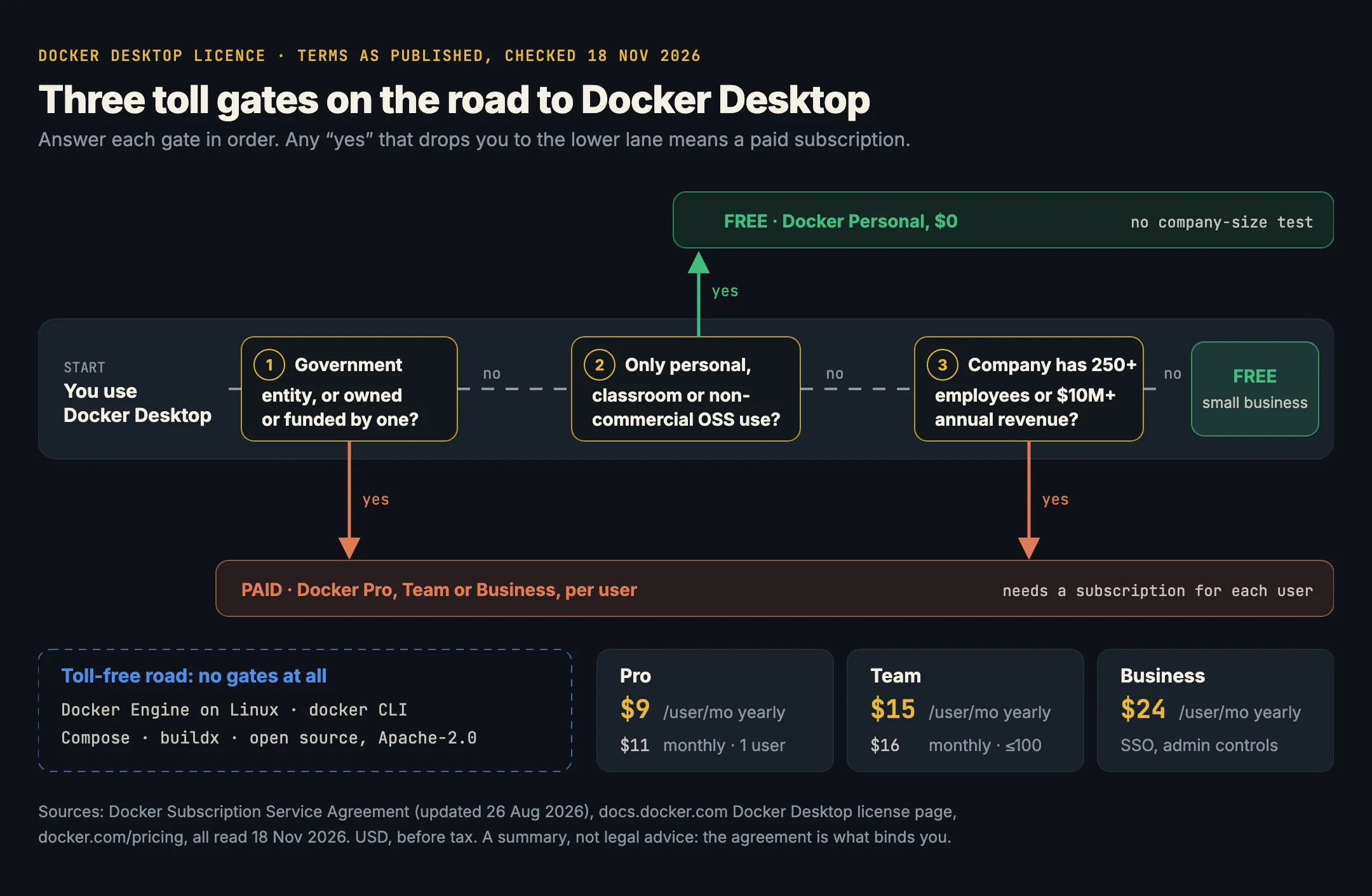
Is Docker Desktop free?
For many people, yes. Docker’s own Docker Desktop license agreement page (read 18 November 2026) says Docker Desktop is free for:
- small businesses, defined as “fewer than 250 employees AND less than $10 million in annual revenue”;
- personal use;
- education;
- non-commercial open source projects.
The same page says it requires a paid subscription for “professional use in larger organizations”, “government entities” and “commercial use beyond the free tier limits”.
Both conditions in the small-business test have to hold. A 40-person company with $12 million in revenue pays. So does a 300-person non-profit with a tiny budget, because it fails the headcount test.
The thresholds, as the agreement words them
The binding text is the Docker Subscription Service Agreement, last updated 26 August 2026 (read 18 November 2026). Its section on standalone Docker Desktop says use without a paid subscription is restricted to:
(i) use for a non-commercial open source project and/or (ii) use in a commercial undertaking with fewer than 250 employees and less than US $10,000,000 (or equivalent local currency) in annual revenue.
and, separately: “Government Entities shall not use Docker Desktop or access other Entitlements of the Services without a paid subscription for Services.” The agreement defines a government entity broadly. It includes any entity “directly or indirectly owned or controlled by the government” and any entity “whose principal source of funds comes from the government”, and Docker decides at its sole discretion who counts. Public universities and state-funded research bodies should read that clause carefully.
What counts as commercial use?
The agreement doesn’t use a single “commercial use” definition. It describes what the free Personal plan covers instead:
- Developer use is “a single, individual developer acting in a personal, non-commercial capacity to develop Open Source Software or free applications”. It explicitly “does not include use in connection with an individual’s employment or engagement by a company, organization, or institution (including a university, research institution, or government entity), whether paid or unpaid.”
- Educational use is limited to “individual members of an educational organization enrolled in a classroom learning environment solely for academic or research purposes, or contribution to an open source project.”
In practice, that means:
- Your laptop, your side project: free.
- Your job, at a company over either threshold: paid, even if you installed it yourself and nobody asked you to.
- A contractor working for a large client: the work is for a company over the line, so plan on a subscription. Check whose subscription covers you.
- A student in a class: free. A research group sharing personal accounts for one project: the agreement says that “requires procurement of an appropriate paid institutional Service”.
- Maintaining a non-commercial open-source project: free. A commercial open-source company is a company, so the size test applies.
Docker Desktop pricing in 2026
From docker.com/pricing, read 18 November 2026, in US dollars per user per month:
| Plan | Yearly billing | Monthly billing | Users | Who it’s for (Docker’s words) |
|---|---|---|---|---|
| Docker Personal | $0 | $0 | 1 | “individual developers who need the essential tools” |
| Docker Pro | $9 | $11 | 1 | “individual professionals” |
| Docker Team | $15 | $16 | up to 100 | “small teams” |
| Docker Business | $24 | not listed | unlimited | “enterprises desiring robust security, control, and compliance” |
All three paid plans include Docker Desktop for commercial use. Business adds the administration features larger companies ask for: single sign-on, SCIM user provisioning and a hardened Docker Desktop. The pricing page lists plans offered since 10 December 2024; older plans are on a separate legacy page.
Some quick sums for a team of 20 developers on yearly billing: Team is 20 × $15 × 12 = $3,600 a year; Business is 20 × $24 × 12 = $5,760 a year.
What’s free no matter how big you are
The subscription covers the Docker Desktop app and Docker’s cloud services. Docker’s open-source projects are separate. The licence page notes: “The licensing and distribution terms for Docker and Moby open-source projects, such as Docker Engine, aren’t changing.”
These are open source under Apache-2.0 (checked on GitHub, 18 November 2026) and free for any use:
- Docker Engine (
dockerd, from the Moby project), which runs natively on Linux; - the
dockerCLI (docker/cli); - Docker Compose (docker/compose), and buildx.
So on a Linux workstation or server, you can install Docker Engine and never touch Docker Desktop:
# Docker's convenience script, fine for a dev machine
curl -fsSL https://get.docker.com -o get-docker.sh
sudo sh get-docker.sh
docker run --rm hello-world
The catch is macOS and Windows. Containers need a Linux kernel (we explain why in containerd vs Docker), so on a Mac or a Windows PC something has to run a Linux VM and an engine inside it. Docker Desktop is one way to do that. It isn’t the only one.
The free alternatives
Every tool below serves the Docker Engine API, so the docker CLI and docker compose keep working. They differ in platform, licence and how much they wrap around the engine. We compare them in detail, with benchmark numbers, in Docker Desktop alternatives compared.
Kiri. An open-source container runtime for Apple silicon Macs (macOS 14 or later), Windows (in WSL2) and Linux, where it runs with no VM. Apache-2.0, free at any company, with a native window, and it bundles the docker CLI, Compose and buildx. Kiri is in beta, has no Intel Mac build, and runs Linux containers only. See What is Kiri? and the install guide.
curl -fsSL https://runkiri.com/install.sh | bash
docker context use kiri
docker compose up -d
Colima. “Container runtimes on macOS (and Linux) with minimal setup”, MIT-licensed, Intel and Apple silicon (GitHub). Command line only. It runs Docker’s own engine in a Lima VM, with optional Kubernetes through k3s.
brew install colima docker docker-compose
colima start
Podman and Podman Desktop. A daemonless engine and its desktop app, Apache-2.0, on Mac, Windows and Linux. Podman serves “a compatibility layer offering support for the Docker v1.40 API” (docs), and Podman Desktop can point your Docker tools at it. It isn’t Docker underneath, so expect the odd difference in rootless networking or volume permissions.
brew install podman
podman machine init && podman machine start
Rancher Desktop. SUSE’s free, Apache-2.0 app for Mac, Windows and Linux. You pick Docker’s engine (Moby) or containerd, and Kubernetes comes built in through k3s (docs). A good fit if Kubernetes is your main reason for running containers locally.
brew install --cask rancherOrbStack is not free for work. OrbStack is a fast, polished Mac app, but it’s proprietary. Its licensing page (read 18 November 2026) says: “Freelance, business, and commercial users of OrbStack must purchase a license for each user.” Its terms count you as commercial “if you are using OrbStack professionally as a freelancer, for a commercial or non-profit entity, or for a government entity, or if you generate more than Ten Thousand Dollars ($10,000.00 USD) per year in connection with all work related to your use of OrbStack.” Pro is $8 per user per month. Personal use is free; free educational and non-commercial open-source licences “may be requested, subject to approval” (FAQ). Unlike Docker, there’s no company-size exemption: a two-person startup pays.
How to tell if your company has a problem
- Count installs. On Macs, look for
/Applications/Docker.app; your device management tool can report it across a fleet. - Check the two numbers. Headcount and annual revenue, for the whole company (Docker’s threshold isn’t per team).
- Check for a subscription. Ask whoever owns developer tooling whether there’s a Docker Team or Business account, and whether every user is assigned a seat.
- Decide per person. Some developers rely on Docker Desktop features, such as Extensions, Docker’s admin controls or Windows containers. Keep them on a paid seat. Others only run
dockeranddocker compose, and any of the tools above will do.
When paying for Docker Desktop is the right call
Paying isn’t always the wrong answer. Docker Desktop is mature, it runs on Intel Macs, it runs Windows containers, and Business gives security teams single sign-on, enforced settings and a vendor contract. If your company needs those, $24 a month per developer is modest next to salary costs. The point is to pay knowingly, for the people who use those features, rather than by default for everyone.
If you’re on an Apple silicon Mac and only need the Docker tools, the Docker Desktop alternative page has Kiri’s side-by-side numbers, and Kiri vs Docker Desktop explains what changes behind the API.
In short
- Docker Desktop is free for personal use, education, non-commercial open source, and companies with fewer than 250 employees and less than $10 million in revenue.
- Everyone else using it for work needs Docker Pro ($9), Team ($15) or Business ($24) per user per month on yearly billing; government entities always pay.
- Docker Engine on Linux, the
dockerCLI and Compose are Apache-2.0 and free at any size. - Kiri, Colima, Podman and Rancher Desktop are open source and free at work. OrbStack is $8 per user per month for any work.
- This is a summary of published terms as of 18 November 2026, not legal advice. Check the agreement for your case.