This week Google said it is donating gVisor and a new project called Agent Substrate to the CNCF (5 November). On 12 November the Kubernetes agent-sandbox project released v1.0.11. Docker, Vercel, E2B, Modal, Daytona and Cloudflare all sell or ship an “agent sandbox”. Most of them run on a container or a microVM.
Two things get mixed up here. The agent is the program doing the work: a model plus the harness that lets it run commands. The sandbox is where it runs. And a sandbox can be a container. What makes it a sandbox is not the container itself, but the walls set up around it: what the code inside can reach, which keys it holds, and how long it lives. This post explains what each one is, which walls a container needs before it counts as a sandbox, and when a plain container is enough.
What is a container?
A container is an ordinary Linux process with limits on it. Namespaces change what it can see (its own files, process list and network). Cgroups cap what it can use (memory, CPU). A program like runc sets those limits up, starts your process and steps away. Docker and containerd sit on top and handle images, networks and volumes (how they fit together).
Containers were built to package and ship software: the same image runs the same way on your laptop and in production. The code inside is code you trust, because you wrote it or chose it.
What is an agent sandbox?
A throwaway machine for an AI agent: an isolated place to run code, with the network, secrets and lifetime controlled from outside.
The agent installs packages, runs tests and executes scripts it wrote a minute ago, often from text it read in a README or an issue. Some of that code may be hostile. The sandbox assumes it is, and limits what it can reach when it runs. (The series intro covers why this became necessary.)
The difference, in one picture
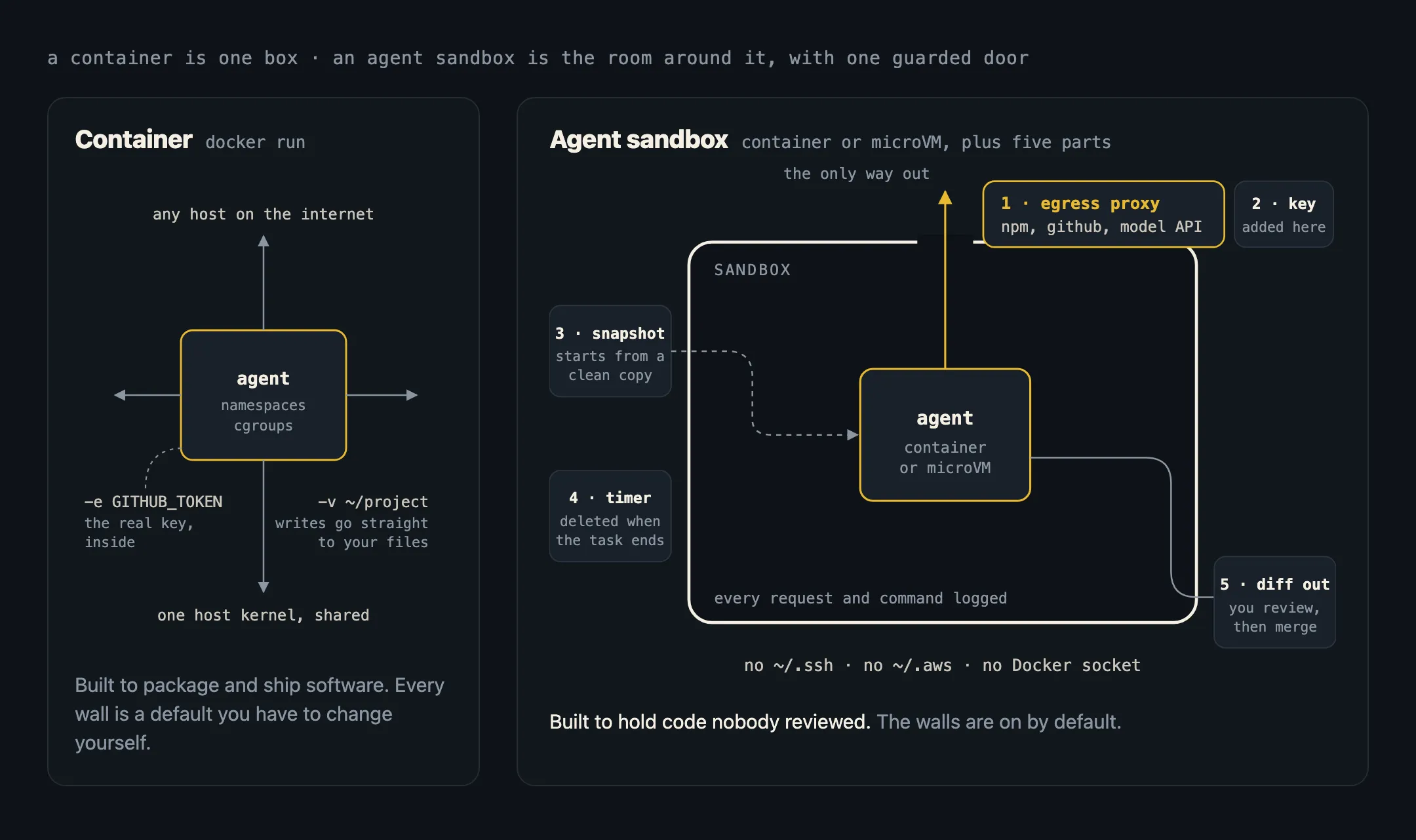
A plain docker run gives the process its own view of the system, but leaves everything else open: full internet, whatever keys you pass in with -e, and direct writes to any folder you mount. You can close each of those yourself. A sandbox closes them by default, and adds parts a container doesn’t have.
Five parts a sandbox adds
1. One way out: an egress proxy
All outbound traffic goes through a proxy that allows only named hosts: your package registry, your Git host, the model API. Everything else is blocked and logged. This is the most important part, because most damage from a compromised agent leaves over the network. More on this in what your AI agent can reach.
Real examples: E2B has allowOut and denyOut lists of IPs, CIDR ranges or domains. Modal has block_network, a CIDR allowlist and a domain allowlist (in beta) checked against TLS SNI. Daytona has networkBlockAll and a domain allowlist. A container gets none of this unless you build it.
2. Keys stay outside
In a container, a key passed with -e GITHUB_TOKEN sits in the process environment, where any code can read it. A sandbox keeps the real key in the proxy and adds it to requests on the way out. The agent can call GitHub, but it never holds a secret worth stealing.
E2B adds secrets “outside the sandbox” to HTTPS requests. Vercel Sandbox’s firewall injects credentials too, decrypting traffic only for domains that have rules. Docker says its sandboxes inject credentials “outside the MicroVM boundary” (16 April). Google says Agent Substrate injects credentials “on the wire”.
3. A clean start from a snapshot
Every task starts from a known copy, not from whatever the last task left behind. Many sandboxes can also copy a running machine: E2B’s fork copies the full filesystem and memory, including running processes, so ten agents can start from one prepared environment. A container image is a snapshot of files only, and a running container keeps everything it changed.
4. A timer, then the bin
Sandboxes are made to be deleted. Modal Sandboxes stop after 5 minutes by default, up to 24 hours, with idle timeouts. Whatever a bad package planted dies with the sandbox. A container is made to stay up, and its volumes are made to survive it.
5. Results come out as a diff
The agent works on a copy of your project. What comes out is a diff or a pull request you review, not writes straight into your folder. With -v ~/project:/work, a container writes to your real files the moment the agent does.
And underneath: a stronger wall
Most hosted sandboxes don’t share the host kernel. E2B runs one Firecracker microVM per sandbox, and so does Vercel Sandbox. Docker Sandboxes run one microVM per agent, on Docker’s own VMM. Modal runs gVisor by default, or a VM. Cloudflare’s Sandbox SDK runs each sandbox in its own VM. The Kubernetes agent-sandbox project hands isolation to gVisor or Kata through a RuntimeClass.
This matters because every container on a machine shares one kernel, and a kernel bug can be a way out. Your container is not a sandbox covers the rungs from containers to microVMs and what each costs.
Different lifetimes
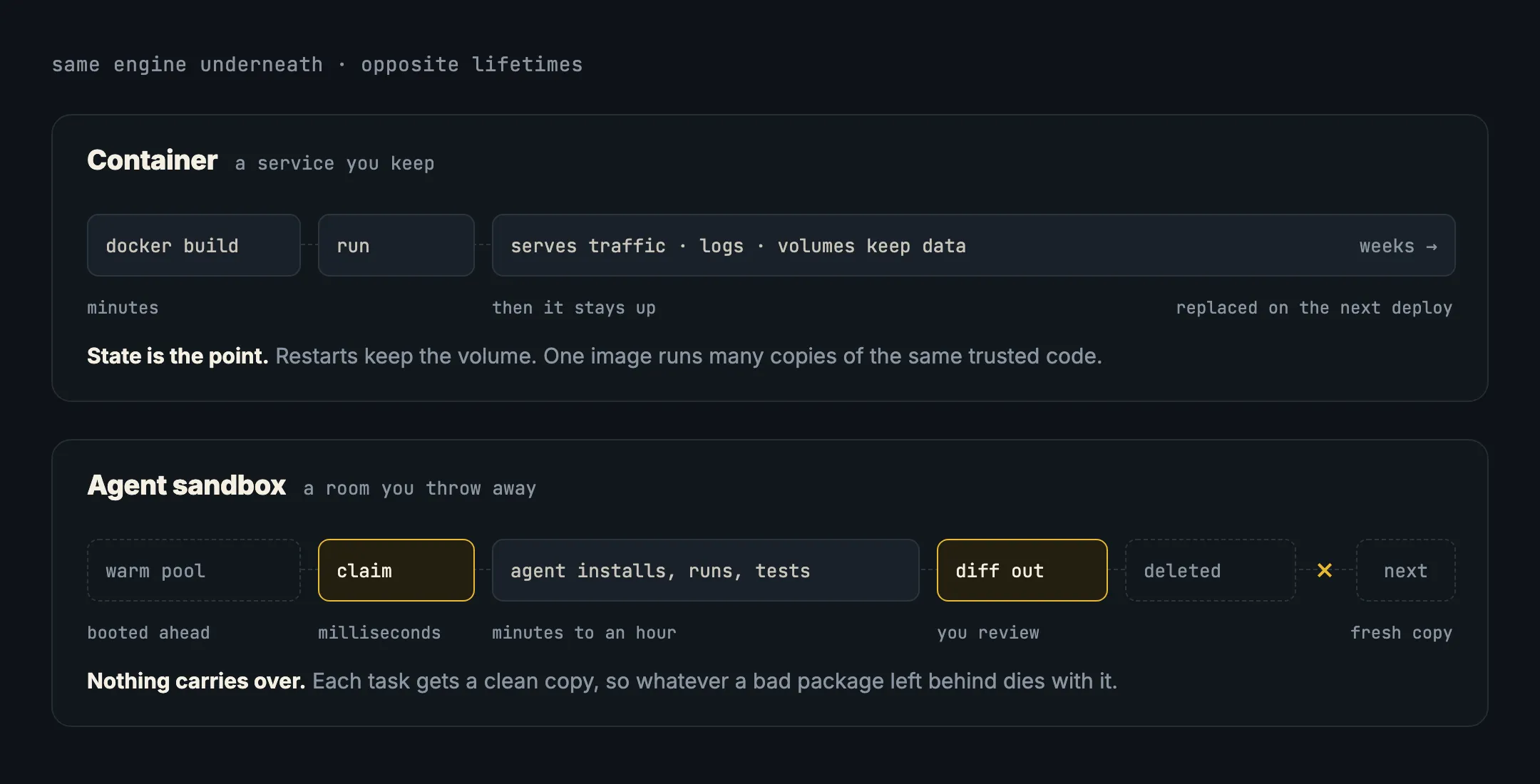
A container in production is a pet you keep alive. A sandbox is used once. That’s why sandboxes keep warm pools, machines booted ahead and waiting: Google gives Agent Substrate a wake-up target under 500 ms, and agent-sandbox has a SandboxWarmPool resource. A Firecracker microVM boots in under 125 ms with under 5 MiB of overhead, which is what makes one-VM-per-task affordable.
Which should you use?
A plain container is enough when the code inside is code you wrote or chose: your app, your database, your CI build with pinned dependencies. That’s what containers are for.
Use a sandbox when an agent runs code nobody reviewed: packages it chose, scripts it generated, MCP servers it started, anything that came from text on the internet.
In between, harden the container. If you can’t move to a sandbox yet, close the gaps a container leaves open. This runs an agent task with no network, no capabilities, a read-only root and a copy of the project instead of the real folder:
cp -r ~/project /tmp/agent-work
docker run --rm -it \
  --network none \
  --cap-drop=ALL --security-opt no-new-privileges \
  --read-only --tmpfs /tmp \
  --pids-limit 256 --memory 2g \
  -v /tmp/agent-work:/work -w /work \
  node:22 bash
What’s still missing: an allowlist (it’s all or nothing here), keys kept outside, a timer and a separate kernel. Never add --privileged, the Docker socket, or your home folder. Any one of them hands the host to whatever runs inside. Run your MCP servers in a box has more on this.
In short
- A container is a process with namespaces and cgroups. It packages trusted software and is built to stay up.
- An agent sandbox is a throwaway machine for untrusted code. It usually runs on a microVM or gVisor, not a plain container.
- A sandbox adds five parts: an egress proxy, keys kept outside, a clean snapshot, a timer, and results as a diff.
- A hardened
docker runcloses some of the gaps. It doesn’t give you an allowlist, outside keys or its own kernel. - Ask any sandbox: does untrusted code share a kernel, and where does the real key live?