Part of our container basics: image layers · registries · runc · Kubernetes · Testcontainers
Your code talks to a database, a message queue or a cache. You can test it against a fake (an in-memory database, a mock), but then you’re testing the fake, not the real thing. Testcontainers lets a test start the real thing instead: a real PostgreSQL, Kafka or Redis in a container, just for that test, removed when it ends.
What Testcontainers is
Testcontainers is a library you add to your test code. Its own description is “a library that provides easy and lightweight APIs for bootstrapping local development and test dependencies with real services wrapped in Docker containers” (testcontainers.com). There are libraries for Java, .NET, Go, Node.js, Python, Rust and Haskell, with more for Ruby, PHP, Elixir and others.
It isn’t a container engine. It’s a client: it talks to a Docker-compatible engine (Docker, Kiri, Podman and others) over the engine’s API, the same way the docker command does, and asks it to start, inspect and remove containers. The company behind it, AtomicJar, joined Docker in December 2023; the libraries stay open source.
What a test looks like
Here’s the same test in Java, Go and TypeScript, each using its library’s PostgreSQL module (adapted from the getting started guide, the Go module and the Node module docs). Pick a tab. CustomerRepository stands for your own code.
@Testcontainers
class CustomerRepositoryTest {

  @Container
  static PostgreSQLContainer<?> db =
      new PostgreSQLContainer<>("postgres:16-alpine");

  @Test
  void savesACustomer() {
    var repo = new CustomerRepository(
        db.getJdbcUrl(), db.getUsername(), db.getPassword());
    repo.save(new Customer("Ada"));
    assertEquals(1, repo.count());
  }
}
func TestSavesACustomer(t *testing.T) {
ctx := context.Background()
db, err := postgres.Run(ctx, "postgres:16-alpine",
postgres.WithDatabase("shop"),
postgres.WithUsername("user"),
postgres.WithPassword("secret"),
postgres.BasicWaitStrategies(),
)
testcontainers.CleanupContainer(t, db)
require.NoError(t, err)
url, err := db.ConnectionString(ctx, "sslmode=disable")
require.NoError(t, err)
repo := NewCustomerRepository(url)
require.NoError(t, repo.Save(ctx, Customer{Name: "Ada"}))
require.Equal(t, 1, repo.Count(ctx))
}import { PostgreSqlContainer } from "@testcontainers/postgresql";
import { expect, test } from "vitest";
test("saves a customer", async () => {
await using db = await new PostgreSqlContainer("postgres:16-alpine").start();
const repo = new CustomerRepository(db.getConnectionUri());
await repo.save({ name: "Ada" });
expect(await repo.count()).toBe(1);
});In each one, a real PostgreSQL 16 starts in a container, and the library hands back the address to connect to: getJdbcUrl() in Java, ConnectionString() in Go, getConnectionUri() in TypeScript. When the test ends, the container is removed: by the JUnit extension, by CleanupContainer, or by await using when db goes out of scope. (await using needs TypeScript 5.2 or later; on older setups, call await db.stop() in an afterAll.)
There’s no database to install on your laptop or on the CI machine, and no state left over between runs.
How it works, step by step
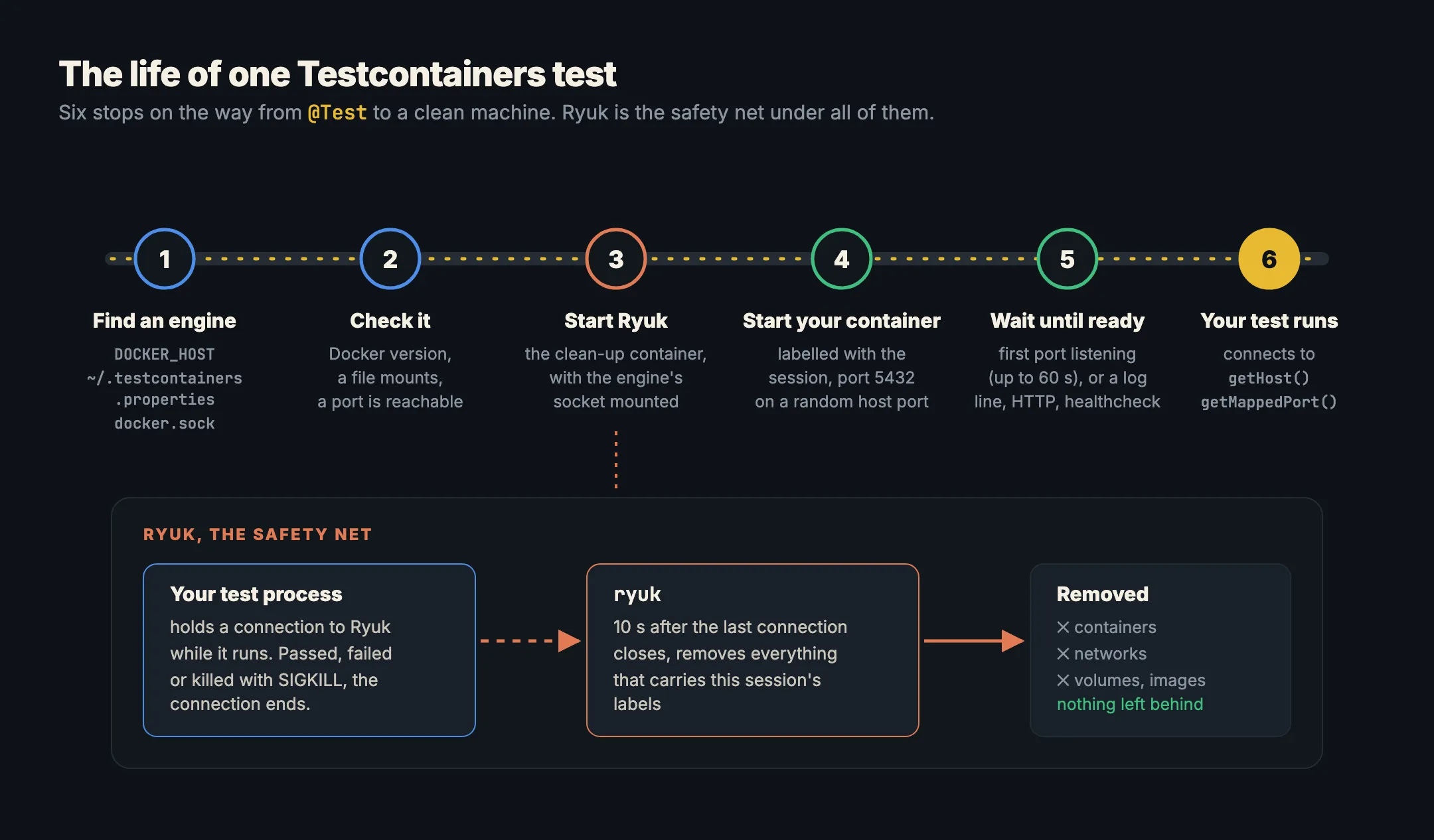
1. It finds an engine
Before anything else, the library needs an engine to talk to. It looks in this order:
- The
DOCKER_HOSTenvironment variable, such asunix:///var/run/docker.sockortcp://192.168.1.10:2376. docker.hostin~/.testcontainers.properties, a small settings file in your home folder.- Docker’s default socket:
/var/run/docker.sockon Mac and Linux,\\.\pipe\docker_engineon Windows.
Most libraries don’t read docker context, so switching contexts doesn’t move your tests. That catches people out when they run more than one engine. The Java library’s configuration page lists every setting.
2. It checks the engine
The Java library runs a few startup checks: the Docker version is new enough, a file can be mounted into a container, and a port the container exposes can be reached. If a check fails, you get a clear error before any test runs. You can switch the checks off with checks.disable=true, but on a working engine you shouldn’t need to.
3. It starts Ryuk
Next it starts Ryuk (testcontainers/ryuk), Testcontainers’ clean-up container. Ryuk mounts the engine’s socket, so from inside its container it can talk to the same engine and remove things. More on what it does below.
4. It starts your container, on a random port
Then it pulls the image if needed and starts your container. Two details matter:
- Labels. Every container, network and volume it creates gets labels that tie it to this test session. That’s how Ryuk finds them later.
- Random host ports. The container’s port, 5432 for PostgreSQL, is published on a random free port on your computer, such as 55031. Two test runs at the same time, or a PostgreSQL you already have on 5432, never collide. Your test asks for the real address with
getHost()andgetMappedPort(5432), or a module’s own helper such asgetJdbcUrl().
5. It waits until the service is ready
A container that has started isn’t a database that accepts connections. So Testcontainers waits. By default it waits for up to 60 seconds for the container’s first mapped port to start listening (startup and waits). You can pick a different wait strategy:
- A log line:
Wait.forLogMessage(".*ready to accept connections.*", 2) - An HTTP response:
Wait.forHttp("/health").forStatusCode(200) - The image’s own healthcheck:
Wait.forHealthcheck()
Modules usually choose the right wait for you. Go’s PostgreSQL module is an exception: it has no default, which is why the Go example above passes postgres.BasicWaitStrategies(). That’s most of what a module is: a ready-made container class for one technology, with the right ports, settings and wait strategy built in. The modules page lists official and community modules for PostgreSQL, MySQL, Kafka, Redis, MongoDB, RabbitMQ, Elasticsearch, LocalStack, Ollama and many more.
6. Your test runs
Only now does your test code run, against a real service on a known address. When the tests finish, the library stops and removes the containers it started.
Ryuk, the safety net
Step 6 assumes your tests end politely. Sometimes they don’t: you press stop in the IDE, the CI job times out, or the process is killed with kill -9. Then the code that removes containers never runs.
That’s what Ryuk is for. While your test process runs, it holds an open connection to Ryuk and tells it which labels belong to this session. When the connection closes, for any reason, Ryuk waits 10 seconds (in case the tests reconnect), then removes every container, network, volume and image with those labels (moby-ryuk). Testcontainers says this “works reliably even when the test process exits abnormally (e.g. sending a SIGKILL)”.
What Testcontainers needs from the engine
Put together, a Testcontainers run asks quite a lot of the engine underneath it:
- answering the Docker API, including the version check;
- running an image’s own start command and entrypoint exactly as Docker would;
- mounting the engine’s own socket into a container (for Ryuk) and having it still reach the same engine;
- publishing ports to random host ports and reporting them back;
- labels, networks and volumes, and removing them by label.
An engine that gets any of these slightly wrong shows up as a test that hangs at “waiting for container to be ready”, or containers that pile up after every run.
Testcontainers on Kiri
Kiri supports all of this since 0.2.1. Leave the version check and Ryuk switched on. Kiri takes Docker’s default socket or pipe when no other engine has it, so most test suites run with nothing to set. If another engine has the default, point DOCKER_HOST at Kiri:
export DOCKER_HOST=unix://$HOME/.kiri/run/docker.sock   # Mac
export DOCKER_HOST=unix:///run/kiri/docker.sock         # Linux
$env:DOCKER_HOST = "npipe:////./pipe/kiri"              # Windows, PowerShell
Command line and CI has the details for each system.
In short
- Testcontainers is a test library that starts real services in containers for your tests and removes them afterwards.
- It’s a client of a Docker-compatible engine, found through
DOCKER_HOST,~/.testcontainers.propertiesor the default socket. - Each container gets a random host port, and the test reads the real address from the library.
- It waits until the service is ready: by default the first port listening, up to 60 seconds; modules pick a better wait for you.
- Ryuk removes everything the session labelled, even when the test process is killed. Leave it on.