Docker Compose runs fine on a Mac without Docker Desktop. You need three things: the docker command-line client, the Compose plugin, and an engine to talk to. With Homebrew that’s brew install docker docker-compose, one line in ~/.docker/config.json so the client can find the plugin, and an engine such as Kiri or Colima. Then docker compose version should answer. This post covers each step, and the errors people hit on the way: docker compose not found, docker-compose: command not found, the daemon socket, and empty bind mounts.
New to some of the terms? Our container basics explain them: image layers, registries and containerd vs Docker.
What Docker Compose is, and why there are two commands
Compose starts a set of containers from one file, compose.yaml: your services, their networks and their volumes, with one up and one down.
There are two generations, and that’s where most confusion starts:
- Compose v1, the
docker-composecommand with a hyphen, was a Python tool. Docker’s migration guide says “Compose v1 is no longer maintained, and users should migrate to Compose v2” (migrate to Compose v2). - Compose v2 and later “is written in Go and integrates with the Docker CLI”. It’s a CLI plugin, a separate program called
docker-composethat thedockerclient runs when you typedocker composewith a space.
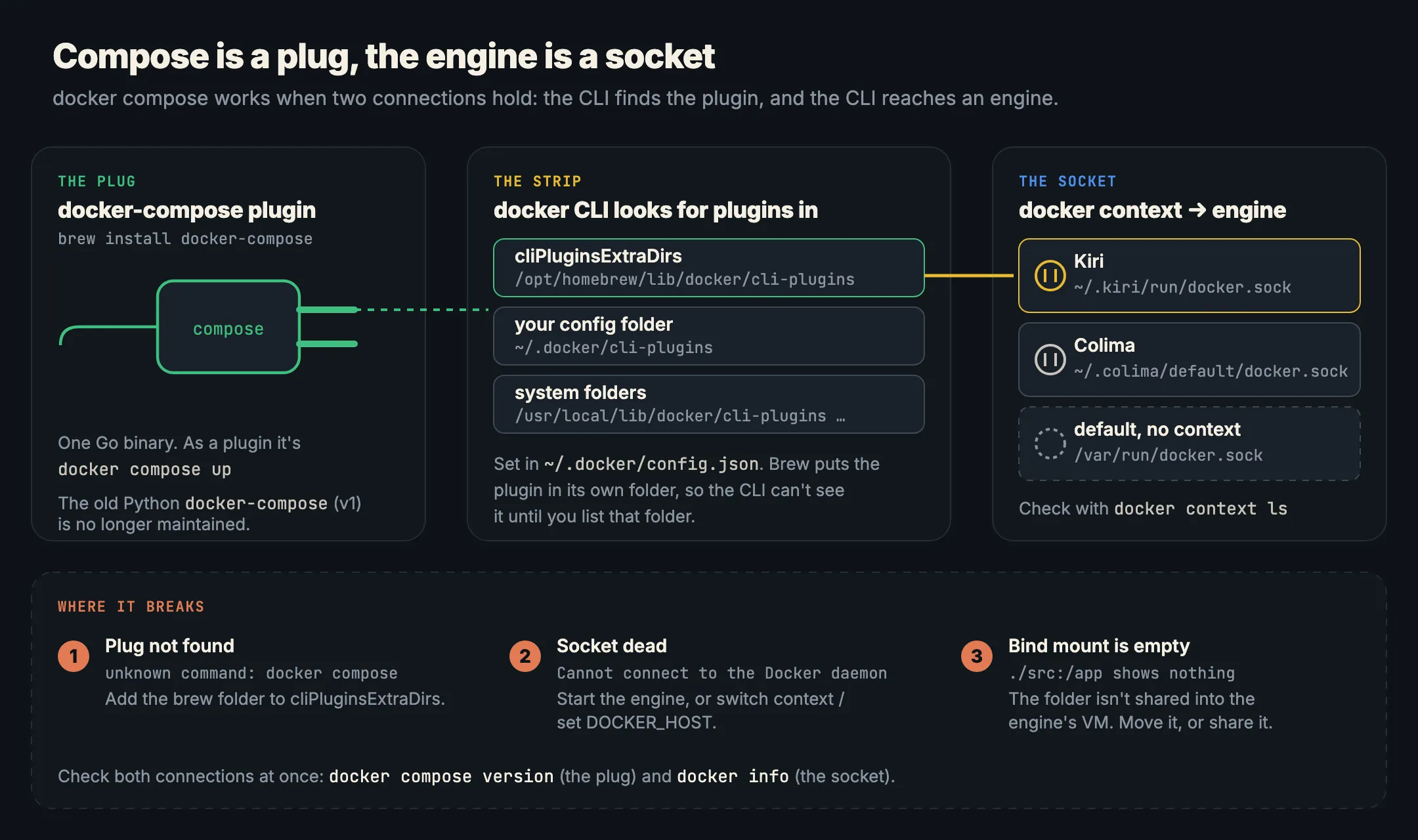
So docker compose doesn’t come from the engine or from Docker Desktop. It’s a file on your Mac that the docker client has to find. Docker Desktop puts it somewhere the client looks. Without Docker Desktop, you do that yourself.
Step 1. Install the docker CLI and Compose with Homebrew
brew install docker docker-compose docker-buildxWhat each formula is:
dockeris the command-line client only, built from Docker’sdocker/clirepository (formula). It has no engine: on its own, every command fails with “Cannot connect to the Docker daemon”.docker-composeis current Compose (5.8.0 when we checked), Apache-2.0 licensed (formula). It installs adocker-composeprogram and links it into$(brew --prefix)/lib/docker/cli-plugins/.docker-buildxis the BuildKit build plugin, installed the same way (formula). Optional, butdocker compose buildworks better with it.
Don’t confuse these with the docker-desktop cask (once called docker), which is Docker Desktop itself (cask).
Step 2. Tell docker where the plugin is (cliPluginsExtraDirs)
Homebrew puts the plugin in its own folder, and the docker client doesn’t look there by default. The formula says so in its caveats: “Compose is a Docker plugin. For Docker to find the plugin, add “cliPluginsExtraDirs” to ~/.docker/config.json”.
The client looks for plugins in the folders listed in cliPluginsExtraDirs, in ~/.docker/cli-plugins, and in system folders starting with /usr/local/lib/docker/cli-plugins (docker/cli source). Two ways to connect them:
Add the folder to ~/.docker/config.json. If you don’t have the file yet:
mkdir -p ~/.docker
cat > ~/.docker/config.json <<EOF
{
  "cliPluginsExtraDirs": [
    "$(brew --prefix)/lib/docker/cli-plugins"
  ]
}
EOF
brew --prefix prints /opt/homebrew on Apple silicon and /usr/local on Intel Macs. If the file already exists, don’t overwrite it: open it and add the cliPluginsExtraDirs key next to what’s there, keeping the JSON valid.
Or link the plugin into your own plugin folder:
mkdir -p ~/.docker/cli-plugins
ln -sfn "$(brew --prefix)/lib/docker/cli-plugins/docker-compose" ~/.docker/cli-plugins/docker-compose
ln -sfn "$(brew --prefix)/lib/docker/cli-plugins/docker-buildx"  ~/.docker/cli-plugins/docker-buildx
Either way, check:
docker compose version
# Docker Compose version v5.8.0
This works before any engine is running, because it only asks the plugin for its version. It proves the plugin is found, nothing more.
Step 3. Point docker at an engine
Containers on a Mac need a Linux VM, because macOS has no Linux kernel. Docker Desktop provides one. Here are two free replacements.
Kiri
Kiri is our open-source container engine for Apple silicon Macs (macOS 14 or later), Linux and Windows, in beta. It serves the Docker Engine API from its own small VM, so docker compose talks to it like any engine. Install the app from the download page, or:
curl -fsSL https://runkiri.com/install.sh | bashKiri brings its own docker CLI, Compose and buildx, so Steps 1 and 2 are optional with Kiri. Its setup adds its Compose and buildx to cliPluginsExtraDirs in ~/.docker/config.json and creates a kiri docker context at unix://$HOME/.kiri/run/docker.sock (install docs). Its docker goes at the end of your PATH, so a Homebrew docker you already have keeps priority. On a Mac with no other engine, Kiri also becomes the default context.
docker context use kiri
docker compose up -d
kiri compose ps          # always talks to Kiri, whatever context is selected
Compose features that work on Kiri include depends_on with condition: service_healthy, healthchecks, several networks per service, network_mode: service:x and docker compose build through BuildKit. Each service also answers at http://<service>.<project>.kiri.localhost with no setup (Compose on Kiri). In our 2 November 2026 run on one Apple silicon Mac, docker run --rm alpine true took 22 ms on Kiri, 152 ms on Colima and 178 ms on Docker Desktop (benchmarks).
Colima
Colima is a free, MIT-licensed command-line tool that runs a Linux VM with Docker’s engine in it. Its README says the “Docker client is required for Docker runtime. Installable with brew install docker”, which is Step 1.
brew install colima
colima start
docker compose up -d
The default VM has 2 CPUs, 2 GiB of memory and 100 GiB of disk. Colima “makes itself the default Docker context on startup”, and its socket is at $HOME/.colima/default/docker.sock (Colima FAQ). Colima doesn’t install Compose for you, so you need Steps 1 and 2.
Check the whole chain
docker context ls        # the * marks the engine docker will use
docker info --format '{{.ServerVersion}}'
Then a real project. Save this as compose.yaml:
services:
  web:
    image: nginx:alpine
    ports: ["8080:80"]
  cache:
    image: redis:7-alpine
docker compose up -d
curl -sI localhost:8080 | head -1 # HTTP/1.1 200 OK
docker compose downCommon Docker Compose problems on a Mac without Docker Desktop
“unknown command: docker compose”
Current docker clients print docker: unknown command: docker compose. Older ones print docker: 'compose' is not a docker command. If you added a flag, you may see unknown shorthand flag: 'd' in -d instead, because the client tried to read -d as its own flag.
All three mean the client didn’t find the plugin. Check:
ls -l "$(brew --prefix)/lib/docker/cli-plugins/"
cat ~/.docker/config.json
Then add cliPluginsExtraDirs or the link from Step 2. A typo in config.json, such as a trailing comma, also breaks it.
“docker-compose: command not found”
That’s the hyphenated v1 name. Either type docker compose with a space, which is the current form, or run brew install docker-compose: the formula also installs a docker-compose program on your PATH, so old scripts that call docker-compose up keep working with current Compose.
“Cannot connect to the Docker daemon at unix:///var/run/docker.sock”
Compose found itself but not an engine. Either the engine isn’t running (colima start, or open Kiri), or the current context points somewhere dead. Run docker context ls and switch. Some tools ignore contexts and only read /var/run/docker.sock or DOCKER_HOST. For those:
export DOCKER_HOST=unix://$HOME/.kiri/run/docker.sock          # Kiri
export DOCKER_HOST=unix://$HOME/.colima/default/docker.sock    # Colima
Cannot connect to the Docker daemon has the full checklist.
Bind mounts that come up empty
A bind mount like ./src:/app needs the folder shared from your Mac into the engine’s VM. When it isn’t, the container usually starts anyway, with an empty /app.
- Kiri shares paths under
/Users,/Volumes,/private,/tmpand/var/foldersover virtiofs. Any other absolute path is the VM’s own (volumes and mounts). - Colima: a bind mount from outside
/Users/$USER“will start without raising any errors but the mapped mountpoint on the container will be empty”. Add the folder to themountssection of~/.colima/default/colima.yamland runcolima restart(Colima FAQ). Colima also doesn’t support mount paths with spaces.
If mounts work but feel slow, see Why Docker bind mounts are slow on a Mac. To be fair to Colima, it read a 1 GB file from a bind mount at 5235 MB/s against Kiri’s 1724 MB/s in that same benchmark run. Kiri led every other row we measured.
Which engine should you pick?
- You want a free CLI-only engine with Docker’s own
dockerd: Colima, with Steps 1 and 2. - You want Compose, buildx and the CLI in one install, a native app, and names like
web.myapp.kiri.localhost: Kiri on an Apple silicon Mac, keeping in mind it’s in beta. - You’re on an Intel Mac: Kiri doesn’t run there, so use Colima.
Moving off Docker Desktop entirely? Read How to switch from Docker Desktop and Docker Desktop alternatives compared. If your images are amd64-only, amd64 images on Apple silicon covers that, and Kiri vs Docker Desktop compares the two side by side. On Windows, see How to run Docker on Windows without Docker Desktop.
In short
- Compose is a CLI plugin called
docker-compose, run asdocker compose. The old Python v1 is no longer maintained. - Install it with Homebrew:
brew install docker docker-compose. Thedockerformula is the client only. - Point the client at the plugin: add
"$(brew --prefix)/lib/docker/cli-plugins"tocliPluginsExtraDirsin~/.docker/config.json, or link it into~/.docker/cli-plugins. - Add an engine: Kiri brings its own CLI and Compose and sets up the plugin folder itself; Colima needs the Homebrew client and plugin.
- Check with
docker compose version(finds the plugin) anddocker info(reaches the engine). - Empty bind mounts mean the folder isn’t shared into the VM. Keep projects under your home folder.