Docker bind mounts are slow on a Mac because your files and your containers live on two different computers. Containers run in a Linux VM; your project folder lives on macOS. Every stat, open and read a container makes on a bind mount crosses from the VM to macOS and back. One crossing is cheap. A npm install, a test run or a dev server that touches 50,000 files in node_modules pays it 50,000 times or more. The fixes all do one of three things: make the crossing faster (VirtioFS), stop crossing for heavy folders (named volumes), or copy files across once and keep them in sync (synchronized file shares, Mutagen, Compose Watch). The same applies when people say a “Docker volume is slow on Mac”: it’s almost always a bind mount, since named volumes never leave the VM.
New to the terms? Image layers explains what’s in an image, and containerd vs Docker explains the engine underneath.
Why Docker bind mounts are slow on Mac
On Linux, a bind mount is free. The container’s /app is your folder on the same disk, under the same kernel. Nothing is copied or translated.
macOS has no Linux kernel, so every Mac engine (Docker Desktop, Kiri, OrbStack, Colima, Podman) runs containers inside a Linux VM. A bind mount of ~/code/app has to reach a folder that belongs to another operating system. The VM gets it through a file-sharing protocol: a filesystem in the VM whose every operation is sent to a process on the Mac, which does the work with macOS’s own file APIs and sends the answer back.
Stephen Turner, an engineering manager at Docker, put it plainly in 2022: “it’s in the nature of virtualization that there is always an unavoidable small overhead in crossing the host-VM boundary. It’s only tiny, but in a development environment with a huge source tree and lots of reads and writes, it adds up” (File sharing with Docker Desktop).
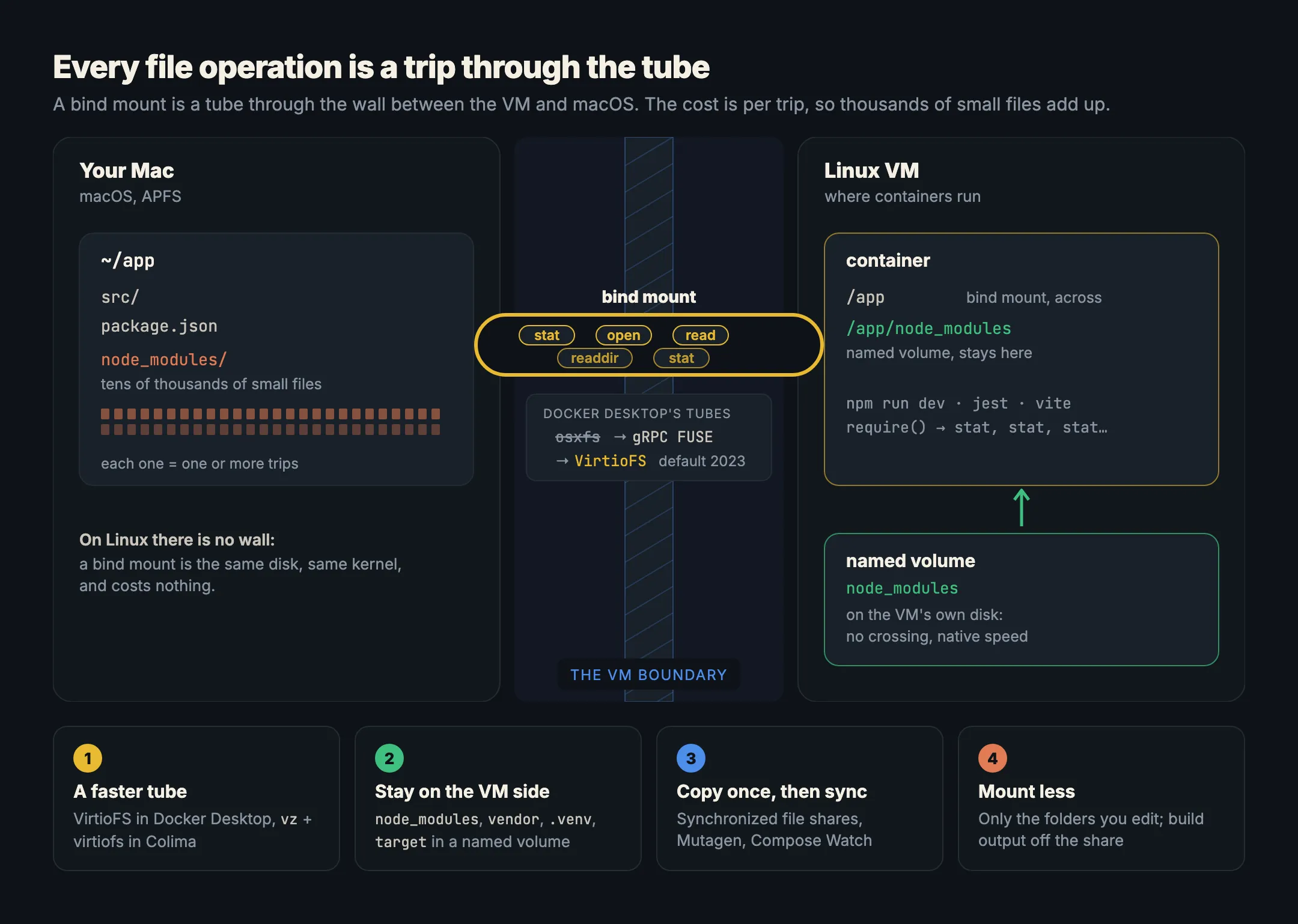
What makes it slow is the number of operations, not the size of the data. Reading one 1 GB file is one long stream and goes fast on every engine. Resolving a Node.js require() stats dozens of paths; a PHP framework boot opens hundreds of files; Jest or Vite crawls the tree. Those are tens of thousands of tiny round trips, each paying the crossing cost.
From osxfs to gRPC FUSE to VirtioFS
Docker Desktop has changed its file-sharing protocol three times, and each change made bind mounts faster:
- osxfs was the original. It was slow enough that Docker added the
:cachedand:delegatedmount flags so you could trade consistency for speed. Docker marked it legacy and finally removed it in Docker Desktop 4.80.0, on 29 June 2026, moving remaining users to VirtioFS (release notes). - gRPC FUSE replaced it as the default. A FUSE client in the VM forwards each file request to a server process on the host, which also watches host files and replays change events into the VM so that tools like
npm startnotice edits (Docker’s design post, written for the Windows version of the same design). - VirtioFS arrived as an experiment in Docker Desktop 4.6 in March 2022, with user reports such as a MySQL import going from 3 min 16 s to 18 s (Docker blog). It became the default for new installs in 4.21 (June 2023) and for everyone on macOS 12.5 or later in 4.23 (September 2023) (release notes).
VirtioFS is a shared-filesystem device built for VMs, using Apple’s Virtualization framework on a Mac. It’s the fastest protocol available, and it’s still a boundary crossing. OrbStack, which also uses VirtioFS, says so in its own docs: “there is still an inherent cost associated with going through macOS for file access. For best performance, use volumes when possible” (OrbStack docs).
Fix 1: make sure you’re on VirtioFS
If an old setup still uses gRPC FUSE, switching is the quickest win.
- Docker Desktop: Settings → General → file sharing implementation, choose VirtioFS. Docker’s settings page calls it the default and says to “use VirtioFS for speedy file sharing” (settings).
- Colima: on macOS 13 or later, Colima defaults to the
vzVM type (source), andvzdefaults tovirtiofsmounts. Its config calls virtiofs “the fastest of the options”;qemuVMs default tosshfs(colima.yaml). The mount type can’t be changed after the VM is created, so an old Colima VM needs recreating, which deletes its images and volumes:
colima stop && colima delete
colima start --vm-type vz --mount-type virtiofs- Kiri shares the Mac’s filesystem with its VM over virtiofs at
/mnt/mac, with nothing to choose (how it works). Paths under/Users,/Volumes,/private,/tmpand/var/folderscome from the Mac, the same list Docker Desktop shares by default (volumes and mounts).
Even on VirtioFS, engines differ. Kiri’s benchmarks read a 1 GB file from a bind mount on one M3 Max with every engine set to 2 CPUs and 8 GB (2 November 2026): Colima 5,235 MB/s, OrbStack 3,240 MB/s, Kiri 1,724 MB/s, Docker Desktop 1,354 MB/s. Colima and OrbStack are faster than Kiri here, and the page says so. That test is one large sequential read, so it shows throughput, not the many-small-files case above, which is why the next fix matters more than the engine you pick.
Fix 2: put node_modules and vendor in a named volume
If node_modules in Docker is slow, this is the fix. It’s also the fix with the biggest effect for most projects. Your source code needs to be a bind mount, because you edit it on the Mac. node_modules, PHP’s vendor, Python’s .venv or Rust’s target don’t: you never edit them by hand, and they hold most of the files.
A named volume lives on the VM’s own disk, so the container reads it without crossing to macOS at all. Mount one over the heavy folder, inside the bind mount:
services:
  web:
    build: .
    command: npm run dev
    ports:
      - "3000:3000"
    volumes:
      - .:/app                          # your source, from the Mac
      - node_modules:/app/node_modules  # dependencies, on the VM's disk
volumes:
  node_modules:
The volume mount wins over the bind mount for that path, so /app/node_modules in the container is the volume, and your Mac’s node_modules folder is ignored. The first time an empty volume is mounted, the engine copies in whatever the image has at that path, so if your Dockerfile runs npm ci, the volume starts with those packages. Docker does this, and so does Kiri (docs).
The same with plain docker run:
docker volume create app_node_modules
docker run --rm -it -v "$PWD":/app -v app_node_modules:/app/node_modules -w /app node:22 npm ci
Two things to know:
- The volume doesn’t update itself. After you change
package.json, run the install inside the container (docker compose exec web npm install), or remove the volume and let it fill again:docker compose down -v. - Your editor doesn’t see the packages. The Mac’s
node_modulesis now separate. If your editor needs type definitions, runnpm installon the Mac too; it’s simply not shared with the container.
For PHP, mount vendor:/app/vendor the same way. For Rust, target:/app/target, which also keeps build output off the shared folder.
Fix 3: sync instead of share
Another approach drops the live share for big trees: copy the files into the VM once, then sync changes both ways. Reads inside the container then run at the VM’s native disk speed.
Synchronized file shares is Docker Desktop’s built-in version. It came in Docker Desktop 4.27 (February 2024), built on Mutagen, which Docker acquired in 2023, and Docker claims a 2–10× boost in file operation speed (4.27 announcement). It keeps a synchronized cache of your folder on an ext4 filesystem inside the VM; any bind mount under a shared folder uses the cache automatically (docs). The limits:
- It needs a Pro, Team or Business subscription and signing in to Docker Desktop.
- About 2 million files per share.
- Kubernetes
hostPathvolumes don’t use it, and:consistenton a mount bypasses it.
Mutagen itself is free and open source, and syncs files into containers using commands like docker exec as its transport; Mutagen Compose is a Compose implementation that understands it (Mutagen docs).
Compose Watch is part of Docker Compose. A develop.watch rule with action: sync copies changed files into the running container, and Docker’s docs say “sync rules can be used in place of bind mounts for many development use cases”, with ignore to skip folders (Compose Watch):
services:
  web:
    build: .
    command: npm start
    develop:
      watch:
        - action: sync
          path: ./web
          target: /src/web
          ignore:
            - node_modules/
        - action: rebuild
          path: package.json
Start it with docker compose watch. Sync has a cost of its own: files written by the container don’t come back to your Mac, so it suits source you edit, not output you want to read.
Do :cached and :delegated still help?
No. They were osxfs options. When users asked in 2021 what happened to them, a Docker engineering manager answered: “they don’t apply with the grpcfuse back end” (docker/for-mac#5402). Docker’s current documentation doesn’t describe them for VirtioFS either, and osxfs itself is gone since 4.80. You can leave :cached in an old compose.yaml; it won’t break anything, and it won’t speed anything up. The one consistency flag with a current, documented effect is :consistent, which opts a mount out of synchronized file shares.
Fix 4: mount less, and exclude heavy folders
A bind mount shares everything under it, including folders the container never needs:
- Mount the folder you edit, not the repository.
./src:/app/srcinstead of.:/appkeeps.git, build output and other projects’ folders off the share. - Keep build output in the container. Point
dist,.next,targetor__pycache__at a named volume or atmpfs(--tmpfs /app/.cache). .dockerignoredoesn’t help here. It trims the build context fordocker build, not what a bind mount shares.- Bake dependencies into the image for anything you don’t edit at all. Docker’s own advice: “Large, static dependency trees or libraries could be moved into a named volume, or WSL, or even baked into the container image” (Docker blog).
Measure before and after
Time the same operation on the bind mount and on a volume. From your project folder, with dependencies installed:
# On the bind mount
docker run --rm -v "$PWD":/app -w /app node:22 bash -c 'time find node_modules -type f | wc -l'

# On a named volume (copy once, then time it)
docker volume create nm_test
docker run --rm -v "$PWD":/src -v nm_test:/app/node_modules node:22 cp -r /src/node_modules/. /app/node_modules/
docker run --rm -v nm_test:/app/node_modules -w /app node:22 bash -c 'time find node_modules -type f | wc -l'
docker volume rm nm_test
The gap between the two real times is what a named volume saves on every crawl of that tree. On Linux there’s no gap to measure: no VM, no crossing. That’s true for Kiri on Linux too, which runs without a VM (how it works).
If the whole engine feels slow and not only file access, see Why Docker Desktop is slow on Mac. For Compose setups on other engines, see Docker Compose on Mac without Docker Desktop, and for the engines side by side, Docker Desktop alternatives compared. Kiri is free to download.
In short
- Bind mounts are slow on a Mac because every file operation crosses the VM boundary to macOS and back; the cost is per operation, so many small files hurt most.
- Docker Desktop went from osxfs to gRPC FUSE to VirtioFS, the default since 2023; osxfs was removed in 4.80. Make sure you’re on VirtioFS.
- Put
node_modules,vendor,.venvandtargetin a named volume. It’s the biggest single win. - For large trees, sync instead of share: synchronized file shares (paid Docker plans), Mutagen, or Compose Watch.
:cachedand:delegateddo nothing on today’s file sharing.- Mount only what you edit;
.dockerignoredoesn’t affect bind mounts.