If you are looking into the downsides of Kiri, or whether anyone runs it in production, here is a straight answer. Kiri is in beta on every platform, and it is a runtime for local development, not a server product. This post lists what it doesn’t do yet, what it does well, and when to use it. Everything about Kiri here comes from Kiri’s docs.
New to some of the terms? Our container basics explain them: image layers, registries, runc, and containerd vs Docker.
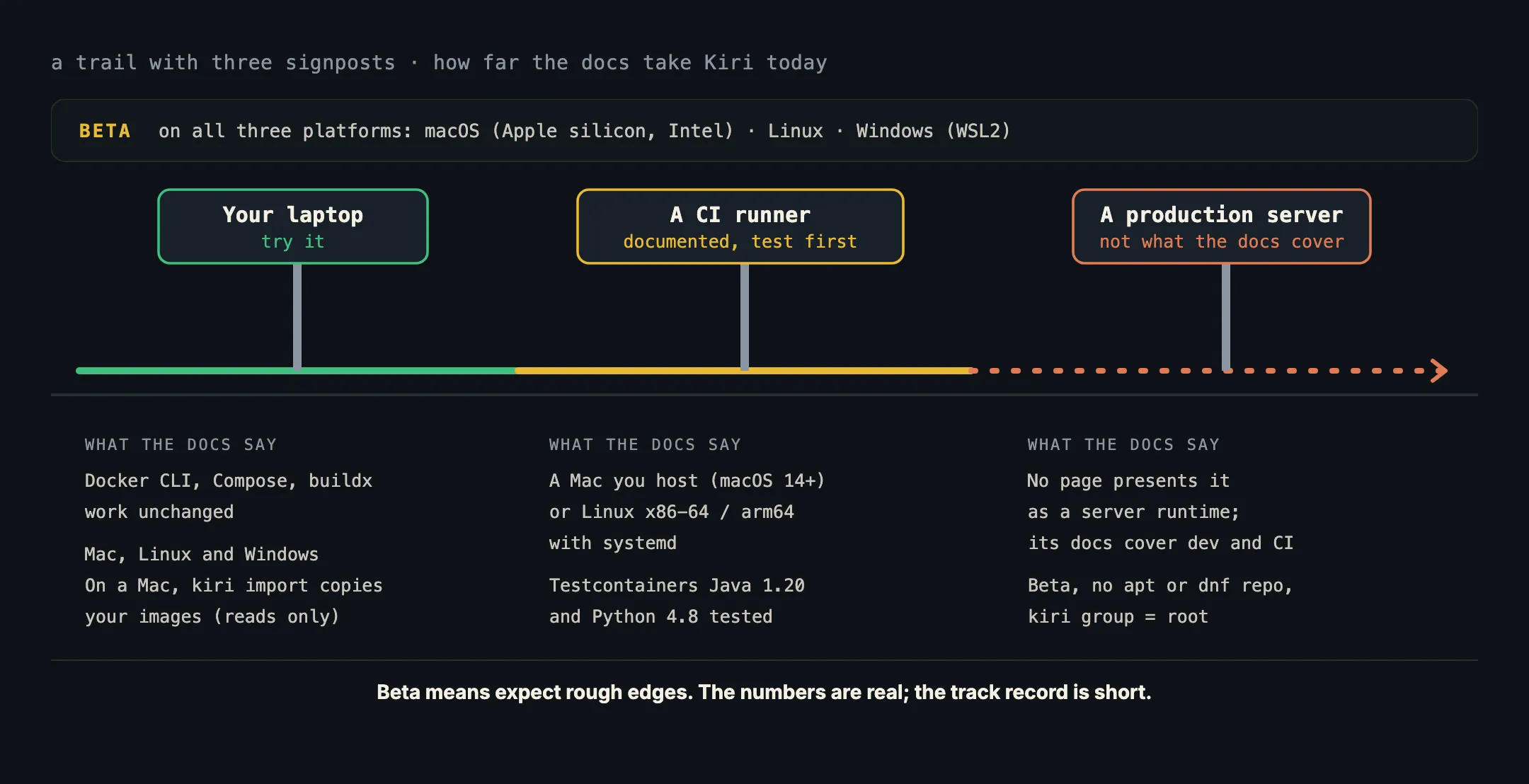
The short answer
- Is Kiri ready for production? The docs don’t present it as a production runtime, and it is in beta on Mac, Linux and Windows. We wouldn’t put a production workload on it.
- What is it for? Running containers on your own machine, with the same
dockercommands, Compose files and Dockerfiles you already use. It also has a documented CI setup. - What are the downsides? It is young, it implements the Docker Engine API itself so some of Docker’s features are missing, and two features (USB and Compose in the window) are marked beta on top of that. Windows carries its own beta warning and unsigned installers.
What “beta” and “local development runtime” mean
Kiri is marked beta on all three platforms: Mac, Linux and Windows. The Windows page is blunt: “Expect rough edges.” Features can still change, and you will probably hit a bug that a mature product has already fixed. Kiri’s repository is open, and the window has a Feedback button for reports.
Local development runtime means Kiri’s job is to give a laptop, workstation or build runner an engine that speaks the Docker Engine API. On a Mac, Kiri starts a small Linux VM and a daemon that serves the API on ~/.kiri/run/docker.sock. On Linux, it runs on the host’s own kernel as a systemd service. It is not a cluster scheduler, a fleet manager or a hosted service, and nothing in the docs describes it as one. Its Kubernetes support is “for local work”.
For how it is built, see What is Kiri?.
What Kiri doesn’t do yet
Docker features Kiri doesn’t implement
Kiri isn’t Docker’s engine. It implements the Docker Engine API itself, so what it hasn’t built answers with an error that says so: “Kiri does not support … yet” (docs). The docs list these gaps:
- GPUs and other device requests.
--gpusis refused with an error (containers). - Network drivers other than
bridge.host,noneandcontainer:<name>work, and so do your own bridge networks, with IPv6 when you ask for it. Overlay and other drivers are refused.-ppublishes TCP and UDP only (networks). - Volume drivers other than
local, and thesizeoption on a volume. - Mount types other than
bind,volumeandtmpfs(volumes). - Windows containers. On Windows, Kiri runs Linux containers in WSL2.
- Docker Desktop’s wider product: Extensions, Docker’s other built-in tools, and the admin features organisations use to manage many installs (comparison).
The docs don’t contain a complete list of every Engine API call that is missing. If a tool of yours calls something unusual, the error is how you find out, so test your own workflow before you commit to it.
Platform limits
- Mac: macOS 14 Sonoma or later.
amd64images run through Rosetta on Apple silicon, and Rosetta has to be installed. On an Intel Mac there is no Rosetta for Linux, so an image with noamd64build is refused (FAQ). - Windows: beta. It needs WSL2, the installers aren’t code-signed yet (so Windows asks you to confirm before one runs), and the engine runs inside a WSL distro.
- Linux: there is no apt or dnf repository yet, so
apt upgradedoesn’t see new versions: you download the new package, or run the install script again (Linux). The window is only in the x86-64kiripackage;kiri-liteand the ARM packages are terminal-only.kiri import,kiri updateand the menu bar are Mac-only.
Features with limits
- USB devices (beta). On a Mac, attaching a device takes it away from macOS while Kiri has it, and the first attach asks for an administrator password. Up to 8 USB 2 and 8 USB 3 devices can be attached. Webcams and audio devices attach, but their streams don’t come through (USB).
- Files in Finder.
~/Kirishows every running container’s files, but read-only. To edit, use a bind mount (files). - Linux machines.
kiri machineis a long-lived container, not a separate VM. Only/Usersfrom your Mac is mounted, and--systemddoesn’t work on Alpine (machines). - Kubernetes. One node, k3s, in one container. The bundled Traefik ingress is turned off, and while the cluster runs, the VM stays awake instead of sleeping.
- Compose in the window (beta). The
docker composecommand is not marked beta. The new Compose section of Kiri’s window is.
Isolation
On a Mac, all your containers share one Linux VM. The VM is a wall between containers and the Mac, and Kiri gives it only /Users, /Volumes and /private. But inside the VM, containers share one kernel, as they do on any Linux host. A container run with --privileged can still reach those three Mac folders, and one that mounts /var/run/docker.sock gets the whole Engine API (security). On Linux, a member of the kiri group can run containers as root, so treat that group like docker or sudo. If you want to run untrusted code, read a container is not a sandbox first.
Where it is slower
Kiri is not fastest at everything in its own benchmark. On the 2 November 2026 run, Colima read a 1 GB bind mount at 5235 MB/s and OrbStack at 3240 MB/s, against Kiri’s 1724 MB/s. OrbStack accepted 2389 new HTTP connections a second to a published port, against Kiri’s 1892 (benchmarks).
What Kiri does well
The figures below come from one Apple M3 Max with 64 GB, with Kiri 0.1.13, Docker Desktop 4.90.0, OrbStack 2.2.4 and Colima 0.10.3 all set to 2 CPUs and 8 GB, medians, on 2 November 2026. The docker run figures use the same docker CLI and warm images; the second row calls the Docker Engine API directly. One machine, one run: your Mac will differ. The full report is public, and kiri bench reruns the lifecycle test on your own Mac.
| Measurement | Kiri | Docker Desktop | OrbStack | Colima |
|---|---|---|---|---|
docker run --rm alpine true |
22 ms | 178 ms | 279 ms | 152 ms |
| Container lifecycle through the Docker API | 3.1 ms | 163 ms | 238 ms | 88 ms |
| Parallel starts | 88.9 /s | 11.4 /s | 8.2 /s | 12.9 /s |
| Pull, image already present | 321 ms | 2798 ms | 1569 ms | 2893 ms |
- Small: in Kiri’s FAQ measurement on one Apple silicon Mac, the daemon and agent used 9.7 MB of resident memory together, before any container memory, against 216 MB for OrbStack’s
dockerdandcontainerd, with no shim process per container. - Sleeps when idle (Mac): the VM powers off after 60 seconds with nothing running, and boots again in about a tenth of a second (112 ms measured).
- Open source, under MIT or Apache-2.0, with no telemetry (FAQ).
- Familiar: the
dockerCLI, Compose and buildx work unchanged, and Testcontainers is tested (Java 1.20 and testcontainers-python 4.8).
Should you use it?
Your laptop: yes, to try. This is what Kiri is for. Nothing you have is replaced: Kiri adds its own kiri Docker context, and docker context use switches between it and Docker Desktop or OrbStack. On a Mac, kiri import copies images, volumes and containers over and only reads from the old engine (on Windows, Settings → Import does the same for Docker Desktop), so you can run both for a week. Use Docker with Kiri walks through it, and Kiri vs Docker Desktop and Kiri vs OrbStack compare the options. If you need GPUs, Windows containers or an Extension, check the list above first.
CI: possible, test it first. Kiri documents a CI setup: on a Mac you host (macOS 14 or later, one that can run a VM), or on any x86-64 or arm64 Linux runner with systemd. The x86-64 Linux packages are installed and tested in Kiri’s own CI on Ubuntu 24.04 (.deb) and Fedora 44 (.rpm) before each release. Fast container startup helps jobs that start many short-lived containers. But it is beta, and Linux upgrades are manual, so pin the version you use and run your whole pipeline against it before you switch.
Production servers: not what Kiri is for. The docs don’t describe a production setup, and we won’t invent one. The Linux service is beta, runs as root, has no package repository for upgrades yet, and its kiri group is equivalent to root. If you run production workloads, use an engine with a long production record, and use Kiri to build and test the same images on your laptop. You can push images built with Kiri to a registry with docker push, as with Docker.
Untrusted code: a container isn’t a sandbox on its own. See container isolation.
In short
- Kiri is in beta on Mac, Linux and Windows, and its docs cover desktop and CI use, not production server setups.
- It isn’t Docker’s engine: no GPUs, no network drivers beyond
bridge(besideshost,noneandcontainer:<name>), only thelocalvolume driver (withoutsize), onlybind,volumeandtmpfsmounts, no Windows containers, no Docker Extensions. Unsupported calls say “Kiri does not support … yet”. - Features with limits: USB is beta and has no webcam or audio; Finder files are read-only; Kubernetes is one node; Linux has no package repository yet.
- It is fast and light on one measured Mac: 22 ms per
docker runagainst 178 ms for Docker Desktop, and 9.7 MB for the engine. Colima and OrbStack read bind mounts faster. - Try it on a laptop, test it in CI, and don’t treat it as a production server runtime.