OrbStack and Kiri set out to do the same job on a Mac: run Docker containers in a light Linux VM, quickly, with the Mac close at hand. Both serve the Docker Engine API, so the docker CLI and Compose work with either. The short answer: OrbStack is the more complete product today, and Kiri is smaller and quicker at the core. This post explains each one, then compares speed, memory and features, then says when to pick which.
New to some of the terms? Our container basics explain them: image layers, registries, runc, and containerd vs Docker.
What OrbStack is
OrbStack is a Mac app for running Docker containers and Linux machines. It runs “an unmodified Docker engine with a setup similar to Docker Desktop” (FAQ) inside its own tuned Linux VM, so docker, Compose and Dev Containers behave as they do on Docker Desktop.
- Platforms: Mac only, on Apple silicon and Intel (machines docs).
- Price: closed source. “Always free for personal use”, and Pro is $8 per user per month, which freelance, business and commercial users need (pricing, licensing).
- Around the engine: full Linux machines, a single-node Kubernetes cluster, USB devices and sound in containers, and a polished window.
What Kiri is
Kiri is an open-source container runtime for Macs (Apple silicon and Intel), Linux and Windows, in beta on all three. On a Mac it also runs one small Linux VM, but it doesn’t put Docker’s engine in it. It has two programs of its own, both written in Rust:
- a daemon on the Mac that serves the Docker Engine API on
~/.kiri/run/docker.sock; and - an agent that is PID 1 inside the VM and starts each container itself, with one
clone3system call.
There is no dockerd, containerd, shim or runc in the path. The app brings the docker CLI, Compose and buildx. Kiri is dual-licensed under MIT or Apache-2.0. We explain the whole design in What is Kiri?
Side by side
| Kiri | OrbStack | |
|---|---|---|
Docker Engine API, docker CLI, Compose, buildx |
Yes | Yes |
| amd64 images on Apple silicon (Rosetta) | Yes | Yes |
Names like web.kiri.local / web.orb.local, with HTTPS |
Yes | Yes |
| Container files in Finder | Read-only, at ~/Kiri |
Yes, and editable (docs) |
| SSH agent inside containers | Yes | Yes |
| Kubernetes | Single-node k3s | Single-node, built in |
| Linux machines | Long-lived containers with your user and /Users |
Full machines, with an opt-in isolated mode (docs) |
| USB devices | Yes, in beta; webcams and audio devices don’t stream yet | Yes (docs) |
| Sound from containers | No | Yes (docs) |
| Reach a container by its IP from the Mac | No: published ports, names and localhost |
Yes (docs) |
| A debug shell for minimal containers | No | Yes, in Pro (docs) |
| Import from Docker Desktop | kiri import desktop-linux |
Yes |
| Import from OrbStack | kiri import orbstack |
n/a |
| Platforms | Mac, Linux, Windows (beta) | Mac |
| Licence and price | Open source, free | Proprietary; $8 per user per month for work |
Speed
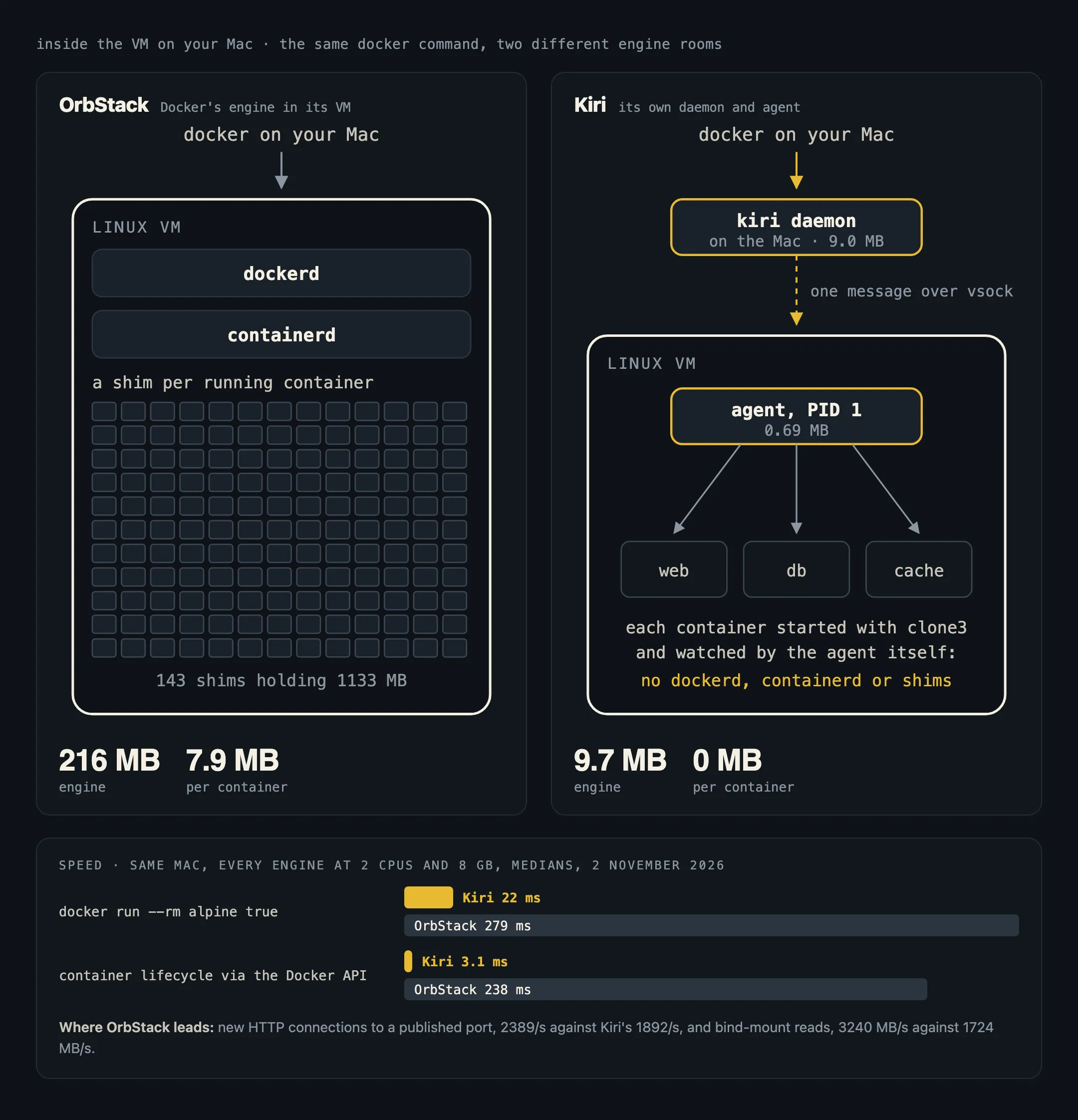
Through the Docker Engine API, Kiri starts and removes a container in 2.55 ms (median of 30 on one Apple silicon Mac, 24 October 2026).
The fuller run was measured on one Mac on 2 November 2026, with every engine set to the same 2 CPUs and 8 GB, driven by the same docker CLI with the same warm images. Medians:
docker run --rm alpine true: 22 ms on Kiri, 279 ms on OrbStack. Most of Kiri’s 22 ms is thedockerCLI starting up.- The container lifecycle through the Docker API (create, start, wait, remove): 3.1 ms on Kiri, 238 ms on OrbStack.
OrbStack ran with Kubernetes off and nothing else inside it. It leads on two rows: it accepts more new HTTP connections to a published port (2389 per second against Kiri’s 1892), and it reads bind mounts faster (3240 MB/s against 1724 MB/s). If your workload is a large source tree mounted into a container, that second row matters more than start time; see why bind mounts are slow on a Mac. Every figure, and how it was measured, is on Kiri’s benchmarks page.
Memory
OrbStack runs Docker’s engine in its VM: dockerd and containerd, plus a shim process for each running container. On the Mac we measured, that was 216 MB for the engine, and 143 shims holding 1133 MB, about 7.9 MB per running container.
Kiri has one small daemon on the Mac (9.0 MB) and one agent in the VM (0.69 MB) that supervises every container itself, so nothing extra runs per container. Its VM also hands memory it isn’t using back to macOS while it runs, and powers off after 60 seconds with no containers running, so an idle Kiri holds no VM memory at all. It boots again in about a tenth of a second (112 ms measured) on the next command. See Memory and sleep.
What OrbStack has that Kiri doesn’t
Choose OrbStack if you rely on any of these:
- Sound, and USB webcams or audio devices, in containers and machines. Kiri passes other USB devices through, in beta.
- Debug Shell, to get tools into minimal containers that have no shell (a Pro feature).
- Full Linux machines. Kiri’s
kiri machineis a long-lived container sharing your user and/Users, not a separate VM. - Editable files from Finder. Kiri’s
~/Kiriis read-only. - Direct IP access to containers from the Mac. With Kiri you reach them through published ports or names.
- A finished product. Kiri is in beta.
What Kiri adds
- Speed at the core: about 2.5 ms to start and remove a container through the API, and a 112 ms cold boot for its VM.
- Sleep when idle: the VM powers off and boots again on the next request in about a tenth of a second.
- The same engine on Linux and Windows. On Linux there’s no VM at all, and on Windows it runs in WSL 2. See Kiri on Linux and Kiri on Windows.
- Open source and free at work, dual-licensed under MIT or Apache-2.0, with no seat count.
Which should you use?
- You want the most complete Mac app, and your company will pay: OrbStack.
- You need sound, webcams, full Linux VMs or a debug shell: OrbStack.
- You want the fastest container starts and the lightest idle footprint: Kiri.
- You work across Mac, Linux and Windows, or need it free at work: Kiri.
- Not sure: run both side by side for a week. Nothing stops you.
If you’re choosing among more tools than these two, our Docker Desktop alternatives post compares OrbStack, Colima, Podman, Rancher Desktop and Kiri, and Kiri vs Docker Desktop covers the other common choice.
Trying both
Kiri uses its own socket, ~/.kiri/run/docker.sock, next to OrbStack’s ~/.orbstack/run/docker.sock, and its own kiri Docker context, so both can run at once. kiri import orbstack copies images, volumes and containers over, reading from OrbStack only; containers arrive stopped.
kiri import orbstack --list   # see what would come over
kiri import orbstack          # copy it
docker context use kiri       # point docker at Kiri
docker context use orbstack # and backThe moving guide covers importing from OrbStack and Docker Desktop step by step.
In short
- Both run Docker containers in a light VM on a Mac and serve the Docker Engine API, so your commands and Compose files work unchanged.
- OrbStack runs Docker’s own engine; Kiri replaces it with a small daemon and an agent, with no shim per container.
- Kiri is faster to start containers (22 ms against 279 ms per
docker run) and lighter (9.7 MB against 216 MB for the engine, and nothing per container). OrbStack accepts more HTTP connections and reads bind mounts faster. - OrbStack has sound, webcams, full Linux machines, editable Finder files, IP access and a debug shell. Kiri runs on Linux and Windows too, and is open source and free at work.