Podman and Kiri are both container engines that run without Docker’s dockerd, and both can stand in for Docker on a developer machine. They get there in different ways. Podman has no long-running engine at all: the podman command does the work, and it can do it as an ordinary user. Kiri has one small daemon and one small agent, and it serves the Docker Engine API directly. Short version: pick Podman for rootless containers, pods and systemd on Linux; pick Kiri for a small Docker-compatible engine that is the same on Mac, Linux and Windows.
New to some of the terms? Our container basics explain them: image layers, registries, runc, and containerd vs Docker.
What Podman is
Podman describes itself as a “daemonless, open source, Linux native tool” for working with OCI containers and images (Podman docs). The project is Apache-2.0 (LICENSE). Its README lists “No manager daemon” among its features and says Podman “can be easily run as a normal user, without requiring a setuid binary” (README).
Daemonless: no engine process in the middle
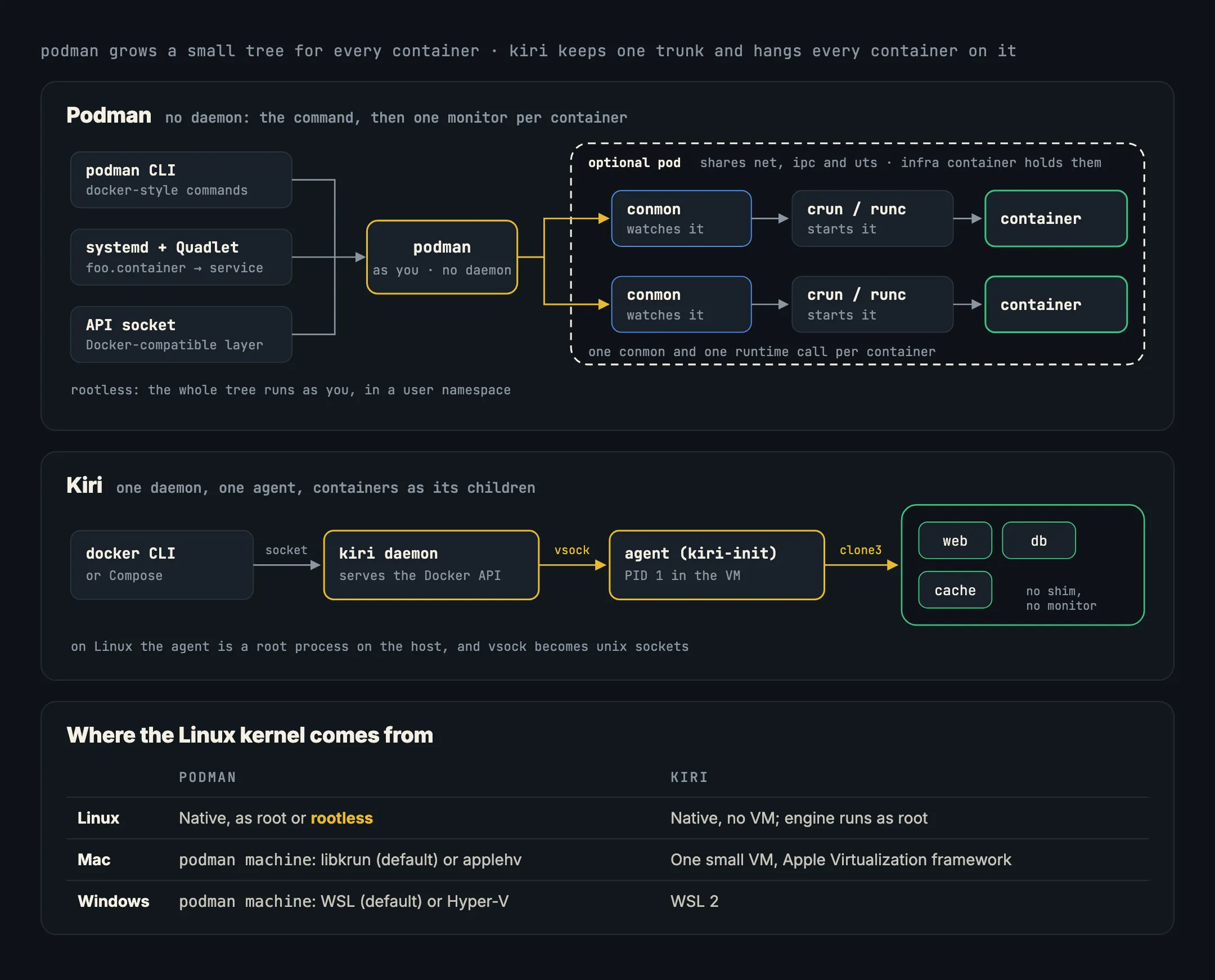
Docker has dockerd running all the time, and every docker command is a request to it. Podman has no such process. When you run podman run, the command itself does the work: it sets up storage and networking, then hands the container to a small monitor called conmon, which launches an OCI runtime such as crun or runc. The conmon README says it “usually double-forks” to detach from whoever started it, keeps the container’s output streams open, writes its logs, and records the exit code (conmon). So there is one conmon per container, and on Linux nothing running when no container is.
That is a real design difference from a daemon. There is no engine to crash, no engine to keep patched, and no single process that owns every container. The cost is that Podman keeps state in files and per-container monitors rather than in one process that knows everything.
Rootless: containers as an ordinary user
Rootless is Podman’s best-known feature. The rootless tutorial says “Rootless Podman is not, and will never be, root”. It maps a range of user IDs from /etc/subuid and /etc/subgid into the container’s user namespace, keeps images under ~/.local/share/containers/storage by default, and uses pasta for networking. Containers never get more privilege than the user who started them. It also lists limits: bind mounts can fail with “permission denied” when a directory is owned by an ID that isn’t mapped, and a container that runs as non-root and mounts volumes may need --userns=keep-id.
If a container escapes, rootless leaves the attacker as you, not as root. That matters on shared servers and CI machines. (A container is still not a sandbox, rootless or not.)
Pods, Quadlet and Kubernetes YAML
Podman manages “pods, containers, container images, and container volumes”. A pod is a group of containers that share network, IPC and UTS namespaces by default, like a Kubernetes pod, with a small infra container holding those namespaces (podman-pod-create). podman kube play recreates containers, pods and volumes from a Kubernetes YAML file (docs).
Quadlet is how Podman fits systemd. You write a unit-style file such as web.container, and a systemd generator turns it into web.service, so systemd starts and restarts the container at boot (podman-systemd.unit). Besides .container, there are .pod, .kube, .network, .volume, .build and .image files. For a service on a Linux server, this is the cleanest part of Podman, and Kiri has nothing like it.
Podman on a Mac or Windows PC
Containers need a Linux kernel, so on a Mac or Windows PC Podman runs a VM: “Podman-managed virtual machine”, as the README puts it. You create it with podman machine init and podman machine start. The podman-machine docs list libkrun (the default; Apple silicon only) or applehv on macOS, and WSL (the default) or Hyper-V on Windows.
Docker compatibility
Podman’s CLI is Docker-shaped, and its API service includes a Docker-compatible layer next to the Podman-native one (podman system service). The service is optional: it starts on demand through systemd socket activation, and by default exits after 5 seconds without a client. On Linux, the rootless socket is $XDG_RUNTIME_DIR/podman/podman.sock, and the rootful one is /run/podman/podman.sock. Point DOCKER_HOST at it and Docker tools talk to Podman.
For Compose, podman compose is “a thin wrapper around an external compose provider”, by default docker-compose or podman-compose (docs). podman-compose is a separate Python implementation of the Compose Spec, licensed GPL-2.0. Its README notes you can also use an unmodified docker-compose through the socket, but then you give up the daemonless model.
Podman Desktop is the GUI: an Apache-2.0 app for Mac, Windows and Linux that manages containers, images and pods, runs Compose files, and connects to Kind and Minikube clusters (Podman Desktop, repository).
What Kiri is
Kiri is an open-source container runtime for Macs (Apple silicon and Intel), Linux and Windows, in beta on all three, licensed MIT or Apache-2.0. Its engine has two parts, both in Rust: a daemon that serves the Docker Engine API (on a Unix socket on Mac and Linux, or through kiri-win.exe on a named pipe on Windows), and an agent that starts every container with one clone3 call. There is no dockerd, containerd, shim or runc. See What is Kiri? and How Kiri starts a container.
So Kiri has a daemon, which Podman by design doesn’t. The difference from Docker is that the daemon is small, and the agent supervises every container itself, so there is no extra process per container.
- Mac: one small Linux VM on Apple’s Virtualization framework. The daemon runs as your user and the agent is PID 1 in the VM. The VM gives memory back and powers off after 60 seconds idle (Memory and sleep).
- Linux: no VM. The same engine runs as the
kiri.servicesystemd unit (Kiri on Linux). - Windows: the Linux build runs in a WSL 2 distro (Kiri on Windows).
- Docker tools: the
dockerCLI, Compose and buildx all work, with builds in a BuildKit that Kiri manages (Compose, Builds). Kiri’sdocker loadalso reads archives made bypodman save(Images).
Side by side
| Podman | Kiri | |
|---|---|---|
| Engine process | None; a conmon monitor per container | One daemon and one agent; no per-container shim or monitor |
| Rootless | Yes, the main design | Not on Linux: the engine runs as root. On a Mac the daemon runs as you, with containers in a VM |
| Pods | Yes, plus podman kube play |
No standalone pods; Compose projects, and Kubernetes pods via a single-node k3s cluster |
| systemd integration | Quadlet units | Runs as one systemd service on Linux; no Quadlet |
| Docker API | Optional, on demand | Always on; it is the interface |
| Compose | podman compose with docker-compose or podman-compose |
docker compose unchanged |
| Mac and Windows | podman machine (libkrun/applehv; WSL/Hyper-V) |
One VM on Mac; WSL 2 on Windows |
| Window / GUI | Podman Desktop | Built-in window (Mac, Windows, full Linux x86-64; none on Linux ARM or kiri-lite); menu bar on Mac, tray icon on Windows |
| Licence | Apache-2.0 | MIT or Apache-2.0 |
| Status | Long established | Beta on every platform |
Speed: we have no Podman numbers
Kiri’s benchmarks page times Kiri against Docker Desktop, OrbStack and Colima on one Mac. Podman was not part of that run, so we have no measured comparison and won’t guess one. For Kiri itself, the page records 22 ms for docker run --rm alpine true and 3.1 ms for the container lifecycle through the API, each on the same 2 CPUs and 8 GB as the other engines (2 November 2026). You can’t read those as a verdict on Podman. If speed decides it for you, time both on your own machine with the same image.
Which should you use?
- You are on Linux and want containers without root: Podman. Kiri’s Linux engine runs as root, and its
kirigroup is root-equivalent (Security). - You want pods, Kubernetes YAML or systemd-managed containers: Podman, with
kube playand Quadlet. - You want no resident engine at all: Podman.
- You want the same Docker-compatible engine on Mac, Linux and Windows, with a built-in window (Mac, Windows and Linux x86-64): Kiri.
- You want the Docker Engine API as the primary interface with no extra socket setup: Kiri serves it by default once started; Podman’s Docker-compatible socket is an optional layer (socket-activated on Linux, or provided by
podman machine). - You need something proven in production: Podman. Kiri is in beta.
Weighing more tools than these two? See Docker Desktop alternatives compared, Kiri vs Docker Desktop and Kiri vs OrbStack.
In short
- Podman has no engine process: the
podmancommand runs containers, with one conmon monitor each. It runs rootless, has pods and Quadlet, and is Apache-2.0. - On a Mac or Windows PC, Podman runs a VM through
podman machine. Everywhere, it offers an optional Docker-compatible API socket and runs Compose through a wrapper. - Kiri is one small daemon and one agent that serve the Docker API all the time, with no shim per container, on Mac, Linux and Windows (in beta on all three).
- Podman is the better fit for rootless and for systemd and Kubernetes-style work on Linux. Kiri suits a small, Docker-compatible engine that is the same on every OS.
- Podman wasn’t in Kiri’s benchmarks, so there is no measured speed comparison.