On Linux, Docker is not a virtual machine and not an app. It is a service on your own kernel. That makes the comparison with Kiri different from the one on a Mac: there is no VM to remove, so what’s left is the engine itself. Docker Engine is four programs working together. Kiri is two. Both answer the same Docker API, so your day-to-day docker commands and Compose files don’t change. This post explains each, puts them side by side, and shows how to run them next to each other. (On a Mac, read Kiri vs Docker Desktop instead.)
New to some of the terms? Our container basics explain them: image layers, registries, runc, and containerd vs Docker.
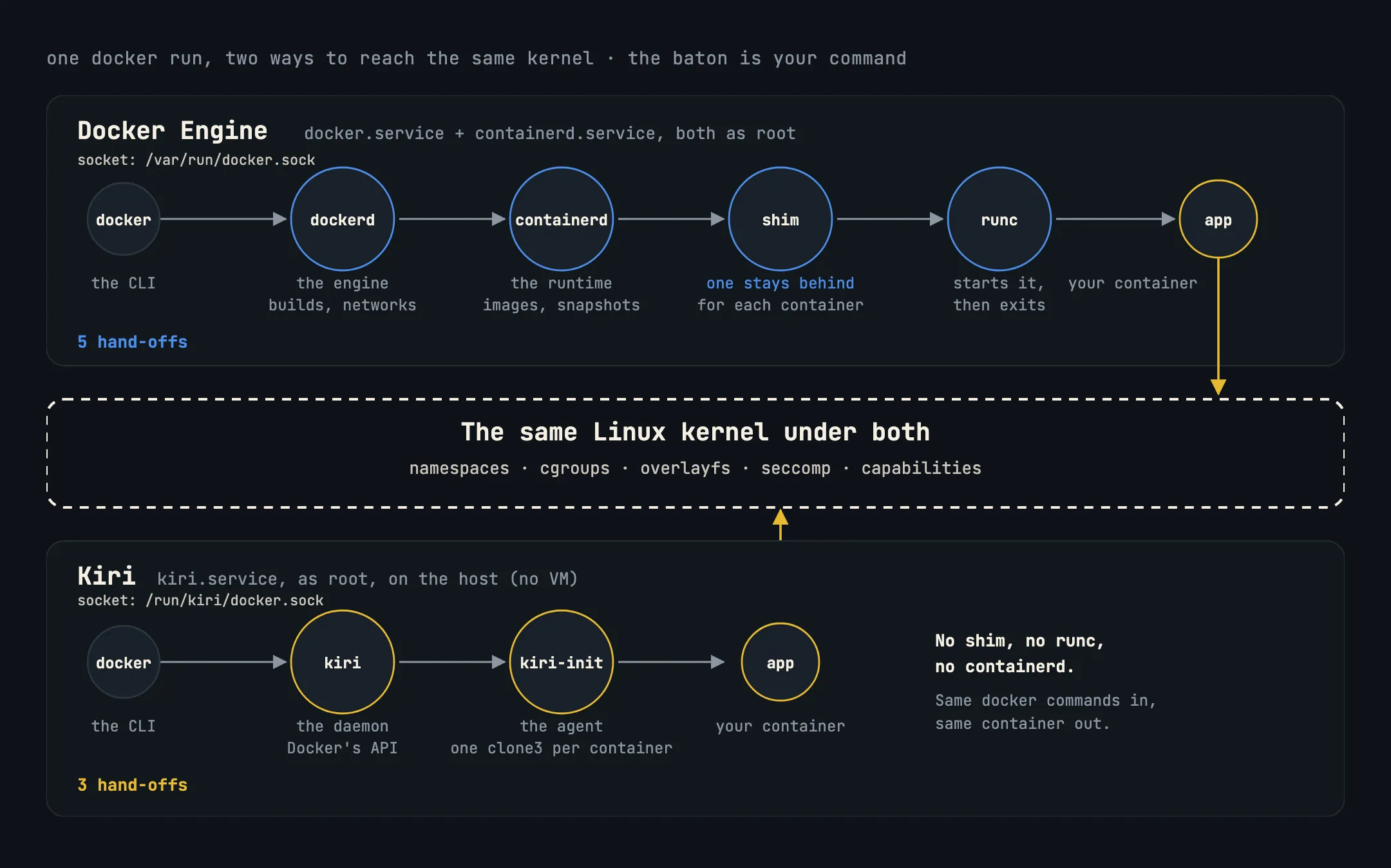
What Docker Engine is on Linux
Docker Engine is the open-source container engine from the Moby project, and on Linux it is the original way to run Docker. You install it with your package manager (install guide) and it runs as a system service. When you type docker run, the docker command sends HTTP requests to a Unix socket, normally /var/run/docker.sock, and four engine programs handle it:
dockerd, the engine daemon. It serves the Docker API, builds images, sets up networks, volumes and ports, and manages image storage on classic graphdriver installs.- containerd, the runtime under it, which manages container lifecycles (and pulls images and stores layers when the containerd image store is enabled).
- A shim, one per container, which stays behind to hold the container’s output and report when it exits.
- runc, which asks the kernel for namespaces and cgroups, starts your process and exits.
containerd vs Docker explains how these fit together.
Two facts about access matter on a shared machine. First, Docker’s own docs say the daemon “always runs as the root user”, and that the docker group “grants root-level privileges” to its members (post-install steps). Second, Docker does have a way out: rootless mode runs both the daemon and the containers without root privileges, inside a user namespace, as a systemd user service with its own rootless context. It needs newuidmap and newgidmap on the host and has its own limits, which that page lists.
And Docker Desktop for Linux?
Docker also offers Docker Desktop for Linux. It is a different thing from Docker Engine: it “runs a Virtual Machine (VM)” and uses its own desktop-linux context, so images and containers from your existing Engine aren’t there. It needs KVM, QEMU 5.2 or later, systemd and at least 4 GB of RAM, and larger companies need a paid subscription (Docker’s page). If you searched for a Docker Desktop alternative on Linux, the plain answer is that you may not need a desktop product at all: Docker Engine and Kiri both run on the host with no VM.
What Kiri is on Linux
Kiri is an open-source container runtime for Macs, Linux and Windows, in beta on all three, under the MIT or Apache-2.0 licence. It has a daemon and an agent, both written in Rust, and no dockerd, containerd, shim or runc. On a Mac they sit on either side of a small VM. On Linux there is no VM: the machine already has a kernel, so the agent (kiri-init) runs as an ordinary root process on the host. Each container is one clone3 call into new namespaces and its own cgroup, with overlayfs, capabilities and a seccomp filter. (Kiri on Linux has the full detail; What is Kiri? covers the design.)
What you get on the machine:
- Packages. A
.debor.rpmfor x86-64 or arm64. The binaries are static, so one.debor.rpmruns across systemd distributions without per-distro builds. Systemd is required. - A service.
kiri.service. Installing a.debor.rpmdirectly leaves it stopped until you set Kiri up (sudo kiri host-access $USER, or Allow access in the window on the full x86-64 package), after which it starts and starts at boot. The install script below starts it for you. Once running, it sits idle until you use it; there is no VM idle sleep on Linux. - A socket.
/run/kiri/docker.sock, mode0660, owned byroot:kiri. Members of thekirigroup can use it withoutsudo. - Two packages.
kiribrings the engine plus thedockerCLI, Compose and buildx;kiri-liteis the engine alone, for machines that already have adocker. You install one or the other. The full x86-64kiripackage also has Kiri’s window (kiri ui);kiri-liteand the arm64 packages are CLI-only. - Data in
/var/lib/kiri(images, containers, volumes) and/var/lib/kiri-daemon.
Install it with the script, which picks the right package and checks it against the release’s SHA256SUMS-linux:
curl -fsSL https://runkiri.com/install.sh | bash
sudo usermod -aG kiri $USER      # sign out and in again
docker run --rm hello-world
Kiri’s daemon runs as root, like Docker’s. Kiri has no rootless mode, so if rootless is a requirement, use Docker Engine. And the kiri group is as powerful as the docker group: membership is root-equivalent, so treat it the same way.
Side by side
| Docker Engine | Kiri | |
|---|---|---|
| Programs in the path | dockerd, containerd, shim, runc |
kiri daemon, kiri-init |
| Runs as | System service, root (or rootless user service) | kiri.service, root |
| Socket | /var/run/docker.sock, docker group |
/run/kiri/docker.sock, kiri group |
| Rootless mode | Yes | No (runs as root) |
| VM | None | None |
docker CLI, Compose, buildx |
Yes | Yes (full package brings them) |
| Kernel features | Namespaces, cgroups, overlayfs, seccomp | Namespaces, cgroups, overlayfs, seccomp |
| Kubernetes | Not included | Single-node k3s, kiri k8s start |
| Public URL for a local port | No | kiri share PORT |
| Packages | apt and dnf repositories | .deb and .rpm downloads; no repository yet |
| Maturity | Years in production | Beta |
What carries over
- The CLI. Kiri speaks the Docker Engine API, so day-to-day commands like
docker run,docker psanddocker buildwork unchanged. Our guide to using Docker commands, images and Compose with Kiri goes through it. - Compose and buildx. The full package brings both, and
kiri composeis Docker’s Compose aimed at Kiri. - Images. Kiri pulls the same images from the same registries. It does not share Docker’s image store, though: an image Docker pulled is not in
/var/lib/kiri, so the first run pulls it again. (kiri importis Mac only.) - The same kernel features. Docker and Kiri both rely on namespaces, cgroups, overlayfs, capabilities and seccomp. Kiri’s default seccomp filter is modelled on Docker’s profile and blocks what Docker’s default blocks.
What is different
- Fewer processes. Kiri has no containerd and no shim per container; the agent supervises the containers itself. This is the main design difference.
- Start-up. Installing Kiri’s
.debor.rpmdirectly leaveskiri.servicestopped until you grant access (the install script starts it for you); once set up, it starts at boot. Docker Engine on Debian and Ubuntu starts on boot by default (Docker docs). - Upgrades. Docker comes from apt or dnf repositories. Kiri has none yet, so you download the new package or run the install script again; an upgrade restarts a running engine, which stops its containers (those with a restart policy start again).
- Extras.
kiri sharegives a local port a public HTTPS address, andkiri k8s startstarts a single-node Kubernetes cluster. - API coverage. Kiri supports
bridge,host,none,container:<name>and custom bridge networks, and bind, volume andtmpfsmounts. Other network drivers, other--mounttypes and--gpusare refused, and any Engine API call Kiri doesn’t implement answers with “Kiri does not support … yet” (migration notes). - Age. Docker Engine is the reference. Kiri is in beta, and its x86-64 Linux packages are tested in CI on Ubuntu 24.04 and Fedora 44.
Speed
We have no Linux numbers to show you. Every Kiri speed figure we’ve published was measured on a Mac, where the comparison includes the cost of a VM, and it would be wrong to carry them over. Kiri’s benchmarks page lists what was measured and when. On Linux, the honest advice is the same as for any engine: time your own workload.
Which should you use?
- You need rootless mode, apt- or dnf-managed upgrades, or the engine most tools were tested against: Docker Engine.
- You run production services: Docker Engine. Kiri is in beta.
- You want fewer moving parts, and Kubernetes or
kiri sharein the same install: try Kiri. - You work on a Mac or Windows PC and a Linux box and want one engine on all three: Kiri.
- You came looking for a Docker Desktop replacement on Linux: you probably want an engine, not a desktop product. Either of these works.
For other tools in this space, see Docker Desktop alternatives compared.
Trying Kiri next to Docker
Docker keeps /var/run/docker.sock; Kiri has /run/kiri/docker.sock. They don’t share a socket, and Kiri doesn’t take anything Docker owns, so they can be installed together. The cleanest way is kiri-lite, which leaves your own docker alone:
curl -fsSL https://runkiri.com/install.sh | KIRI_LITE=1 bash
sudo usermod -aG kiri $USER                  # sign in again
docker context create kiri --docker host=unix:///run/kiri/docker.sock
docker context use kiri                      # docker now talks to Kiri
docker context use default                   # and back to Docker Engine
With the full package, Kiri offers its docker through update-alternatives only if /usr/bin/docker is missing or already an alternatives link; otherwise yours stays and Kiri’s is at /usr/libexec/kiri/docker. Tools that ignore contexts, such as Testcontainers and docker-py, read /var/run/docker.sock. Kiri links that path to its socket only when nothing is there, and if Docker’s engine starts later it takes the path back. While Docker owns /var/run/docker.sock, point those tools at Kiri with DOCKER_HOST=unix:///run/kiri/docker.sock. See where docker finds Kiri.
To remove Kiri, sudo apt remove kiri-lite (or kiri) keeps your images, containers and volumes; apt purge deletes them (along with /var/lib/kiri-daemon and the kiri group). On Fedora, sudo dnf remove kiri also keeps the data in /var/lib/kiri and /var/lib/kiri-daemon.
In short
- On Linux, Docker Engine is
dockerd, containerd, a shim per container and runc, as a root system service. Docker Desktop for Linux is separate and runs the engine inside a VM. - Kiri is one daemon and one agent on the host’s kernel, with no VM, as
kiri.service. It serves the Docker API on/run/kiri/docker.sock. - Your day-to-day
dockercommands and Compose files carry over, and you can pull the same images, though image stores are separate. - Docker has rootless mode and years of use. Kiri is in beta, runs as root, and has no apt or dnf repository yet.
- Try Kiri with
kiri-liteand a context, and switch back withdocker context use default.