Colima and Kiri are both free, open-source ways to run Docker containers on a Mac without Docker Desktop. Both serve the Docker Engine API, so your docker commands and Compose files work with either one. They get there differently. Colima starts a Linux VM with Docker’s own engine inside it. Kiri replaces that engine with a small daemon and an agent of its own. Colima is established, runs from the terminal, supports containerd and Incus, and reads bind mounts about three times faster in our test. Kiri is in beta, has a window, and starts containers much faster. Below: Colima first, then Kiri, then both side by side with the benchmark numbers.
New to some of the terms? Our container basics explain them: registries, runc, and containerd vs Docker.
What Colima is
Colima describes itself as “container runtimes on macOS (and Linux) with minimal setup” (README). The name stands for Containers on Lima, and Lima is the tool that starts and manages the Linux VM underneath. Colima is a command-line tool: there is no app window.
How it works, from its README and FAQ:
- A VM with a runtime inside.
colima startcreates a Linux VM and starts a container runtime in it. The runtime is Docker by default.colima start --runtime containerduses containerd instead, and you reach it withcolima nerdctl. There is also an Incus runtime for containers and VMs. - VM types.
--vm-type vzuses Apple’s Virtualization framework. QEMU is the other long-standing option, and--vm-type krunkitis for GPU-accelerated containers (the README says it needs krunkit installed). - Rosetta.
colima start --vm-type=vz --vz-rosettaruns amd64 images on Apple silicon through Rosetta 2. The README says it needs macOS 13 or later. - Kubernetes.
colima start --kubernetesadds a k3s cluster. You needkubectlyourself. - Size of the VM. The default is 2 CPUs, 2 GiB of memory and 100 GiB of disk. Change it with
--cpu,--memoryand--disk, or edit the config withcolima start --edit. Stop and start it to change CPUs or memory, or to grow the disk. - Profiles. Each profile is its own VM, with its own config at
~/.colima/<profile>/colima.yaml. - Licence. MIT (LICENSE). Free for any use, work included.
brew install colima docker
colima start --vm-type vz --vz-rosetta --cpu 4 --memory 8   # drop --vz-rosetta on Intel Macs
docker run --rm alpine echo hello
The docker client is not bundled; you install it with Homebrew. After colima start it works “with no additional setup”, because Colima registers a Docker context for it. The latest release at the time of writing is v0.10.3 (releases).
One caveat from Colima’s own FAQ: host folders outside /Users/<you> (and /tmp/colima) aren’t visible to containers until you add them to the mounts section of colima.yaml (FAQ).
What Kiri is
Kiri is an open-source container runtime for Macs (Apple silicon and Intel), Linux and Windows, in beta on all three. It is dual-licensed under MIT or Apache-2.0. The Mac version needs macOS 14 or later. On a Mac it also runs one small Linux VM, but it doesn’t put Docker’s engine in it. It has two programs of its own, both written in Rust:
- a daemon on the Mac that serves the Docker Engine API on
~/.kiri/run/docker.sock; and - an agent that is PID 1 inside the VM and starts each container itself, with one
clone3system call.
There is no dockerd, containerd, shim or runc in the path. The app brings the docker CLI, Compose and buildx, and has a window as well as a command line. Kiri also runs a single-node k3s cluster (kiri k8s start; install kubectl yourself) and runs amd64 images on Apple silicon. The design is explained in What is Kiri?.
Side by side
| Colima | Kiri | |
|---|---|---|
| What runs the containers | Docker, containerd or Incus, inside a Lima VM | Kiri’s agent in a small VM; no Docker engine |
Docker Engine API, docker CLI, Compose |
Yes; you install the CLIs | Yes; the app brings them |
| VM | Lima, with vz or QEMU (krunkit for GPU) | One small VM using Apple’s Virtualization framework; on Linux no VM, on Windows WSL 2 |
| amd64 images on Apple silicon | Yes, --vz-rosetta |
Yes, through Rosetta |
| Kubernetes | k3s with --kubernetes |
Single-node k3s with kiri k8s start |
| VM size | Default 2 CPUs, 2 GiB, 100 GiB disk | Default 2 CPUs, memory cap half the Mac’s (2 to 8 GB), sparse disk up to 64 GiB; the VM powers off after 60 s with nothing running |
| Window or menu bar | No, command line only | Yes |
| Other runtimes | containerd, Incus | No |
| Platforms | Mac (Intel and Apple silicon), Linux | Mac, Linux, Windows (beta) |
| Licence | MIT | MIT or Apache-2.0 |
| Maturity | Established, v0.10.3 | Beta |
Speed: the benchmarks
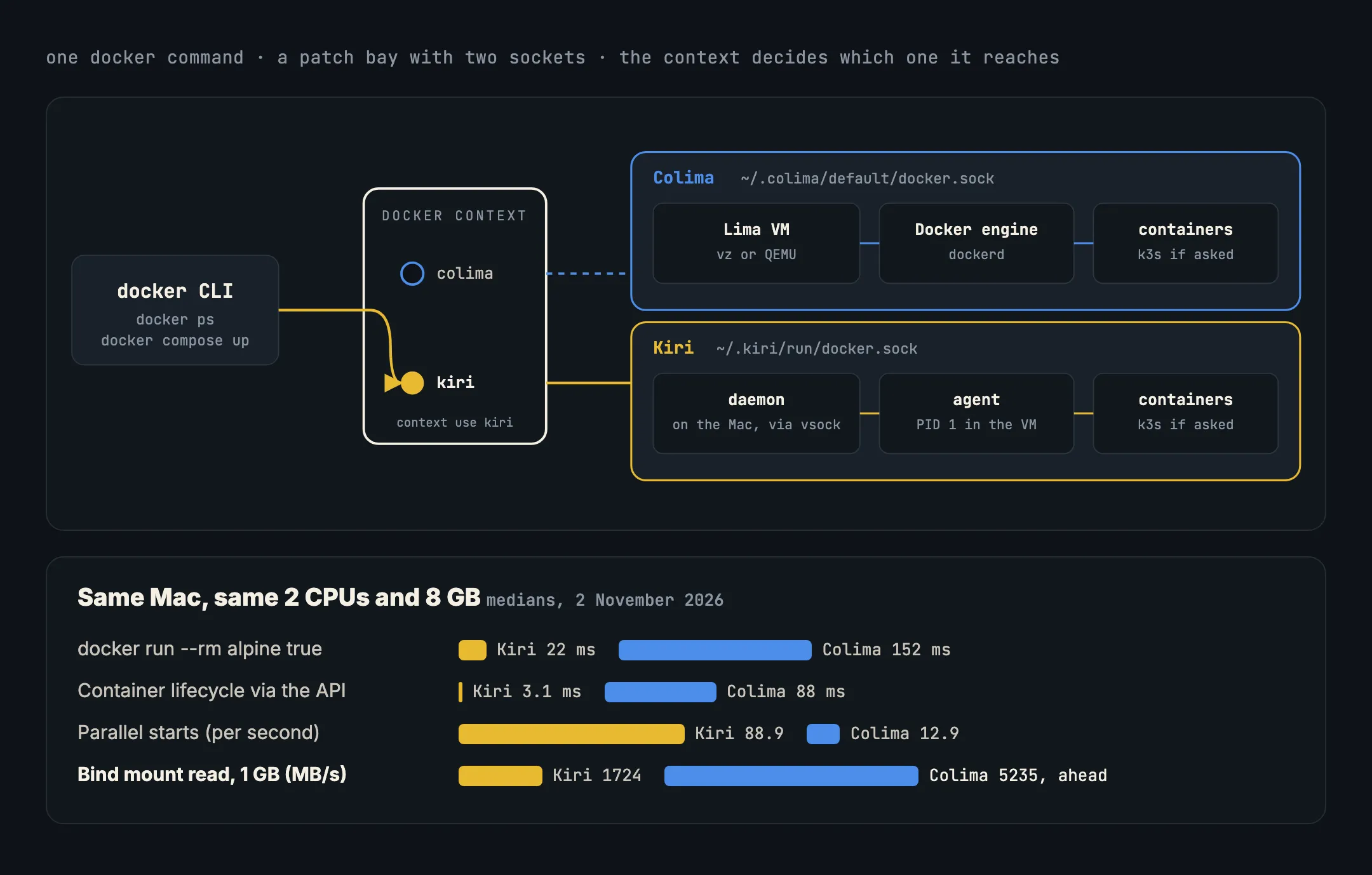
Kiri’s benchmarks page holds one full run of four engines, measured on 2 November 2026 on one Apple M3 Max Mac with 64 GB. Every engine was set to 2 CPUs and 8 GB and checked with docker info: Kiri 0.1.13, Docker Desktop 4.90.0, OrbStack 2.2.4, and Colima 0.10.3 with vz and virtiofs. All used the same docker CLI and the same warm images, with 30 samples after 3 warm-ups for times and 5 for transfers. Medians, Colima and Kiri only:
| Measurement | Colima | Kiri |
|---|---|---|
docker run --rm alpine true |
152 ms | 22 ms |
docker exec … true |
36.8 ms | 15.7 ms |
| Container lifecycle through the Docker API | 88 ms | 3.1 ms |
| Exec through the Docker API | 20.8 ms | 0.3 ms |
| Pull, image already present | 2893 ms | 321 ms |
| Parallel starts | 12.9 /s | 88.9 /s |
| 20 containers started | 4.1 /s | 19.7 /s |
| 200 MB container to host (stdout) | 63 MB/s | 223 MB/s |
| Bind mount read, 1 GB | 5235 MB/s | 1724 MB/s |
| New HTTP connections to a published port | 1484 /s | 1892 /s |
Read the bind-mount row first if you work on a large source tree. Colima reads bind mounts about three times faster than Kiri in this run, and it was the fastest of all four engines on that row. Colima’s run used virtiofs (Kiri uses virtiofs for Mac bind mounts too). Start times and parallel starts are where Kiri leads, because it has no Docker engine to go through. Most of Kiri’s 22 ms is the docker CLI itself starting up; the full container lifecycle through the API is 3.1 ms.
Two limits on these numbers. They come from Kiri’s own benchmark, one machine, one day, so rerun them on your own Mac. The benchmarks page shows how; note that kiri bench itself looks for Kiri, OrbStack and Docker Desktop, not Colima. And we didn’t measure Colima’s memory use or idle footprint, so we make no claim about it. See why bind mounts are slow on a Mac for the broader picture.
Which should you use?
- You want a free, scriptable engine you control from the terminal, and your work depends on fast bind-mount reads: Colima. Its bind-mount reads are the fastest we measured.
- You want containerd, nerdctl or Incus instead of Docker’s engine: Colima.
- You want a tool that has been around longer: Colima. Kiri is in beta.
- You want faster container starts, a window, and the same engine on Linux and Windows: Kiri.
- You start many short-lived containers, as in tests and CI-style loops: Kiri, going by the lifecycle and parallel-start rows.
- Not sure: run both for a week. They use separate sockets and contexts; just watch the default context and shared ports.
If you’re weighing more than these two, see Docker Desktop alternatives compared, which covers OrbStack, Podman and Rancher Desktop as well, and Kiri vs OrbStack.
Running both side by side
Each tool has its own socket and its own Docker context, so both can run at once: Colima at ~/.colima/default/docker.sock, Kiri at ~/.kiri/run/docker.sock. The docker command talks to whichever context is current.
docker context ls            # the current one has a *
docker context use colima    # docker now reaches Colima
docker context use kiri      # and now Kiri
docker --context kiri ps     # one command, without switching
kiri ps                      # always Kiri, whatever the context
Colima’s FAQ says it “makes itself the default Docker context on startup”, so after colima start your docker may point at Colima even if you were using Kiri. Check with docker context ls. Some apps ignore Docker contexts and look only at /var/run/docker.sock; the Colima FAQ lists ways to fix that, such as setting the socket path in the app.
To bring your images and volumes into Kiri, the moving guide covers kiri import and the context switch step by step. It names Docker Desktop and OrbStack as sources; for Colima, pull your images again, pipe local ones with docker --context colima save <image> | docker --context kiri load, or push them to a registry and pull them from Kiri. Volumes have to be copied by hand.
In short
- Colima runs Docker (or containerd, or Incus) in a Lima VM, from the command line, under an MIT licence. Its VM defaults to 2 CPUs and 2 GiB, and it supports vz, Rosetta and k3s.
- Kiri replaces Docker’s engine with a daemon and an agent, has a window, and runs on Mac, Linux and Windows. It is in beta.
- In Kiri’s 2 November run, Kiri was ahead of Colima on nine of ten rows. Colima led bind-mount reads by about three times (5235 against 1724 MB/s).
- They run side by side. Switch with
docker context use, and watch for Colima setting itself as the default context when it starts.