Kiri is a Docker-compatible container engine written in Rust. It serves the Docker Engine API, so docker, Compose and buildx work with it, but underneath there is no dockerd, no containerd, no shim and no runc. On Mac and Linux, two Rust programs do the whole job: a daemon and an agent (on Windows, a small host program, kiri-win.exe, relays the named pipe into WSL 2, where the same engine runs). This post shows how the code is laid out, why the design has one process per role, and what Rust does and does not give a container engine.
New to some of the terms? Our container basics explain them: image layers, registries, runc, and containerd vs Docker.
What “written in Rust” means here
It means the engine’s own code, the part that answers docker run, is Rust, with static binaries on Linux and inside the VM. Kiri is a Cargo workspace of seven crates plus a build-task helper (xtask). Kiri is open source, and the layout below comes from the workspace’s Cargo.toml files.
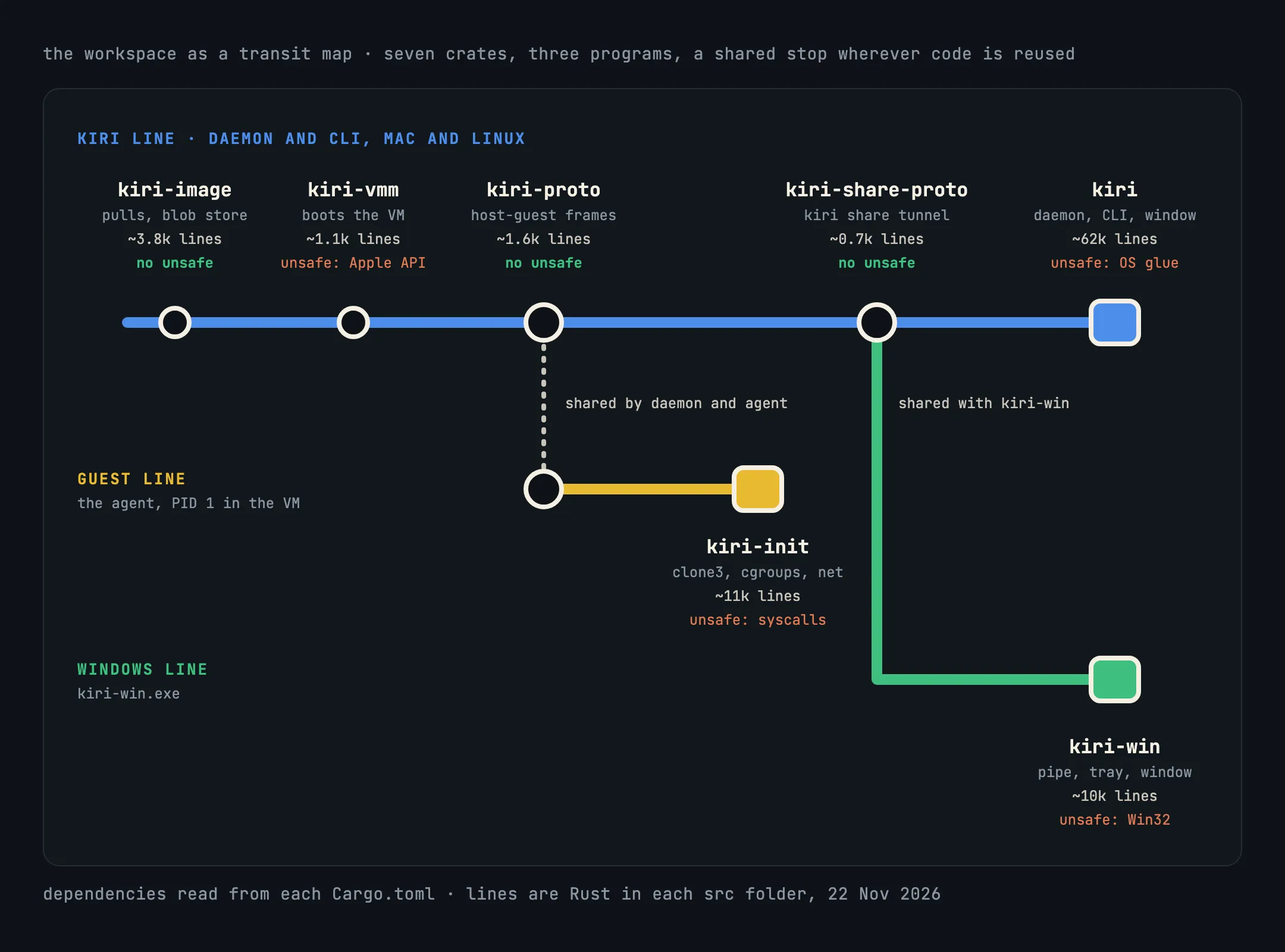
The crates, and what each one does:
kiriis the big one: the daemon, thekiricommand and the window. One binary serves all three (the window is in the x86-64 full Linux package and on Mac;kiri-liteand the Linux ARM packages are command line only).kiri daemonstarts the engine. It serves the Docker Engine API on~/.kiri/run/docker.sockon a Mac and/run/kiri/docker.sockon Linux, keeps container records, pulls and pushes images, and owns the VM on a Mac.kiri-initis the agent. On a Mac it is PID 1 inside the Linux VM; on Linux it runs as an ordinary root process on the host. Either way it starts every container itself.kiri-protois the wire protocol between the daemon and the agent: each frame is a length, a kind and a payload. It isno_stdand forbids unsafe code.kiri-imagehandles OCI image references, registry pulls and the content-addressed blob store on the host.kiri-vmmboots the guest. On a Mac it drives Apple’s Virtualization framework; on Linux it runs the agent as an ordinary root process beside the daemon, because the host’s own kernel runs the containers.kiri-share-protois the protocol betweenkiri shareand the Kiri Share edge.kiri-winis the Windows side: it serves the Docker API on a named pipe and carries it into WSL 2. It is also the Windows window and tray icon.
The numbers in the map are Rust source lines in each crate’s src folder on 22 November 2026, so treat them as a rough sense of scale, not a quality measure.
The two programs that matter
The daemon is the part the docker CLI talks to. It speaks HTTP over a Unix socket (on Windows, kiri-win.exe puts a named pipe in front of it), and it decides what a request means: create a record, pull an image, start a container.
The agent, kiri-init, is where containers actually start. Kiri’s docs describe it as a small static Rust binary with one single-threaded poll() loop. That loop serves the daemon, reaps child processes, forwards container output, relays ports, answers DNS and gets the VM’s address by DHCP. To start a container it makes one clone3 call that creates the child directly inside new namespaces and the container’s cgroup, then the child mounts overlayfs, calls pivot_root, drops capabilities and installs a seccomp filter. The container’s network is set up with hand-written rtnetlink and nf_tables messages. See How Kiri starts a container for the full step-by-step sequence.
On a Mac, the daemon and agent talk over vsock, a socket that goes straight between the Mac and its VM (about 31 µs at the median). On Linux there is no VM, and the same messages travel over Unix sockets.
Why one process per role
A conventional Docker install splits the job across several programs. dockerd takes the API request and hands it to containerd, containerd starts a shim for each container, and the shim runs runc, which builds the container and exits. We explain that chain in containerd vs Docker. Each program has a reason to exist, and each has a cost: another process to start, another interface to cross, another thing in memory.
Kiri collapses that into two roles:
- The daemon owns the API and the records. No separate
dockerdor containerd sits in front of it. - The agent owns the containers. Every container process is a direct child of the agent, so no shim is needed to watch it, and no extra process is left running per container.
Here is what Kiri’s design costs, measured. Through the Docker Engine API, Kiri starts and removes a container in 2.55 ms (median of 30 after 5 warm-ups on one Apple silicon Mac, 24 October 2026). Through the docker CLI, docker run --rm alpine true takes 22 ms in the fuller 2 November run, because most of that is the CLI starting up. On the memory side, the engine processes measure 9.0 MB for the daemon plus 0.69 MB for the agent, with no extra process per running container. On a Mac, Apple’s Virtualization framework helper adds 69 MB while the VM is awake. The full tables, and how they were measured, are on Kiri’s benchmarks page.
Those numbers come from the design: fewer processes, one message instead of a chain of calls. They do not come from the language: the runc and containerd that Kiri skips are written in Go, and what Kiri changed is the number of steps, not the syntax.
What Rust buys a container engine
Rust’s own site says the language has “no runtime or garbage collector”, and that its type system and ownership model “guarantee memory-safety and thread-safety” (rust-lang.org). For this engine, that translates into four things, each with a limit.
Memory safety, in the safe parts. A container engine parses untrusted input all day: image manifests and layers from a registry, HTTP requests, frames from a peer. In safe Rust a bug in that parsing can’t corrupt memory the way an out-of-bounds write can in C. The limit: Kiri has unsafe code, as any program that makes raw system calls must. Three crates, kiri-proto, kiri-image and kiri-share-proto, carry #![forbid(unsafe_code)]. The agent doesn’t: it makes clone3, mount and pivot_root calls through libc, and has over 200 unsafe blocks. The workspace denies unsafe_op_in_unsafe_fn, so each unsafe operation sits in its own marked block. Rust narrows where memory bugs can live. It doesn’t remove them.
No garbage collector. The agent runs one poll() loop that serves everything (and is PID 1 inside the Mac VM), so a pause in it is a pause for every container’s I/O. With no collector there is no collection pause to plan around. Memory use is also easy to read: the agent is 0.69 MB resident.
Static binaries. On Linux the kiri and kiri-init binaries are static, so one package runs on every systemd distribution without distro-specific library dependencies (the full kiri package also bundles docker, Compose and buildx). The agent has four dependencies beyond the protocol crate: flate2, libc, ruzstd and tar. That is a small surface to review. On a Mac, the agent sits directly on Kiri’s own roughly 10 MB Linux kernel, with no distro userspace beside it. Go can also build static binaries, so this is a convenience of the toolchain, not something only Rust can do.
One language across three platforms. The same engine runs on a Mac, on Linux and on Windows, in beta on all three, and the protocol crates are shared code, not three ports kept in step by hand. Go and other compiled languages offer the same reach, and on a Mac Kiri still pairs Rust with Apple’s Virtualization framework and a Linux kernel.
The release profile also sets panic = "abort", fat link-time optimisation and a single codegen unit. That favours small, fast binaries over fast builds.
What Rust does not buy
- Speed on its own. Look at another Rust container runtime. youki, a CNCF sandbox runc alternative written in Rust, reports in its own README (one Ubuntu 22.04 machine) a mean of 111.5 ms to create, start and delete a container, against 224.6 ms for runc and 47.3 ms for crun. crun is written in C (crun README), and its README says it is faster than runc with a much lower memory footprint. So a C runtime beat the Rust one there. Speed comes from what the code does.
- A security boundary. Rust protects the engine’s own memory. It doesn’t isolate containers from each other; namespaces, cgroups, capabilities and seccomp do that, as on any Linux host. See a container is not a sandbox.
- A finished product. Kiri is in beta. The language is a choice of tool, and the polish of a mature engine still has to be earned.
How Kiri compares to youki
Kiri isn’t the first container software in Rust. youki implements the OCI runtime spec, “similar to runc”, and swaps in where runc does. That’s a different slot from Kiri’s: youki is only the low-level runtime and still needs a higher layer such as containerd or Podman above it, while Kiri replaces the whole stack from the API down. If you want a Rust runc inside an otherwise ordinary Docker or Kubernetes setup, youki is the project to look at. If you want a Docker-compatible engine with no runc at all, that’s what Kiri is for. Kiri’s code is open source (MIT or Apache-2.0; the guest Linux kernel is GPL-2.0), and you can read it directly.
Try it
On a Mac, install Kiri and open the app to start the daemon (on Linux the socket is /run/kiri/docker.sock):
docker context ls                             # "kiri" points at ~/.kiri/run/docker.sock
docker --context kiri run --rm alpine true    # or: kiri run --rm alpine true
The kiri context sends the request to Kiri’s daemon, which sends one Run frame for the agent to start with clone3. Inside the VM there is only the agent and your containers’ processes, with nothing from containerd or runc between them.
In short
- Kiri’s engine is Rust: a daemon that serves the Docker Engine API and an agent (PID 1 inside the Mac VM, or a root process on Linux) that starts every container with
clone3. - The workspace has seven crates:
kiri,kiri-init,kiri-proto,kiri-image,kiri-vmm,kiri-share-protoandkiri-win. - One process per role replaces
dockerd, containerd, shims and runc. That design, not the language, is where the 2.55 ms start and 9.7 MB engine come from. - Rust gives memory safety in safe code, no garbage collector and static binaries. It doesn’t remove
unsafe, isolate containers, or make a program fast by itself. - For a Rust runc inside a normal stack, see youki. For the whole engine in Rust, see What is Kiri? and Kiri vs OrbStack.