Apple now publishes its own way to run Linux containers on a Mac: an open-source command-line tool called container. If you searched for “Docker Desktop vs Apple container”, you probably want to know whether it can replace Docker on your Mac. The short answer: it runs containers well, but it is not a drop-in Docker replacement, because it doesn’t speak the Docker Engine API that docker and Compose rely on.
New to some of the terms? Our container basics explain them: image layers, registries, runc, and containerd vs Docker.
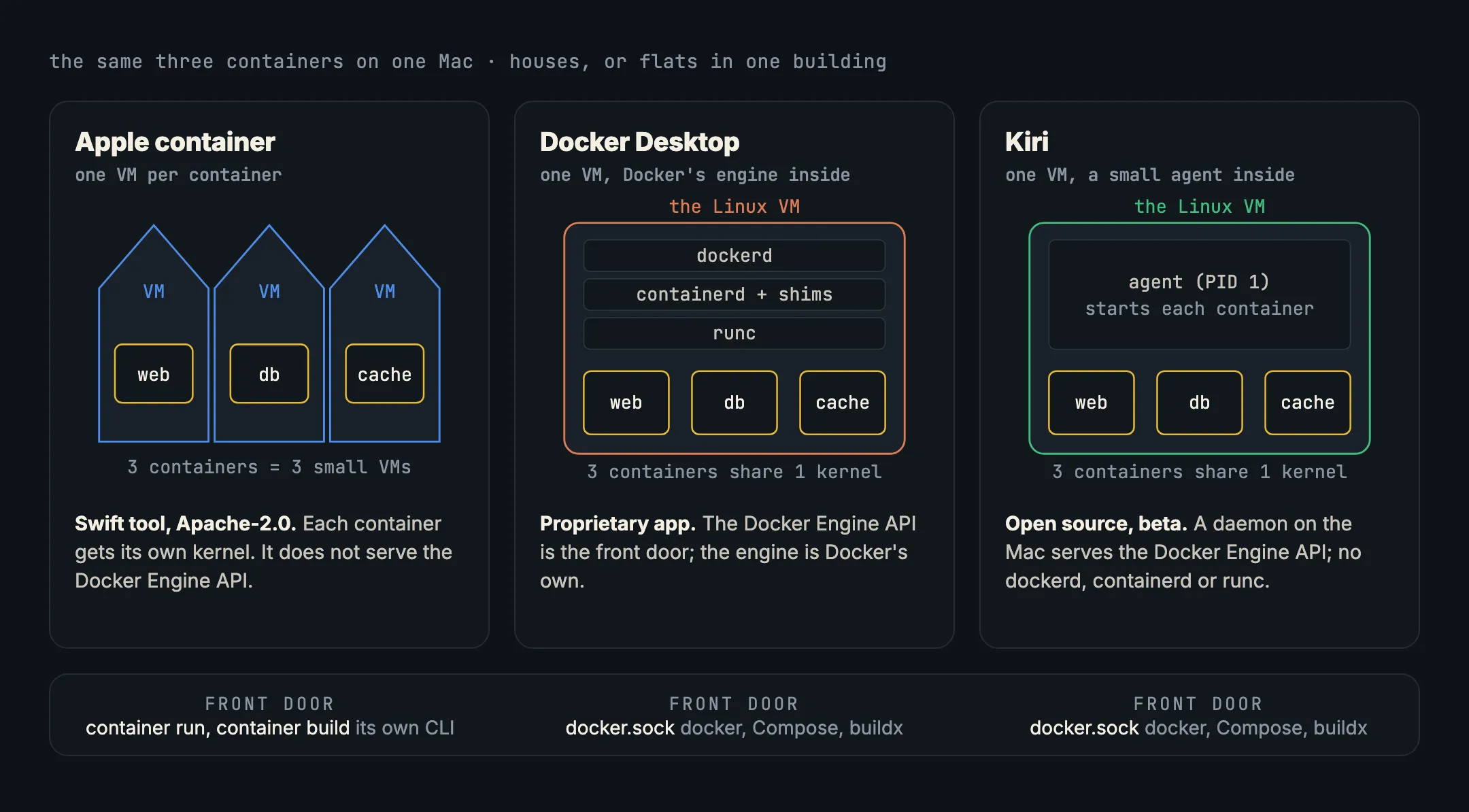
What Apple’s container tool is
container is, in the project’s words, “a tool that you can use to create and run Linux containers as lightweight virtual machines on your Mac.” It is written in Swift and uses Apple’s Containerization Swift package for low-level container, image and process management. Both projects are under the Apache-2.0 licence.
The facts that matter before you try it:
- Apple silicon only. The README says: “You need a Mac with Apple silicon to run
container.” - macOS 26 or later. It is “designed to run on macOS 26 or later”. The technical overview says macOS 15 can run it but isn’t recommended, and that issues which can’t be reproduced on macOS 26 won’t be fixed for macOS 15.
- Active development. The latest release on GitHub when we checked was 1.7.1, published 6 November 2026. The README says the project is “under active development”.
- OCI images. It pulls and pushes standard images from standard registries, and
container buildreads aDockerfile. - Its own commands. You install a signed package from the releases page, start the service with
container system start, then runcontainer run --rm alpine echo hello.
The design choice that sets it apart is in the technical overview: it runs “a lightweight VM for each container”, not one shared Linux VM for all of them. That gives each container its own kernel and VM-level isolation, and lets you mount only the host data each container needs. The trade-off, which the same page states, is memory: the memory a container’s Linux guest frees is not returned to macOS, because the Virtualization framework supports memory ballooning only partially, so memory-hungry containers may need an occasional restart.
Networking
On macOS 26 and later you get the full set: container network commands, multiple networks, and container-to-container communication. On macOS 15, containers can’t talk to each other and --network returns an error (technical overview). Publishing a port works as you’d expect: container run -p 8080:80 takes [host-ip:]host-port:container-port[/protocol] (command reference).
Docker API and Compose
The command reference documents no Compose command and never mentions Docker itself, only the Dockerfile format. The request to expose the Docker Engine API, issue 66, is closed as “not planned”. The Compose request, issue 230, is closed too, and Apple’s tool still has no Compose command. A third-party project, Container-Compose, exists for it.
There are community bridges. Socktainer provides a Docker-compatible socket on top of container; check its compatibility notes and test your own workflow before you rely on it. These are separate projects, not part of Apple’s tool.
What that means in practice: docker run, docker compose up, Testcontainers, IDE plugins and scripts that expect a Docker socket don’t work against container out of the box. Your Dockerfiles and images do.
What Docker Desktop is
Docker Desktop is Docker, Inc.’s app for running containers on Mac, Windows (Linux or Windows containers) and Linux. It runs one Linux VM and puts Docker’s own engine inside: dockerd, containerd, a shim for every running container and runc. The docker CLI talks to it through a socket, which is why Compose, buildx and most tooling work without changes. Extensions come with it, and paid tiers add fleet administration.
It’s proprietary, and larger companies need a paid subscription: free for personal use, education, non-commercial open source and companies with fewer than 250 employees and less than $10 million in annual revenue; see Docker Desktop licence in 2026. We compare it in detail in Kiri vs Docker Desktop.
What Kiri is
Kiri is an open-source container runtime for Macs (Apple silicon and Intel), Linux and Windows, in beta on all three. On a Mac it runs one small Linux VM with Apple’s Virtualization framework, like Docker Desktop, but without Docker’s engine. Two programs of its own, written in Rust, do the work: a daemon on the Mac that serves the Docker Engine API on ~/.kiri/run/docker.sock, and an agent that is PID 1 in the VM and starts each container itself. There is no dockerd, containerd, shim or runc. The app brings the docker CLI, Compose and buildx, and runs on macOS 14 or later. Kiri is dual-licensed under MIT or Apache-2.0. See What is Kiri? for the design.
So Kiri sits between the other two: it shares a VM across containers like Docker Desktop, and it is open source and small like Apple’s tool.
Side by side
Apple container |
Docker Desktop | Kiri | |
|---|---|---|---|
| VM layout | One VM per container | One shared VM | One shared VM |
| Inside the VM | Each container’s own kernel | Docker’s engine: dockerd, containerd, shims, runc | A small agent, no dockerd or runc |
| Docker Engine API | No (issue closed “not planned”) | Yes | Yes |
docker CLI and Compose |
No, own container CLI; Compose only through third-party tools |
Yes | Yes |
| Mac requirements | Apple silicon, macOS 26 or later | See Docker’s docs | Apple silicon or Intel, macOS 14 or later |
| Other platforms | Mac only | Windows, Linux | Windows, Linux |
| Licence | Apache-2.0 | Proprietary; paid for larger companies | MIT or Apache-2.0, free |
| Status | Active development, 1.7.1 (6 Nov 2026) | Mature product | Beta |
| Port publishing | -p |
-p |
-p |
| Container-to-container networking | Full on macOS 26; none on macOS 15 | Yes | Yes, user networks with DNS by name |
| Memory back to macOS | Not returned for a running container, per its docs | Per Docker’s docs | Partly returned by a balloon while running; VM powers off after 60 s idle to release the rest |
| Kubernetes | Experimental container cluster subcommand |
Built-in, single or multi-node | Single-node k3s |
Where we left a cell as “see Docker’s docs”, we haven’t verified the current figure. Kiri’s rows come from its documentation.
The differences that matter
Isolation versus density. One VM per container is a stronger boundary: a kernel bug exploited inside one container reaches that container’s VM, not your other containers. If you run untrusted code, that is a real advantage, and it is the reason to look at Apple’s tool. In Docker Desktop and Kiri, every container shares the VM’s kernel, exactly as on a Linux server, so the Linux isolation limits in a container is not a sandbox apply. The cost of Apple’s design is the memory behaviour described above and a VM to boot per container.
The API is the ecosystem. Most tools in the container world speak the Docker Engine API: Compose, Testcontainers, devcontainers, CI scripts. Docker Desktop and Kiri serve it; Apple’s tool deliberately doesn’t. If your project has a compose.yaml, that is the deciding factor today. Testcontainers on a Mac and Compose without Docker Desktop both need a Docker socket.
Requirements. Apple’s tool needs Apple silicon and is designed for macOS 26 or later. Intel Macs are out, and macOS 15 runs it with limits and isn’t supported. Kiri’s Mac app needs macOS 14 or later, on Apple silicon or Intel.
Speed. We have no measured numbers for Apple’s tool, so we make no speed claim about it. Kiri’s own benchmarks measured docker run --rm alpine true at 22 ms on Kiri against 178 ms on Docker Desktop (median, warm image, one Apple silicon Mac, 2 November 2026, same 2 CPUs and 8 GB).
Which should you use?
- Your project uses
docker, Compose, Testcontainers or devcontainers: Docker Desktop or Kiri. Apple’s tool can’t serve them without a third-party bridge. - You want each container in its own VM, you’re on Apple silicon with macOS 26, and you’re happy with a new CLI: Apple’s
container. It is open source and from Apple, and works well for new scripts written directly againstcontainer. - You need Windows containers, Extensions or a mature vendor-backed product: Docker Desktop. Kiri doesn’t do Windows containers and is in beta. (Intel Macs rule out Apple’s tool, leaving Docker Desktop or Kiri.)
- You want the Docker workflow without a paid subscription, on any of Mac, Linux or Windows: Kiri.
- Not sure: they don’t conflict. Kiri uses its own socket and a
kiriDocker context, so you can keep Docker Desktop installed and switch withdocker context use kiri. Apple’s tool has its own CLI and doesn’t touch either. The moving guide covers importing from Docker Desktop.
In short
- Apple’s
containerruns Linux containers as one lightweight VM each, on Apple silicon with macOS 26 or later, under Apache-2.0; 1.7.1 came out on 6 November 2026. - It has its own CLI. It doesn’t serve the Docker Engine API (the request is closed as “not planned”) and has no Compose command, so
dockerand Compose tooling don’t work with it unless you add third-party projects. - On a Mac, Docker Desktop and Kiri both serve the Docker Engine API from one shared VM, so your commands and Compose files stay the same. Docker Desktop runs Docker’s engine and is paid for larger companies; Kiri replaces Docker’s engine with a host daemon and a small guest agent, is open source, and is in beta.
- Choose Apple’s tool for per-container VMs and Apple’s own CLI, Docker Desktop for maturity and Windows containers, Kiri for the Docker workflow that is free and runs on Mac, Linux and Windows.
Related: five Mac runtimes side by side in Docker Desktop alternatives compared.