Testcontainers on a Mac works without Docker Desktop. You need a Docker-compatible engine and up to three settings: DOCKER_HOST (where your tests reach the engine’s API), TESTCONTAINERS_DOCKER_SOCKET_OVERRIDE (the socket path Ryuk mounts inside the engine’s VM) and, sometimes, TESTCONTAINERS_HOST_OVERRIDE (where mapped ports answer). Which ones you need depends on the engine. This post gives the exact values for Kiri, Colima, Podman and OrbStack, then fixes the two errors everyone hits: “Could not find a valid Docker environment” and Ryuk failing to start.
New to Testcontainers? What is Testcontainers, and how does it work? explains the library, its lifecycle and Ryuk. This post assumes you’ve read it, or already use it.
Why Testcontainers on Mac breaks without Docker Desktop
Docker Desktop puts its socket where Testcontainers looks for one, so it works with nothing set. Other engines put their socket somewhere else, and that’s where most of the trouble starts.
The Java library looks, in this order (source): tc.host in ~/.testcontainers.properties, then DOCKER_HOST or docker.host, then /var/run/docker.sock, then Docker Desktop’s ~/.docker/run/docker.sock. The Go library’s order is similar, plus a few rootless socket paths (Go docs). Neither reads the docker CLI’s current context. So docker context use colima makes docker ps work, and your tests still fail.
The second problem is subtler. Testcontainers works out three addresses, and on a Mac with a VM they aren’t all the same:
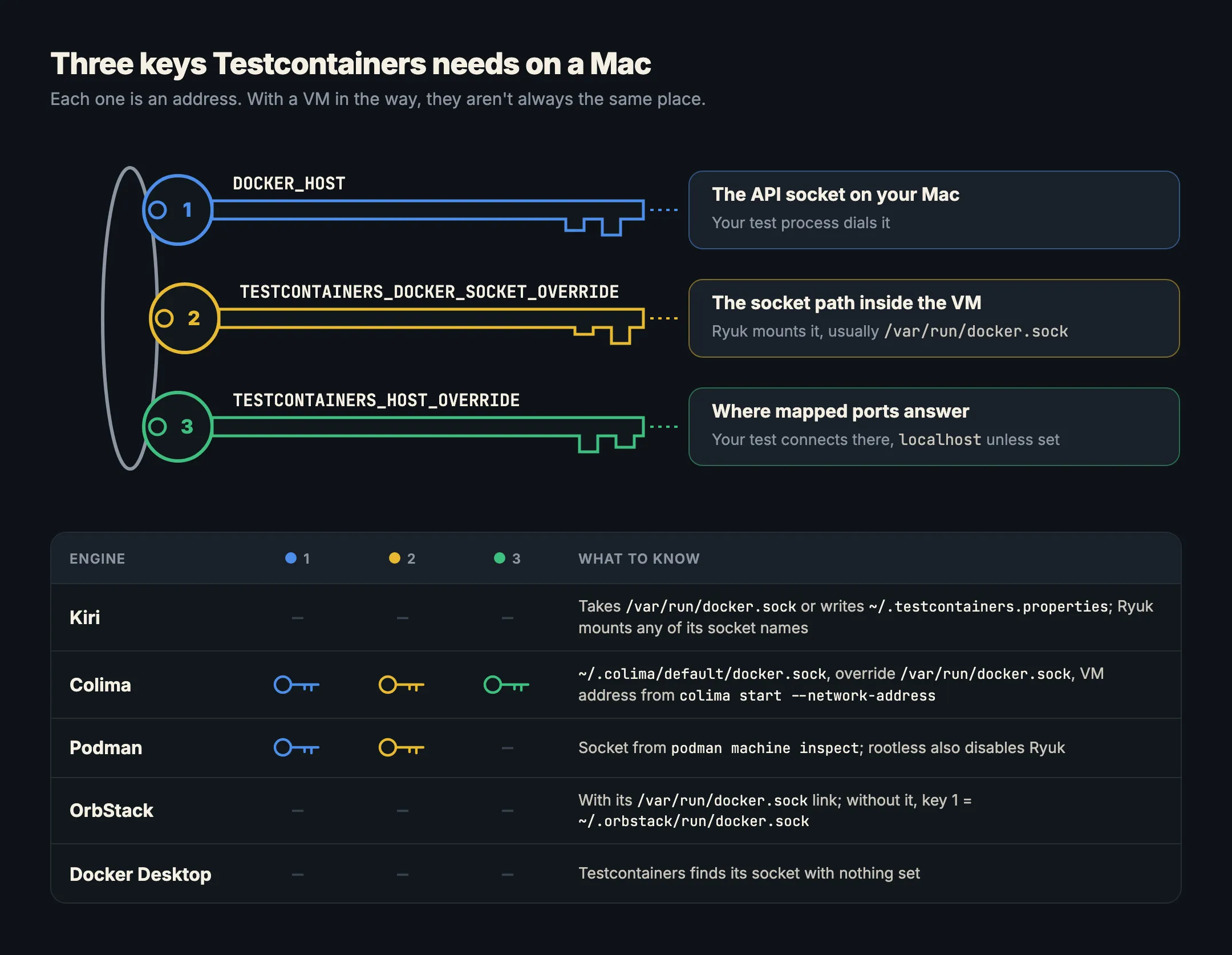
- The API socket on your Mac. Your test process dials it. That’s
DOCKER_HOST. - The socket path inside the engine. Ryuk is a container, so it mounts the engine’s socket by a path that must exist inside the VM. The Java library takes this from
DOCKER_HOST’s path unless you override it (source). SetDOCKER_HOST=unix:///Users/you/.colima/default/docker.sockand Ryuk tries to mount/Users/you/.colima/default/docker.sockin the VM, which isn’t the engine’s socket there.TESTCONTAINERS_DOCKER_SOCKET_OVERRIDEfixes that. - Where mapped ports answer. Usually
localhost. Some engines forward ports to the Mac in ways that work better when tests connect to the VM’s own address. That’sTESTCONTAINERS_HOST_OVERRIDE.
All three are environment variables in the Java, Go, Node and Python libraries (Java, Node, Python).
Testcontainers with Kiri
Kiri serves the Docker Engine API on ~/.kiri/run/docker.sock, and Testcontainers runs on it as it does on Docker since 0.2.1: it reports Docker Engine 27.5.1, so the version check passes, and Ryuk gets the same engine whatever name its socket mount uses. On most Macs there’s nothing to set:
- If no other engine has
/var/run/docker.sock, Kiri links it to its own socket once you enter your password (kiri setup --docker-socket), and a LaunchDaemon puts the link back after a restart. - Until then, Kiri writes
docker.hostinto~/.testcontainers.properties, unless you already have that file (docs).
If another engine owns the default socket, point your tests at Kiri for that shell:
export DOCKER_HOST=unix://$HOME/.kiri/run/docker.sock
./gradlew test        # or: go test ./..., npm test, pytest
Leave the startup checks and Ryuk switched on. No socket or host override is needed.
Testcontainers with Colima
Colima’s socket is ~/.colima/default/docker.sock (since 0.4.0, per its FAQ). The Testcontainers Java docs give this setup (supported environments):
colima start --network-address
export DOCKER_HOST="unix://${HOME}/.colima/default/docker.sock"
export TESTCONTAINERS_DOCKER_SOCKET_OVERRIDE=/var/run/docker.sock
export TESTCONTAINERS_HOST_OVERRIDE=$(colima ls -j | jq -r '.address')
What each line does:
--network-addressgives the VM an address your Mac can reach. Colima leaves it off by default because it needs root and slows startup (FAQ).TESTCONTAINERS_DOCKER_SOCKET_OVERRIDEtells Ryuk to mount/var/run/docker.sock, the engine’s socket inside the VM, not the Mac path.TESTCONTAINERS_HOST_OVERRIDEmakes tests connect to mapped ports on that VM address. Thejqcall reads it fromcolima ls -j, so installjqfirst (brew install jq).
The Go docs suggest a symlink instead of DOCKER_HOST for tools that only look at the default path (Go: Colima):
sudo ln -sf $HOME/.colima/default/docker.sock /var/run/docker.sockYou still need the socket override for Ryuk. Put the exports in ~/.zshrc so your IDE’s test runner gets them too (start the IDE from a terminal, or set them in its run configuration).
Testcontainers with Podman
Podman’s machine has its own socket path. The Java docs use (supported environments):
export DOCKER_HOST=unix://$(podman machine inspect --format '{{.ConnectionInfo.PodmanSocket.Path}}')
export TESTCONTAINERS_DOCKER_SOCKET_OVERRIDE=/var/run/docker.sock
Ryuk is where Podman differs:
- Rootless Podman: the Java docs say to disable Ryuk with
TESTCONTAINERS_RYUK_DISABLED=true. You lose cleanup when a test run is killed, so prune now and then withpodman container prune. - Rootful Podman, to keep Ryuk: the Go docs say to switch the machine to rootful and run Ryuk privileged (Go: Podman):
podman machine stop
podman machine set --rootful
podman machine start
echo "ryuk.container.privileged=true" >> ~/.testcontainers.properties
Testcontainers for Go also has a Podman module (since v0.45.0) that you select with TESTCONTAINERS_PROVIDER=podman; its docs recommend it on macOS, where automatic Podman detection “may fail and prevent Ryuk from starting”.
Testcontainers with OrbStack
OrbStack creates a docker context called orbstack and, if you give it admin access, a link at /var/run/docker.sock “to improve compatibility with some third-party tools” (OrbStack docs). With that link, Testcontainers finds it with nothing set.
If you declined admin access, point DOCKER_HOST at OrbStack’s own socket, the path its FAQ names:
export DOCKER_HOST=unix://$HOME/.orbstack/run/docker.sockOrbStack’s docs don’t cover Testcontainers directly. If Ryuk fails to start with a mount error, add TESTCONTAINERS_DOCKER_SOCKET_OVERRIDE=/var/run/docker.sock, the same value the Testcontainers docs use for Colima, Podman and Rancher Desktop.
“Could not find a valid Docker environment”
This is the Java library’s message when every detection step failed (source). Go says socket not found or rootless Docker not found, and Node says Could not find a working container runtime strategy. Same problem, same checks:
- Is the engine running?
docker versionshould show a Server section. If it says it can’t connect, see Cannot connect to the Docker daemon. - Does the test process see
DOCKER_HOST? Your terminal has it; Gradle daemons, Maven in an IDE and GUI apps started from the Dock often don’t. Stop the Gradle daemon (./gradlew --stop) after changing it, and check the IDE’s run configuration. - Does the path exist?
ls -l ~/.colima/default/docker.sock(or your engine’s path). A typo inDOCKER_HOSTproduces this exact error. - Is an old setting winning? Open
~/.testcontainers.properties. Atc.hostline is checked beforeDOCKER_HOSTin Java and Go, and an olddocker.hostcan point at an engine you removed. The Java library also writes adocker.client.strategyline there after it first succeeds; delete it if detection behaves oddly after you switched engines. - Read the log above the exception. Java lists each configuration it tried and why it failed. That list usually names the problem.
A minimal properties file pointing at one engine looks like this (colons escaped, as the Java docs show):
docker.host=unix\:///Users/you/.colima/default/docker.sockRyuk failing to start
Ryuk errors come in three shapes:
- A mount error such as
operation not supportedwhen the Ryuk container is created. Ryuk was given the Mac-side socket path, and the VM can’t mount it. Colima’s own issue tracker shows exactly this for its socket over virtiofs (colima#997). Fix:TESTCONTAINERS_DOCKER_SOCKET_OVERRIDE=/var/run/docker.sock. Can not connect to Ryuk at localhost:<port>(Java’s warning, source). Ryuk started but its mapped port isn’t reachable where the library looked. On Colima, that’s what--network-addressplusTESTCONTAINERS_HOST_OVERRIDEsolve.- Ryuk not starting on Podman. On rootless Podman the Java docs’ answer is to disable Ryuk. To keep it, use rootful Podman with
ryuk.container.privileged=true, as the Go docs describe.
Which engine is easiest for Testcontainers?
Docker Desktop and Kiri need no settings: both put a socket where Testcontainers looks and give Ryuk a working mount. OrbStack is the same once you let it create its link. Colima and Podman work well once the exports are in your shell profile, and they’re what the Testcontainers docs themselves document, though the Java docs add that alternative runtimes “are not actively tested in the main development workflow”.
If you’re moving a whole team off Docker Desktop, Switching from Docker Desktop and Docker Desktop alternatives compared cover the rest, and Compose setups are in Docker Compose on Mac without Docker Desktop. To try Kiri, download it; there’s also a page on Kiri as a Colima alternative.
In short
- Testcontainers doesn’t read docker contexts. It reads
DOCKER_HOST,~/.testcontainers.properties, then default socket paths. - On a VM engine, Ryuk needs
TESTCONTAINERS_DOCKER_SOCKET_OVERRIDE=/var/run/docker.sock, the socket’s path inside the VM. - Colima needs
DOCKER_HOST, the socket override, andTESTCONTAINERS_HOST_OVERRIDEwithcolima start --network-address. - Podman needs
DOCKER_HOSTfrompodman machine inspectand the socket override; rootless Podman disables Ryuk, rootful runs it privileged. - Kiri, OrbStack (with its link) and Docker Desktop need nothing set.
- “Could not find a valid Docker environment” means detection failed: check the engine, the variable your test process sees, the path, and stale lines in
~/.testcontainers.properties.