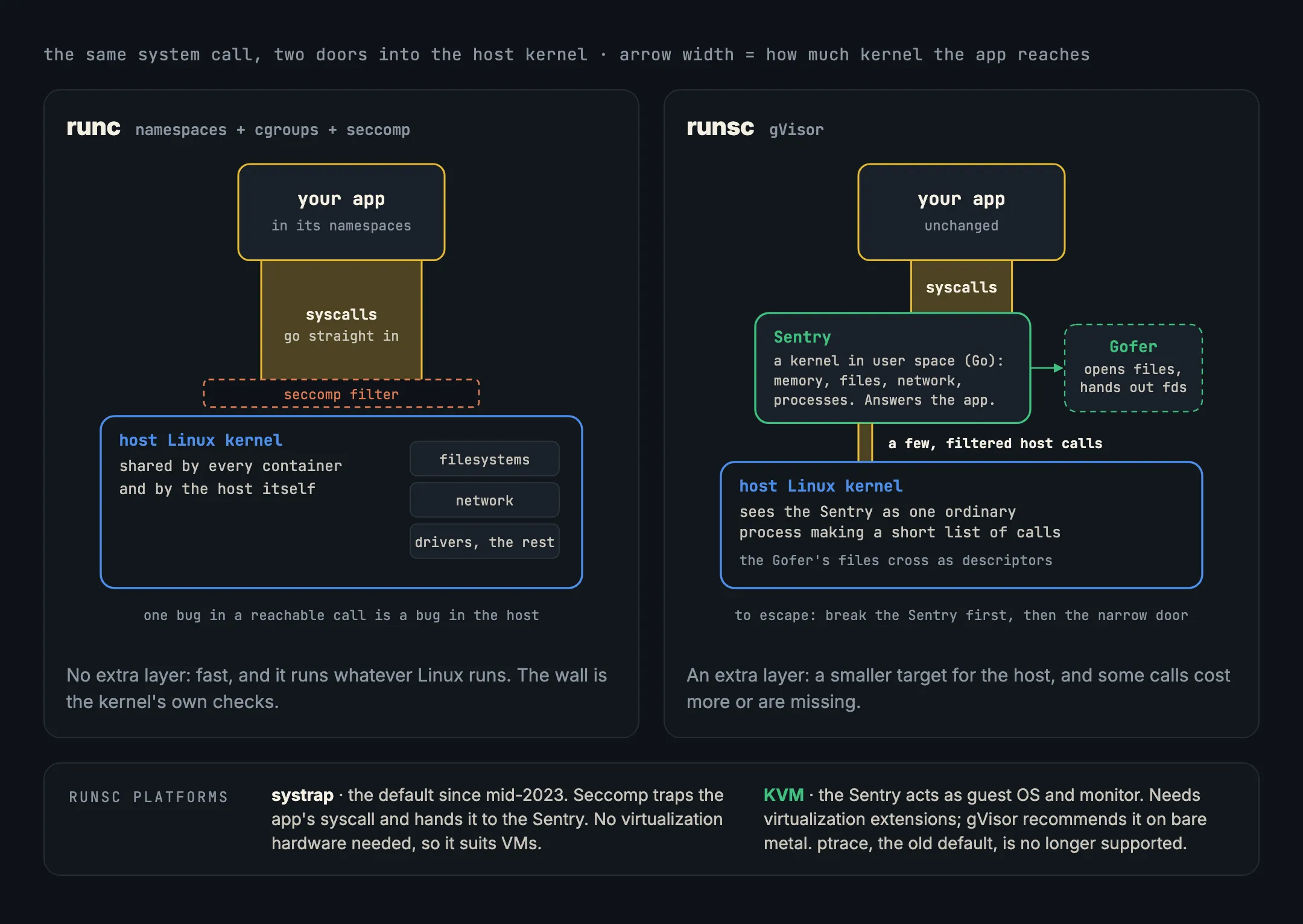
runc and runsc fill the same slot: the last program that turns a container’s description into a running process. The difference is where that process’s system calls go. With runc they go to the host’s Linux kernel. With runsc, the runtime of gVisor, they go to a kernel written in user space, and only a short, filtered list of calls reaches the host. Because both follow the same standard, swapping one for the other is a flag in Docker and a class name in Kubernetes. This post explains each, shows how to switch, and says what you give up.
New to some of the terms? Our container basics explain them: image layers, registries, runc, and containerd vs Docker.
What runc is
runc is the reference implementation of the OCI Runtime Specification. Given a bundle (an unpacked root filesystem and a config.json), it asks the Linux kernel for the pieces of a container: namespaces for the process’s own view of the system, cgroups for CPU and memory limits, a switch into the container’s files, dropped capabilities and a seccomp filter. Then it starts your program and exits. We cover it step by step in What is runc?.
The key point for this comparison: after runc has set things up, your program is an ordinary Linux process. Its system calls go to the same kernel that runs the host and every other container. Namespaces and seccomp limit what it can see and which calls it may make, but the kernel doing the work is shared. That is why a container is not a sandbox against code you don’t trust: a kernel bug reachable from inside is a bug in the host.
What runsc is
runsc is the OCI runtime of gVisor, which describes itself as an application kernel that runs in user space, “not a hypervisor or a system call filter”. It is written in Go and reimplements Linux system calls, memory management, filesystems, networking and process management. It has two parts that matter here:
- The Sentry is the kernel-like part. It intercepts the app’s system calls and page faults and handles them in its own code. It runs in a restricted environment itself, and makes only a limited set of host system calls, which gVisor says don’t map one to one to the app’s calls.
- The Gofer is a companion process for what the Sentry can’t do in its restricted environment, mainly the container’s filesystem. It runs with slightly more privilege and hands file descriptors to the Sentry on request, according to gVisor’s security model.
So the app talks to a Linux-like kernel that is not the host’s, and that kernel talks to the host through a much narrower door. To escape, an attacker has to break the Sentry first and then get through that door.
Platforms: how calls reach the Sentry
runsc has to catch the app’s system calls somehow. gVisor’s platforms page lists three:
- Systrap is the default, since mid-2023. It relies on seccomp’s
SECCOMP_RET_TRAP, which makes the kernel sendSIGSYSto the calling thread so gVisor can handle the call, and needs no virtualization hardware, so it suits running inside a VM. - KVM lets the Sentry act as both guest OS and virtual machine monitor. It needs hardware virtualization and is the one gVisor suggests on bare metal. In nested virtualization, the page says systrap often performs better.
- ptrace is the older one. gVisor says it has high context-switch overhead, is no longer supported, and is expected to be removed.
Side by side
| runc | runsc (gVisor) | |
|---|---|---|
| Who answers the app’s system calls | The host Linux kernel | The Sentry, in user space |
| What limits the app | Namespaces, cgroups, seccomp, capabilities, AppArmor or SELinux | The same kind of setup, plus the Sentry between app and host |
| Written in | Go | Go |
| Syscall coverage | Whatever the host kernel has | A subset of the Linux ABI |
| System-call and file I/O cost | Native | Extra work per call |
| Needs | A Linux kernel | Linux 5.6 or newer, x86_64 or ARM64 |
| Plugs into | Docker, containerd, Kubernetes | Docker, containerd, Kubernetes (as a RuntimeClass) |
| Escape path | A bug in a reachable kernel call | A bug in the Sentry, then the narrow host interface |
Install runsc and use it with Docker
gVisor’s install guide prefers its apt repository. If you use it and Docker is already installed, the runtime is configured for you. Otherwise download the release tarball and register it:
ARCH=$(uname -m)
URL=https://storage.googleapis.com/gvisor/releases/release/latest/${ARCH}
wget ${URL}/gvisor.tar.zstd ${URL}/gvisor.tar.zstd.sha512
sha512sum -c gvisor.tar.zstd.sha512
sudo tar --zstd -xf gvisor.tar.zstd -C /usr/local/bin
rm -f gvisor.tar.zstd gvisor.tar.zstd.sha512

sudo runsc install            # adds a runtime named "runsc" to Docker's config
sudo systemctl restart docker
Keep the gvisor-bin/ directory that comes in the tarball next to runsc. runsc install writes a runtime entry into Docker’s configuration, for example /etc/docker/daemon.json. A Docker runtime entry looks like this, so you can check what it wrote, or write it yourself:
{
  "runtimes": {
    "runsc": { "path": "/usr/local/bin/runsc" }
  }
}
Then pick the runtime per container with --runtime:
docker run --rm --runtime=runsc hello-world
docker run --rm --runtime=runsc -it ubuntu dmesg
The second command should print a boot log that starts with Starting gVisor... and ends with Ready!. gVisor’s docs add that an attacker can fake that output, so use it to check your setup, not as a security test. You can also make runsc Docker’s default with "default-runtime": "runsc" in daemon.json, but read the compatibility notes below first. Docker needs to be version 17.09.0 or newer.
Use it with Kubernetes
Kubernetes picks a runtime through a RuntimeClass. With containerd, register the runsc handler in /etc/containerd/config.toml (this needs runsc and containerd-shim-runsc-v1 installed, and containerd 1.3.9+ or 1.4.3+):
version = 2
[plugins."io.containerd.grpc.v1.cri".containerd.runtimes.runc]
  runtime_type = "io.containerd.runc.v2"
[plugins."io.containerd.grpc.v1.cri".containerd.runtimes.runsc]
  runtime_type = "io.containerd.runsc.v1"
On containerd 2.x with a version = 3 config, put the runsc block under [plugins."io.containerd.cri.v1.runtime".containerd.runtimes.runsc] instead. Restart containerd, then create the class and a pod that uses it. These are from gVisor’s containerd quick start:
apiVersion: node.k8s.io/v1
kind: RuntimeClass
metadata:
  name: gvisor
handler: runsc
---
apiVersion: v1
kind: Pod
metadata:
  name: nginx-gvisor
spec:
  runtimeClassName: gvisor
  containers:
  - name: nginx
    image: nginx
Only pods that name runtimeClassName: gvisor run in gVisor; the rest keep using runc. GKE Sandbox and the Minikube gVisor add-on do this setup for you. gVisor notes that clusters built with kubeadm can hit issues; see its FAQ.
What you give up
Compatibility. gVisor’s compatibility page says it implements only a subset of the Linux system call ABI, and that the missing part is mostly alternatives to calls it does support. It lists things that behave differently:
- CPU and memory cgroups inside the sandbox are for accounting only, not enforced between processes in the same sandbox.
- ext3 and ext4 and other block-device filesystems aren’t supported natively; mount them on the host instead.
- iptables is only partly supported, nftables limited, io_uring off by default.
- Custom hardware devices generally don’t work, except NVIDIA GPUs and TPUs.
- KVM inside the sandbox isn’t supported.
If something fails, gVisor asks for a compatibility bug report with the full command that runs the image.
Performance. gVisor’s performance guide says system-call overhead matters most for workloads bound by system calls and shrinks as an app does more work per call. Raw disk I/O shows no significant fundamental overhead, but file-heavy workloads on its in-memory and VFS paths do worse, and its web-server tests were “predictably poor”. Networking is mostly bound by implementation costs, and the stack is improving. Memory access has no added cost once mappings exist, and each sandbox has a small, mostly fixed memory overhead. The numbers in that guide come from a charts-only page tested on older hardware and a Debian 9 VM, mostly on the ptrace platform, so don’t read them as today’s figures. The only way to know is to run your own workload on both runtimes. Its production guide says gVisor can sandbox any application, but you generally shouldn’t sandbox every one.
What it doesn’t cover. gVisor says it doesn’t protect against attacks on higher-level components such as containerd, Spectre-style side channels, or exploits inside the workload itself.
Which should you use?
- Trusted services you run every day: runc. It’s native speed, runs everything Linux runs, and gets the most testing. Harden it with seccomp, dropped capabilities and rootless mode.
- Untrusted or user-submitted code, multi-tenant platforms: runsc is a strong step up, because compromised or untrusted code inside the container meets the Sentry, not the host kernel. Test that your language runtime and tools work under it.
- AI agents that run code they wrote or fetched: runsc is a good fit where the work is mostly compute and light I/O, and where you can’t get KVM for a microVM. If the agent does heavy file or build work, measure first. Either way, the runtime is one part: you still need control of the network and the secrets, as we describe in agent sandbox vs container.
- Strongest wall, own kernel per workload: a microVM (Firecracker, Kata) goes further than either. See the ladder in container isolation.
Where Kiri stands
Kiri has no runc to swap. Its agent starts each container itself, with one clone3 into namespaces and a cgroup, and there’s no OCI runtime slot in that path. On Linux there is no VM, so containers share the host kernel much as they do with runc. On a Mac, containers run inside one Linux VM and share that VM’s kernel, so the VM is the wall to your Mac, not a gVisor-style layer between containers. Kiri doesn’t support plugging in runsc, so if you need gVisor today, use Docker or containerd on Linux as above.
In short
- runc runs your container as an ordinary process on the host kernel, limited by namespaces, cgroups and seccomp. runsc (gVisor) puts a user-space kernel, the Sentry, between the app and the host.
- Switch in Docker with
--runtime=runscafterrunsc installand a Docker restart. In Kubernetes, registerrunscin containerd, add a RuntimeClass withhandler: runscand setruntimeClassName: gvisoron the pods that need it. - The price is a subset of Linux’s system calls, and extra cost on system-call and file-heavy work. gVisor documents the gaps; measure your own workload.
- Use runc for trusted workloads and runsc where code is untrusted, such as multi-tenant platforms and AI agents.