Run a Testcontainers test and look at docker ps. Next to your database there is a second container you didn’t ask for, from an image called testcontainers/ryuk. That is Ryuk, Testcontainers’ resource reaper. Its one job is to remove what your tests started, even when your tests never get the chance to do it themselves. This post explains how it works, why it needs the Docker socket, which settings control it, and the cases where switching it off is the right call and the cases where it isn’t.
New to some of the terms? Our container basics explain them: registries. For the library itself, read What is Testcontainers? first.
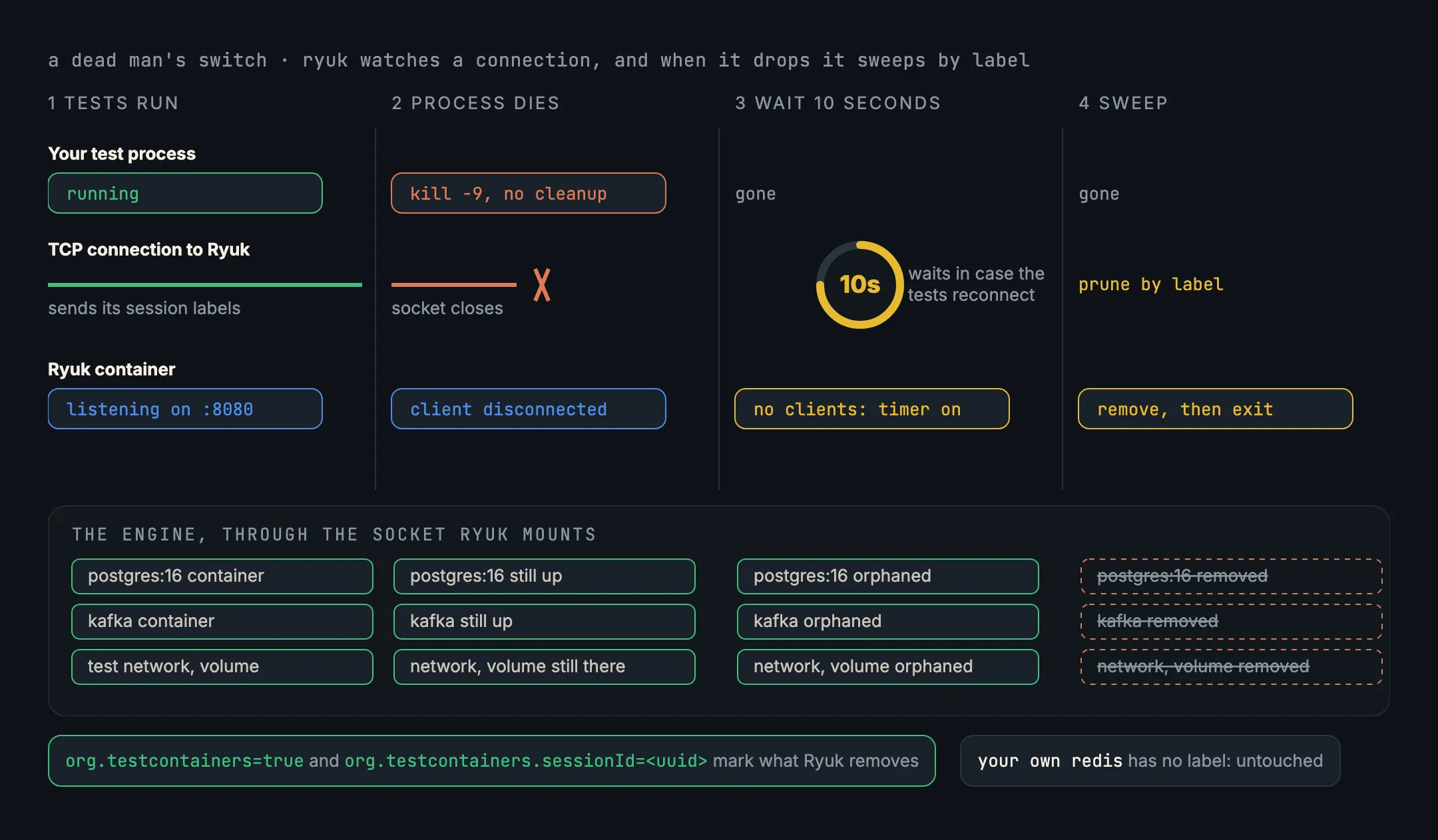
What Ryuk is
Ryuk is a small program written in Go, shipped as the Docker image testcontainers/ryuk. Its README describes the project as one that removes “containers, networks, volumes and images by given filter after specified delay”. The image is built FROM scratch with a single binary in it (Dockerfile), so there is no shell inside.
It is not part of one language library. The Java, Go, Node and other Testcontainers libraries all start the same image. The Go docs say it “is used across the board for many of the different language implementations” (garbage collector). Java’s main branch currently pins testcontainers/ryuk:0.14.0 (source); the exact tag depends on your library version.
What a test run does with it
The sequence, from the Java source and the Ryuk README:
- The library starts Ryuk first, before your containers. The container is named
testcontainers-ryuk-<session id>, publishes port 8080 on a random host port, mounts the engine’s socket at/var/run/docker.sock, and is set to remove itself when it stops. The library waits for a “Started” line in its log. - It labels everything it creates. Every test container, network, volume and library-built image carries
org.testcontainers=trueandorg.testcontainers.sessionId=<a random UUID for this run>, plus labels for the language and library version (source). Ryuk’s own container is not given theorg.testcontainers.sessionIdlabel, so it never matches its own sweep. - It opens a TCP connection to Ryuk and sends the labels as plain lines such as
label=org.testcontainers.sessionId=…. Ryuk answers with an acknowledgement, and the library doesn’t start your containers until it has one. - It keeps the connection open for as long as the test process lives.
- When the connection closes, for any reason, Ryuk waits and then sweeps. The wait is
RYUK_RECONNECTION_TIMEOUT, 10 seconds by default, in case a new connection arrives. After that Ryuk removes every container, network, volume and image that matches the labels it was given, then exits (README).
The connection is the whole trick. When the process ends, politely or not, the operating system closes its sockets. Nothing has to run inside your process for Ryuk to notice. That’s why it still works after kill -9, a CI timeout or an IDE’s stop button, the cases where a shutdown hook never runs.
If nothing ever connects, Ryuk gives up: RYUK_CONNECTION_TIMEOUT defaults to 60 seconds without a connection, and then it shuts down.
Why Ryuk needs the Docker socket
To remove a container, Ryuk has to ask the engine to remove it. It does that the same way the docker command does: through the engine’s API. Inside its own container, the only way to reach that API is a socket mounted from outside, so the library mounts the engine’s Unix socket into Ryuk at /var/run/docker.sock.
That has three consequences.
The mount path is the path on the engine’s side. On Linux with Docker, /var/run/docker.sock is the same on both sides, and nothing is needed. With an engine in a VM (Colima, Podman machine, Rancher Desktop), your test process dials a socket on your Mac, but Ryuk mounts a path inside the VM. The Java library takes the path from DOCKER_HOST unless TESTCONTAINERS_DOCKER_SOCKET_OVERRIDE is set, which the docs describe as the “path to Docker’s socket. Used by Ryuk, Docker Compose, and a few other containers”. Our Mac setup post has the values for each engine.
A remote engine mounts the remote socket. If DOCKER_HOST is a tcp:// address, there is no Unix path to mount from it. The Java code falls back to /var/run/docker.sock on the remote machine (source). If the remote engine keeps its socket elsewhere, set the override. Your tests also need to reach Ryuk’s mapped port on that remote host, because the connection is the whole mechanism.
It’s a powerful mount. Anything that can use the engine’s socket can start containers, including privileged ones, so a container with the socket mounted can control the whole engine. Docker’s security page explains why access to the daemon is access to the host. The mount is what lets Ryuk do its job, and it is why some locked-down environments refuse to run it.
Podman and privileged mode
Some environments need Ryuk to run differently, or not at all (disabling it is covered below). One setting changes how it runs:
ryuk.container.privilegedruns Ryuk with--privileged. The Java docs say: “In some environments ryuk must be started in privileged mode”. In the Java source the default istrue, while Go and Node default tofalse(TestcontainersConfiguration). The Go library readsTESTCONTAINERS_RYUK_CONTAINER_PRIVILEGEDor the same property (Go configuration), and Node readsTESTCONTAINERS_RYUK_PRIVILEGED(Node configuration).
For Podman, the Java docs say that with rootless Podman you should set TESTCONTAINERS_RYUK_DISABLED=true, and that rootful Podman no longer needs the privileged setting from library version 1.19.0 on (supported environments). The Go docs describe rootful Podman with ryuk.container.privileged=true instead. The two libraries differ, so use the page for the language you test in.
The settings that control Ryuk
In Java and Go, most settings follow one pattern: a property in ~/.testcontainers.properties becomes an environment variable by upper-casing it, replacing dots with underscores, and prefixing TESTCONTAINERS_ (Go configuration). Ryuk has several exceptions across languages, so use the exact names below.
| What | Setting | Notes |
|---|---|---|
| Switch Ryuk off | TESTCONTAINERS_RYUK_DISABLED=true |
Environment variable in Java, Go and Node. Go also takes ryuk.disabled=true in the properties file; the variable wins. |
| Run it privileged | ryuk.container.privileged |
Java and Go property. Node: TESTCONTAINERS_RYUK_PRIVILEGED. |
| Use another image | ryuk.container.image |
Java property, for a private registry. Node: RYUK_CONTAINER_IMAGE. |
| Socket Ryuk mounts | TESTCONTAINERS_DOCKER_SOCKET_OVERRIDE |
Path inside the engine’s machine. |
| Wait for Ryuk to start | ryuk.container.timeout |
Java source default: 30 seconds. |
| Time before the sweep | RYUK_RECONNECTION_TIMEOUT |
Ryuk default 10 s. Go reads it as an environment variable or ryuk.reconnection.timeout; Node as TESTCONTAINERS_RYUK_RECONNECTION_TIMEOUT. |
| See what Ryuk does | RYUK_VERBOSE=true |
Ryuk’s own debug logging. Go forwards it (RYUK_VERBOSE or ryuk.verbose), Node as TESTCONTAINERS_RYUK_VERBOSE; Java has no setting to pass it. |
The Go docs add one warning: with the Compose module, raise ryuk.connection.timeout to at least 5 minutes and ryuk.reconnection.timeout to at least 30 seconds, because starting all the services can take longer than the defaults.
When turning Ryuk off is right
TESTCONTAINERS_RYUK_DISABLED=true is the setting everyone finds first, usually in a forum answer. The Java docs say when it makes sense: “If your environment already implements automatic cleanup of containers after the execution, but does not allow starting privileged containers”. The Go docs say the same: “only for Continuous Integration services that have their own mechanism to clean up resources”.
That describes a few real cases:
- CI that throws the machine away. A fresh VM or ephemeral container per job, deleted afterwards, means leftovers disappear with it. Ryuk adds a container and a socket mount for no gain.
- Policy forbids the mount. A cluster or runner that won’t allow the Docker socket in any container leaves you no choice (if it only forbids privileged containers, try
ryuk.container.privileged=falsefirst). Then the CI system’s own teardown has to do the work. - Rootless Podman, where the Java docs tell you to disable it.
When turning it off is wrong
- Your own computer. Press stop in the IDE, or lose a terminal, and the databases keep running. After a week you have dozens of containers, some holding ports and gigabytes. This is what Ryuk prevents.
- Long-lived CI runners that run many jobs one after another. A job killed by a timeout leaves its containers for the next job, which then fails in confusing ways (a port in use, a volume with old data).
- Just to silence an error. A Ryuk startup error usually means a wrong socket path, an unreachable port or a missing image. Disabling it hides the symptom and keeps the cause. Fix the cause first (see the next section).
Disabling Ryuk doesn’t remove all cleanup. The Java docs say the library “will continue doing the cleanup at JVM’s shutdown, unless you kill -9 your JVM process”. Go’s CleanupContainer and Node’s await using remove containers on a normal finish as well. What you lose is the safety net for abnormal ends.
If you do disable it, add your own net: remove leftovers by label at the start or end of a CI job. docker container prune alone only removes stopped containers, not ones still running after a timeout. On a Linux runner, for example: docker ps -aq --filter label=org.testcontainers=true | xargs -r docker rm -fv, then docker network prune -f --filter label=org.testcontainers=true and docker volume prune -af --filter label=org.testcontainers=true.
Common Ryuk errors
Could not connect to Ryuk at <host>:<port> / Timed out waiting for Ryuk container to start. These come from the Java library when no acknowledgement arrived within ryuk.container.timeout (30 seconds by default); it prints Ryuk’s logs with the message (source). Read those logs first. Then check that the mapped port is reachable from where your tests run, which on a VM engine or a remote host may need TESTCONTAINERS_HOST_OVERRIDE.
Can not connect to Ryuk at <host>:<port>. A warning from the same class: Ryuk started, but the connection failed. Same causes.
A mount error when Ryuk is created. The socket path is wrong for the engine’s side. Set TESTCONTAINERS_DOCKER_SOCKET_OVERRIDE, usually to /var/run/docker.sock.
The image can’t be pulled. Ryuk is an image like any other. If your network blocks Docker Hub, or Hub’s pull limit stops you, point ryuk.container.image (Java) or RYUK_CONTAINER_IMAGE (Node) at a copy in your own registry.
Ryuk is still there after the tests. Normal for a few seconds: the sweep waits 10 seconds after the connection closes. If docker ps still lists it minutes later, the tests are probably still connected, which Ryuk’s verbose logging (RYUK_VERBOSE=true in Go, TESTCONTAINERS_RYUK_VERBOSE=true in Node) will also show.
Containers left behind with Ryuk on. Ryuk removes by label. A container that your code started through plain Docker, without the library, has no label and is never removed, and neither is anything you started yourself.
Ryuk on Kiri
On Kiri, leave Ryuk on. The docs say Testcontainers works with Kiri as it does with Docker, with no need for checks.disable or TESTCONTAINERS_RYUK_DISABLED, and that Kiri gives Ryuk “the engine itself, whichever name the socket has”, including Kiri’s own socket on a Mac and the //var/run/docker.sock path from Windows (docs). Kiri is tested with Testcontainers for Java 1.20 (MySQL, Redis and Ryuk) and testcontainers-python 4.8, and since 0.2.2 Testcontainers for .NET works too (including its MongoDB and LocalStack modules). The setup, including what to do if another engine owns the default socket, is in Testcontainers on Mac without Docker Desktop and the 0.2.1 notes.
In short
- Ryuk is the
testcontainers/ryukcontainer that Testcontainers starts first. It removes containers, networks, volumes and images by label. - It works as a dead man’s switch: your process keeps a TCP connection open, and when it closes, Ryuk waits 10 seconds and sweeps. That is why it works after
kill -9. - It mounts the engine’s Docker socket, which is powerful. On VM engines the path is the one inside the VM, set with
TESTCONTAINERS_DOCKER_SOCKET_OVERRIDE. TESTCONTAINERS_RYUK_DISABLED=trueis right where the machine is thrown away after the job, where policy forbids the mount, or on rootless Podman. It is wrong on your own computer and on long-lived runners.- Most Ryuk errors are a wrong socket path, an unreachable port or an image that can’t be pulled. Read Ryuk’s logs (turn on verbose logging if your library supports it), and fix the cause before disabling.