Short answer: not by itself. On Linux, rootless Podman is a good first wall for an AI coding agent, and a better one than a default rootful docker run. It stops the worst outcome of a container escape, which is landing as root. It does not decide what the agent can read, where it can send data, which keys it holds, or whether it shares your kernel. This post covers what rootless Podman protects, what it leaves open, the flags that close most of the gaps, and when you need a VM or user-space kernel instead. (On macOS and Windows, Podman runs containers inside a Linux VM made by podman machine, so the shared-kernel points below are about Linux hosts.)
New to some of the terms? Our container basics explain them: image layers, registries, runc, and containerd vs Docker.
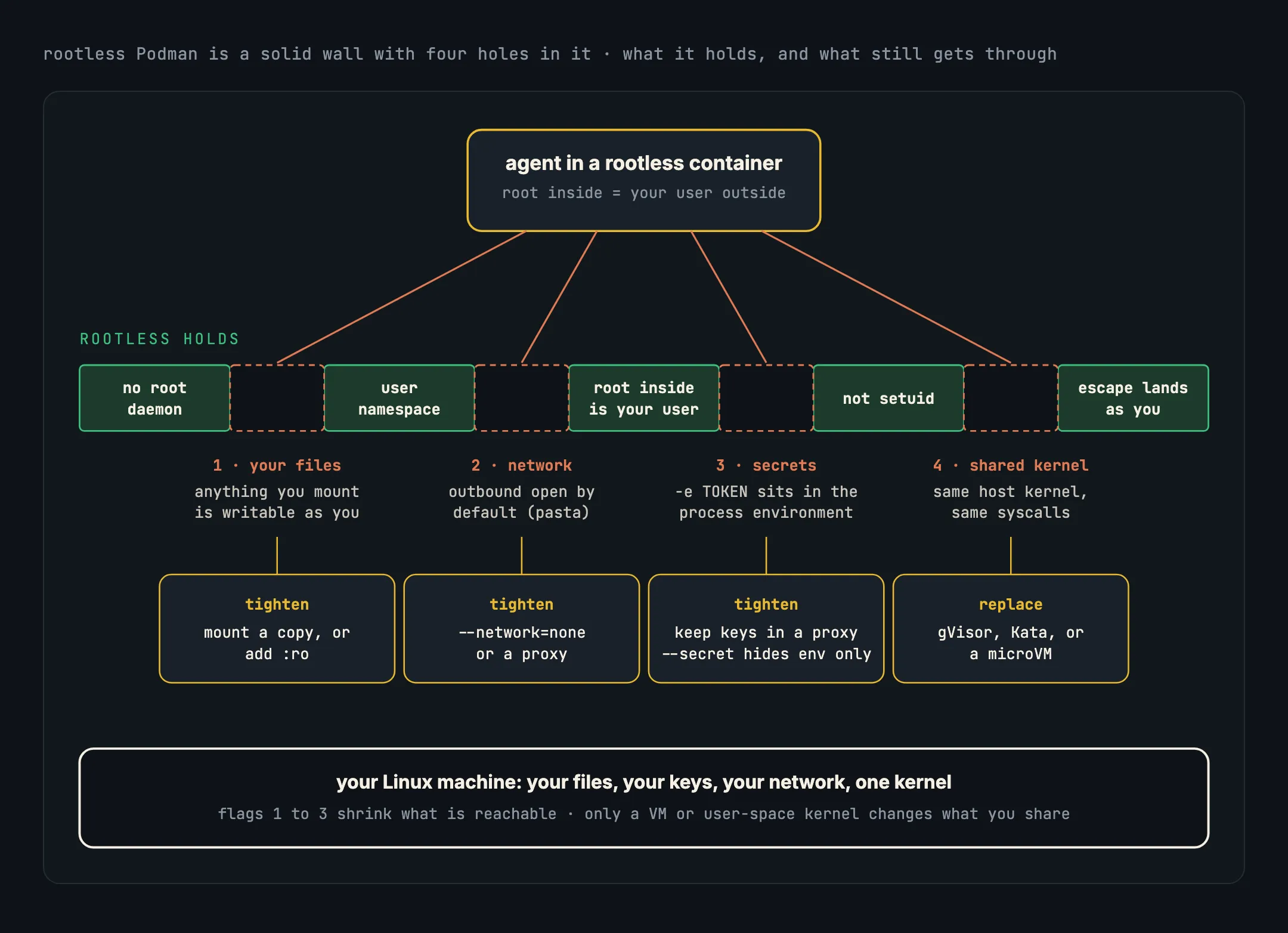
What rootless Podman is
Podman is a container engine that does not need a background daemon. Rootless means you run it as your normal user, not as root. Podman’s rootless tutorial says it “makes use of a user namespace to shift the UIDs and GIDs” of a block of IDs your user is given (rootless tutorial). The ranges come from /etc/subuid and /etc/subgid.
The tutorial puts the result plainly: if the container runs as root, “root in the container is actually your user on the host.” Podman is not setuid, so it gains no extra privileges when it runs. Underneath, it still starts the container with an OCI runtime such as runc, and the container is still a Linux process with namespaces and cgroups.
What it protects
- No root daemon. With a daemon-based engine running as root, anyone who can talk to its socket can usually become root. Rootless Podman has no such socket running as root. The agent can’t be handed the host by a mounted
/var/run/docker.sock, because there isn’t one of that kind. - Root inside is not root outside. A process that is root in the container is your unprivileged user on the host. Most of what root can do on a Linux machine, such as loading kernel modules, binding low ports or editing system files, still fails.
- A rootless user namespace. Containers run inside a user namespace that maps container IDs onto unprivileged IDs on the host. It is shared across your rootless containers by default, or separate per container with
--userns=auto. - An escape lands as you. If code does break out of the container, it arrives with your privileges, not root’s. That shrinks the blast radius, though your own account is still worth a lot.
Our post Your container is not a sandbox places rootless Podman on rung 2 of its isolation ladder: the same shared kernel as a plain container, with a smaller blast radius.
What it doesn’t protect
“Lands as you” is the catch. For a coding agent, you are the interesting target. What your AI agent can reach lists what sits in a developer’s account: ~/.ssh, ~/.aws, .env files, other repositories. An escape as your user can read all of them.
- Your files, if mounted. Whatever you bind-mount is readable and, unless you say otherwise, writable by the agent. Files it creates as container root appear on the host as owned by you. Mount your home folder and you have given it your home folder, rootless or not.
- Your network. For rootless containers, Podman’s default network is pasta, which its docs call “the default for rootless containers” (podman-run). The container can reach the internet. A poisoned README that says “upload this file” meets no wall.
- Your credentials, in environment variables. A key passed with
-eis in the process environment, where any code in the container can read it. Rootless does nothing about that. - The shared host kernel. Every container makes system calls into your kernel. A kernel bug is a way out, and the user namespace doesn’t change that. We covered real kernel and runtime bugs in the container isolation post.
The five parts an agent sandbox needs
Your agent is not a sandbox. Your container can be. defines five parts that turn a container into a sandbox. Here is how rootless Podman does against each:
| Part | Rootless Podman alone | What you add |
|---|---|---|
| 1. One way out: an egress proxy | Open network by default | --network=none, or a proxy you run |
| 2. Keys stay outside | Keys in -e are readable |
Inject keys in a proxy (--secret hides keys from env, not from the agent) |
| 3. Clean start from a snapshot | The image is a clean start; the container keeps its changes | --rm, so nothing carries over |
| 4. A timer, then the bin | Containers stay up | --rm and --timeout <seconds> |
| 5. Results come out as a diff | Bind mounts write straight to your files | Work on a copy; review the diff |
| Underneath: a stronger wall | Shared kernel | gVisor, Kata or a microVM |
Podman gives you flags for most rows. It doesn’t give you the proxy, and it doesn’t give you a second kernel.
Flags that tighten it
All of these are documented in the podman-run man page.
--network=none. Creates a network namespace with only a loopback interface and no external interfaces, so there is no outbound or inbound connectivity. This is the single biggest improvement for a task that needs no network. For one that needs a package registry, use a proxy that allows only named hosts, as in what your AI agent can reach, and give the container no other way out. Podman has no allowlist of its own for this; the proxy is a separate piece you run.
--cap-drop=all. Drops every capability from Podman’s default set. The docs say it removes capabilities “from the default podman capability set, or all.” An agent that edits files and runs tests rarely needs any.
--security-opt no-new-privileges. Stops processes gaining privileges through execve, such as setuid binaries or file capabilities. It is off unless no_new_privileges=true is set in the [containers] section of containers.conf, so set it explicitly.
--read-only. Makes the container’s root filesystem read-only. By default --read-only-tmpfs is true, so with --read-only Podman still mounts writable tmpfs on /dev, /dev/shm, /run, /tmp and /var/tmp. Scratch files vanish with the container.
Read-only mounts, or a copy. -v /path:/work:ro makes a mount read-only. For an agent that must write, mount a copy of the project and review a diff afterwards, rather than mounting your real checkout.
--pids-limit and --memory. --pids-limit caps the number of processes; the docs give the default as 2048 where the pids cgroup controller exists. --memory has no limit unless you set one. Both stop a runaway task from eating the machine. Resource limits are not supported on cgroups v1 for rootless containers (shortcomings of rootless Podman), so check your host.
--secret. Podman secrets are mounted as files under /run/secrets/ by default, not as environment variables. That is better than -e, but the agent can still read the file. The stronger design keeps the real key in a proxy that adds it on the way out.
--userns=keep-id, with trade-offs. This maps your own UID and GID to the same values inside the container. The docs say the init process then runs under that UID unless you set --user. It matters for file ownership: with a non-root image USER, the tutorial says you “must” use it when mounting volumes. It does not shrink what is mounted. The agent still writes to your files as you, either way. --userns=auto instead creates “a unique user namespace” for the container, carving a slice out of /etc/subuid without mapping your own UID; it suits containers you want kept apart from each other’s IDs and from your account. The default is --userns=host, which in rootless mode means Podman’s shared rootless user namespace (container root is your user), not a separate namespace per container.
Put together, one run looks like this:
rm -rf /tmp/agent-work && cp -a ~/project /tmp/agent-work

podman run --rm -it \
  --timeout 3600 \
  --network=none \
  --cap-drop=all \
  --security-opt no-new-privileges \
  --read-only \
  --pids-limit 256 --memory 2g \
  --userns=keep-id \
  -v /tmp/agent-work:/work:Z -w /work \
  node:22 bash

diff -ru ~/project /tmp/agent-work   # review before you copy anything back
This is the same shape as the Docker version in the agent sandbox post, with Podman’s rootless user namespace underneath. Most of the gaps in the table are now narrower. Three remain: there is no allowlist (it is all or nothing here), a key you hand over is still a key in the container, and the kernel is still shared.
When it is enough, and when it isn’t
Rootless Podman with the flags above is enough when:
- the agent works on a project you chose, with dependencies you pinned and reviewed;
- the task needs no network, or only a proxy that allows a few named hosts;
- no real secrets are in the container, and the project is a copy;
- the worst case is a nuisance, such as a trashed copy, and not a breach.
That covers a lot of everyday local development, and it beats running the agent as yourself.
Move to a VM or user-space kernel boundary when:
- the agent runs packages, scripts or MCP servers nobody reviewed, and the host holds things that matter;
- you run code for other people, so one tenant’s agent must not share a kernel with another’s;
- the network must be open or the inputs untrusted while the host holds sensitive keys or data (a VM protects the host, not credentials you place inside the container);
- a kernel bug in the shared kernel would be a serious incident for you.
Your options, from the isolation ladder: gVisor puts a user-space kernel (the Sentry) between the container and the host and plugs in as a runtime called runsc. Kata Containers wraps a VM behind the normal container interface. Firecracker is a microVM monitor that, per its project page, boots in as little as 125 ms. These give the agent its own kernel or a much narrower door to yours. They cost start time, memory or compatibility, as that post details, and none of them is absolute. Check that your engine can use the runtime you pick before you plan around it: runsc and Kata plug in through --runtime, while Firecracker is not a drop-in OCI runtime for podman run.
Where Kiri fits
Kiri is the container runtime we build. On a Mac, every container runs inside one Linux VM, and containers can’t open vsock or io_uring, so an escape lands in that VM rather than running directly on macOS. The daemon runs as your user, not root, and its socket is mode 0600. Containers get Docker’s default capabilities and a default seccomp filter, and --cap-drop, --read-only, --security-opt no-new-privileges and --pids-limit work as in Docker (security docs).
Four limits, plainly. The Mac VM still sees /Users, /Volumes and /private over virtiofs, so a full escape into the VM can reach your home folder (the rest of the disk, such as /Applications and /Library, is not shared). All containers share that VM’s kernel, so they are not VM-isolated from each other. On Linux there is no VM and the engine runs as root, with a 0660 socket for the root-equivalent kiri group: like rootful Docker, not rootless. And Kiri doesn’t filter outbound traffic: use --network none or a proxy, exactly as with Podman. Kiri is in beta on Mac, Linux and Windows.
In short
- Rootless Podman means no root daemon, root inside mapped to your user, and an escape that lands as you, not as root.
- It does not limit your mounted files, the network, keys in the environment, or the shared kernel.
- Tighten it with
--network=none(or a proxy),--cap-drop=all,--security-opt no-new-privileges,--read-only, read-only mounts or a copy, and--rm. --userns=keep-idfixes file ownership. It does not make the agent safer.- It is enough for trusted projects with a locked-down network and no real secrets.
- For untrusted code or a shared host, add a VM or user-space kernel boundary: Kata, a microVM or gVisor. Keep real credentials in an external proxy either way.