A container is not a thing the Linux kernel knows about. The kernel has namespaces, cgroups and a few other features, and a container is an ordinary process that has been wrapped in them. Namespaces are the part that decides what the process can see. The unshare command lets you make them from a shell, one at a time, so you can watch each one work. This post explains what a namespace is, lists the eight kinds, and then runs unshare for the ones that matter most.
Part of our container basics: image layers · registries · runc · Kubernetes
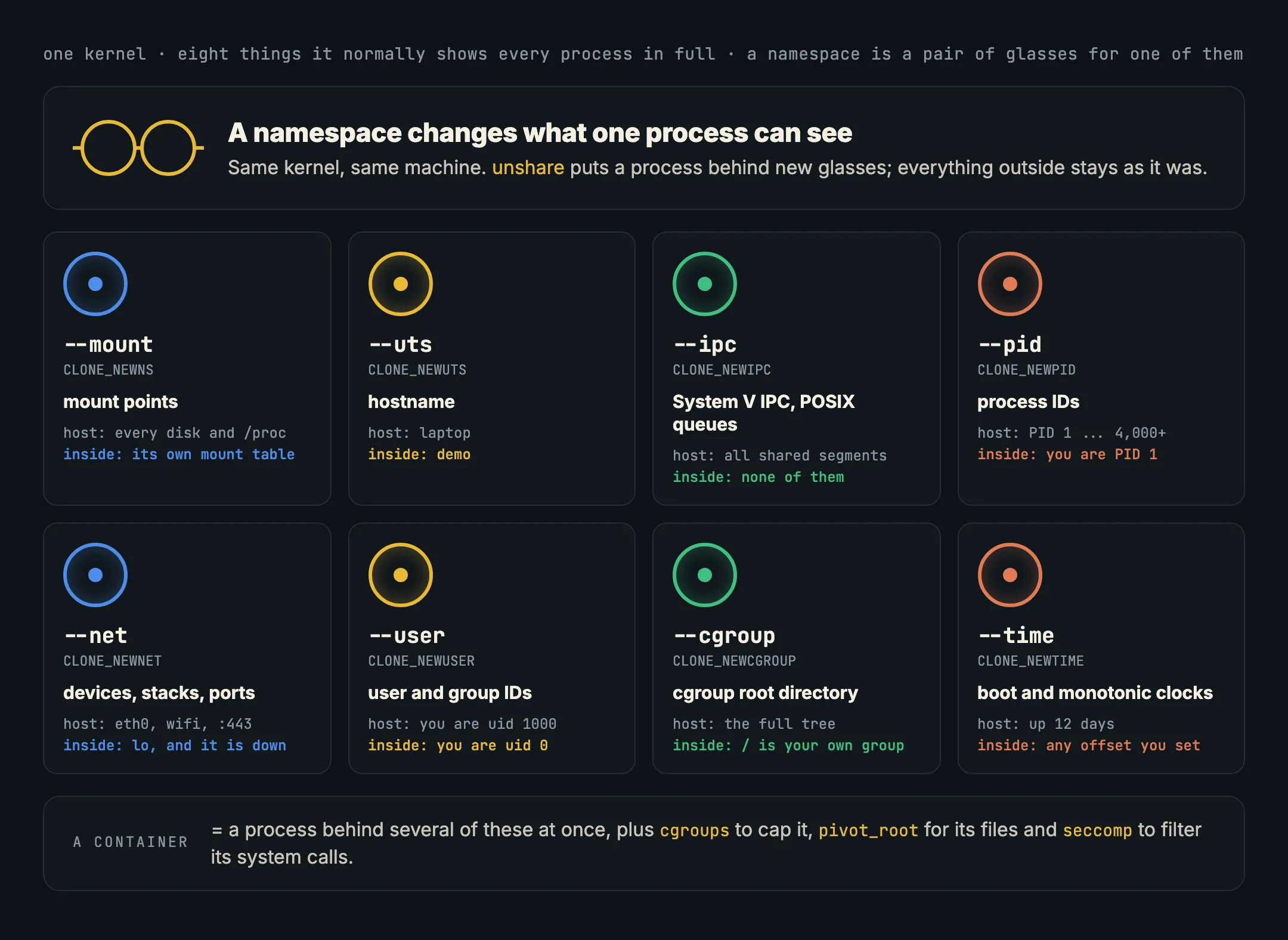
What a namespace is
Normally every process on a Linux machine sees the same things: one list of process IDs, one hostname, one set of network devices, one table of mounted disks. These are global to the machine.
A namespace wraps one of those global things so that a group of processes sees its own private copy. Processes in the same namespace see the same view. Processes outside it keep the old one. The namespaces(7) man page puts it as: a namespace makes it appear to the processes inside that they have their own isolated instance of a global resource.
Two things to hold on to:
- A namespace hides and renames. It does not limit. A process in a new network namespace can’t see your network card, but nothing stops it using all the CPU. Limits are the job of cgroups.
- It is one kernel. There is no second operating system. A namespace is a different view of the one kernel you already have.
The eight kinds
There are eight types, each with its own CLONE_NEW* flag that programs pass to the kernel when they create a process or call unshare(2). This list follows the namespaces(7) page.
| Namespace | Flag | What it isolates |
|---|---|---|
| Mount | CLONE_NEWNS |
Mount points |
| UTS | CLONE_NEWUTS |
Hostname and NIS domain name |
| IPC | CLONE_NEWIPC |
System V IPC objects and POSIX message queues |
| PID | CLONE_NEWPID |
Process IDs |
| Network | CLONE_NEWNET |
Network devices, stacks and ports |
| User | CLONE_NEWUSER |
User and group IDs |
| Cgroup | CLONE_NEWCGROUP |
The cgroup root directory |
| Time | CLONE_NEWTIME |
Boot and monotonic clocks |
The cgroup namespace needs Linux 4.6 and the time namespace needs Linux 5.6, according to the same page.
Every process is in exactly one namespace of each type, and you can see which. Each process has a directory of links:
ls -l /proc/self/nsNewer kernels list a couple of extra entries, such as pid_for_children. Each entry looks like uts -> 'uts:[4026531838]'. The number is an identifier. Two processes with the same number for uts are in the same UTS namespace.
Meet unshare
unshare comes from util-linux, so it is on practically every Linux distribution already. Its man page describes it as running a program in new namespaces that are unshared from the parent. The pattern is:
unshare [options] [program [arguments]]With no program, it starts your shell. Each namespace has a flag: --mount, --uts, --ipc, --net, --pid, --user, --cgroup, --time. Normally, when the last process in a namespace exits, the namespace goes away.
Most of the examples below need root, because creating those namespaces takes privilege. They are marked. The user namespace is the exception, and it gets its own section.
A new hostname: –uts (needs root)
The UTS namespace is the easiest one to see, because it holds just two small strings: the hostname and the (rarely used) NIS domain name.
hostname                                   # e.g. laptop
sudo unshare --uts sh -c 'hostname demo; hostname'
hostname                                   # still laptop
The middle line prints demo. The hostname demo call changed the name, but only inside the new UTS namespace. Back in your own shell the machine is still called what it was. Without the namespace, that same command would have renamed the whole machine.
Your own process list: –pid (needs root)
The PID namespace gives a process its own numbering. The first process in it is PID 1.
sudo unshare --pid --fork --mount-proc bashTwo flags here are not optional:
--forkruns the program as a child ofunshare. The man page notes this is useful when creating a PID namespace: the process that callsunsharestays in the old PID namespace, and only its children enter the new one. Without--fork, the new namespace has no process 1 to start with.--mount-procmounts a fresh/procfor the new namespace, and implies a new mount namespace so it doesn’t disturb the host’s/proc. Tools likepsread/proc, so without it they would still show the host’s processes.
Now, inside the new shell:
echo $$     # 1
ps -ef       # a short list: bash as PID 1, and ps itself
You see two processes, not the hundreds the host has. bash is PID 1. From the host, in another terminal, that same shell has a normal, large PID. It has two numbers, one per namespace. Exit the shell and the namespace is gone. The man page has a one-line version of the same check, sudo unshare --fork --pid --mount-proc readlink /proc/self, which prints 1.
Fake root: –user –map-root-user (no root needed)
The user namespace is the interesting one. Since Linux 3.8, an ordinary user may create one, and inside it that user can be root, a root that only has power over things the namespace owns.
unshare --user --map-root-user sh -c 'id; cat /proc/self/uid_map'--map-root-user maps your own user ID to 0 inside the new namespace. id prints uid=0(root), and uid_map shows the mapping, with the first number 0 and the second your real UID. It implies --user, so you could drop that flag; the man page lists both for clarity.
This is not real root. Try cat /etc/shadow inside and you are still refused, because to the rest of the system you are still yourself. What you gained are capabilities over the namespaces you own. That is why this flag combines well with others: it lets an ordinary user create a mount or network namespace and manage it. That is how rootless containers work.
unshare --user --map-root-user --pid --fork --mount-proc bash # PID namespace, no sudoAn empty network: –net (needs root)
A new network namespace starts with nothing: no interfaces except a loopback one, and that is switched off.
sudo unshare --net ip link1: lo: <LOOPBACK> mtu 65536 qdisc noop state DOWN mode DEFAULT group default qlen 1000
link/loopback 00:00:00:00:00:00 brd 00:00:00:00:00:00No eth0, no Wi-Fi, no route to anywhere. A program in here can’t reach the internet or your other services, and it has its own port numbers, so listening on a port won’t clash with one on the host. Bring up loopback and it can at least talk to itself:
sudo unshare --net sh -c 'ip link set lo up; ip link'To give such a namespace real connectivity, someone has to create a virtual cable (a veth pair), put one end inside and wire the other to the host. Container engines do this for every container on a bridge network; it is the part of the work that has no one-line unshare equivalent.
Look at them: lsns and nsenter
Two more tools from util-linux complete the set.
lsns lists the namespaces on the machine. The lsns man page describes it as listing information about all the currently accessible namespaces:
sudo lsns            # every namespace, with process counts
sudo lsns -t uts     # only UTS namespaces
nsenter does the opposite of unshare: it runs a program inside namespaces that already exist, taken from a running process. Its man page selects the process with --target PID and the namespaces with the same names as unshare. Try it with the hostname from before. In one terminal:
sudo unshare --uts sh -c 'hostname demo; exec sleep 300'In a second terminal:
pid=$(pgrep -nx sleep)
sudo nsenter --target "$pid" --uts hostname     # prints: demo
sudo lsns -t uts                                # lists UTS namespaces, including the host's and this one
sudo nsenter --target "$pid" --all puts a shell inside every namespace of that process at once, which is what docker exec and kubectl exec do in spirit. If a container has no shell of its own, --all fails, because the shell is looked up inside the container’s files. Join only its network namespace instead, and use the host’s own tools: sudo nsenter --target "$pid" --net ip addr.
A namespace normally lives as long as a process is in it. The man page for unshare shows how to keep one without a process: sudo unshare --uts=/root/uts-ns bind-mounts it onto a file (create the file with sudo touch first), and sudo nsenter --uts=/root/uts-ns joins it later. The bind mount stays until you run sudo umount /root/uts-ns.
From namespaces to a container
Put the pieces from this post together and you have most of a container’s walls, but not all of them. A real container also needs:
- Cgroups, which cap CPU, memory and process count. Namespaces change what a process sees; cgroups limit what it can use.
- A new root filesystem. A mount namespace alone still shows the host’s files. The runtime unpacks the image, calls
pivot_rootso the image’s files become/, and unmounts the old root so the host’s files are out of reach. - Reduced privileges: dropped capabilities and a seccomp filter that refuses risky system calls.
Then it starts the program, which is what runc does on most machines: it reads a config.json, makes the namespaces, sets up the rest and runs your command. Because all of this is the same kernel underneath, a container is a much thinner wall than a virtual machine. Our post on why a container is not a sandbox explains what that means in practice.
How Kiri does it
Kiri has no runc. Its agent (which runs inside a Linux VM on a Mac and in WSL2 on Windows, or directly on the host’s kernel on Linux) makes one clone3 call straight into new namespaces and the container’s cgroup, using the CLONE_INTO_CGROUP flag. The child then sets up overlayfs, calls pivot_root, drops capabilities and installs a seccomp filter. It is the same list as above, done in the agent’s own code. How Kiri starts a container walks through every step with timings.
In short
- A namespace gives a group of processes their own view of one global thing. It hides; it doesn’t limit.
- There are eight kinds: mount, UTS, IPC, PID, network, user, cgroup and time.
unsharemakes them from the shell:--utsfor a hostname,--pid --fork --mount-procfor PID 1,--user --map-root-userfor root without sudo,--netfor an empty network.lsnslists namespaces andnsenterjoins one from a running process.- A container is a process in several namespaces plus cgroups,
pivot_rootand seccomp.
Next in the basics: What is runc?, the program that does all of this for you.