Search for “docker runtimes” or “Kubernetes container runtime” and you get answers that don’t agree, because “container runtime” names three different things. One is the service that pulls images and manages containers. One is the small program that actually starts a container. And one is a sandboxed variant that puts a stronger wall around it. This post sorts them by level, shows how Docker and Kubernetes choose between them, and says where Kiri sits.
New to some of the terms? Our container basics explain them: image layers, registries, runc, Kubernetes, and containerd vs Docker.
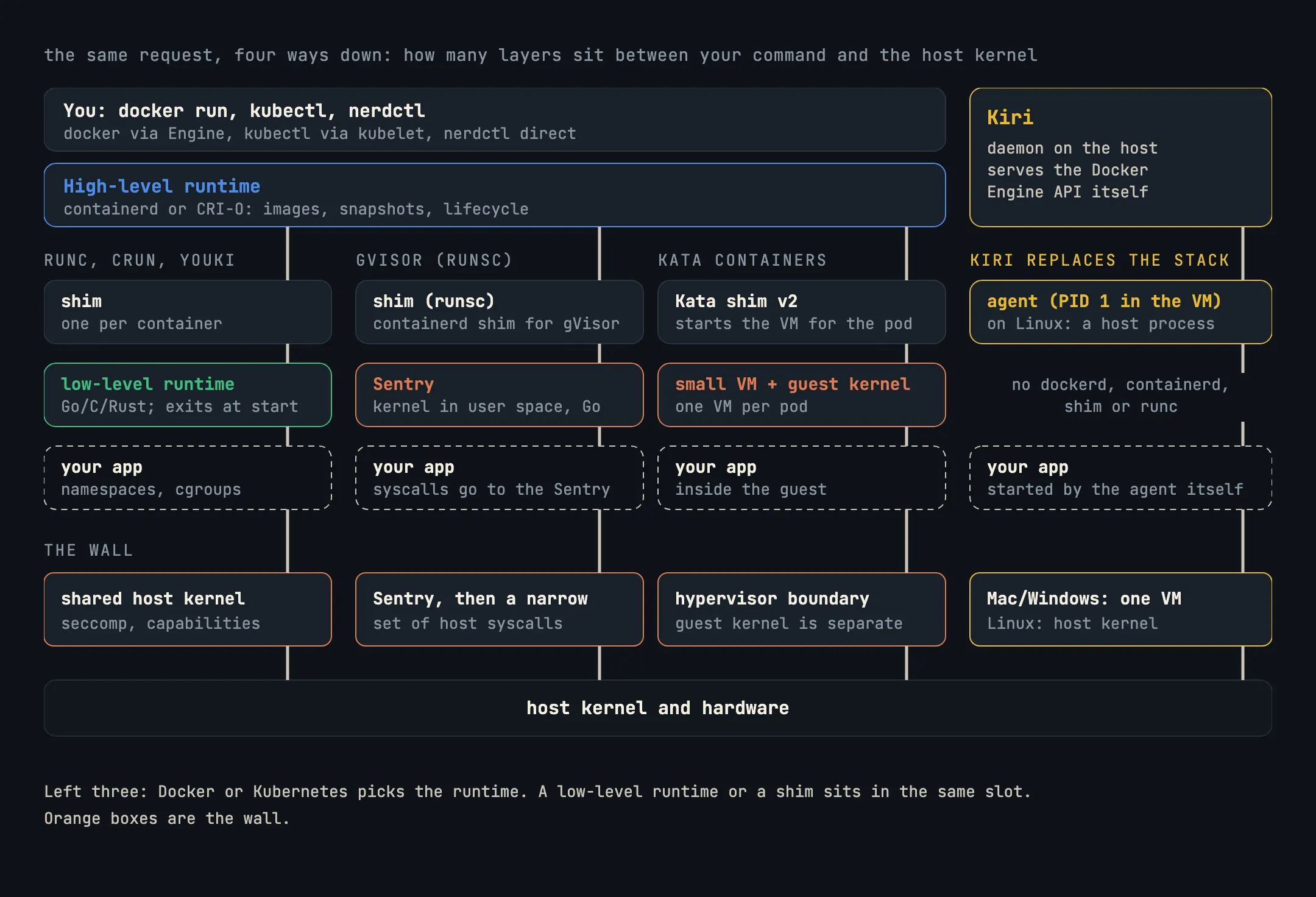
The three levels
High-level runtimes manage containers on a machine. They pull images from a registry, unpack the layers, keep track of what’s running and expose an API. containerd describes itself as “an industry-standard container runtime with an emphasis on simplicity, robustness and portability.” CRI-O is built for Kubernetes only: it is an implementation of the Kubernetes Container Runtime Interface (CRI). dockerd, the Docker Engine daemon, is also in this level, and it uses containerd underneath. Our post on containerd vs Docker covers that split.
Low-level runtimes do one job: take an unpacked image plus a config.json and start the process inside Linux namespaces and cgroups. They follow the OCI Runtime Specification, so any of them can fill the slot. The usual picture of “Docker runs containers” ends here, in runc.
Sandboxed runtimes fit the same runtime slot from Docker’s or Kubernetes’s point of view (as an OCI runtime or a containerd shim v2), but add a wall. Instead of leaving your app on the host kernel, they put a user-space kernel (gVisor) or a virtual machine (Kata) in between.
The low-level runtimes: runc, crun and youki
All three do the same job and read the same config.json. They differ in language and speed.
- runc is written in Go and is the reference implementation. In Docker’s own documentation, runc is the daemon’s default:
--default-runtimedefaults to"runc". CRI-O says it supports runc and Kata Containers. - crun is “fully written in C” and says it is “faster than runc and has a much lower memory footprint.” Podman defaults to crun on most Linux distributions, and CRI-O supports it alongside runc and Kata.
- youki is written in Rust. Its README says it “has the potential to be faster and use less memory than runc.” The benchmark it includes (version 0.3.3, one Ubuntu machine) puts youki at about half of runc’s create-start-delete time, but with crun still lower than youki. Treat that as one data point on one machine, not a ranking.
For most developers the difference doesn’t show. You notice it when you start thousands of short-lived containers on a node, where start time, memory spent creating each container, and tight container memory limits add up. All of them share the host’s Linux kernel, so none of them changes how isolated your container is. That’s what the next level is for.
The sandboxed runtimes: gVisor and Kata
gVisor calls itself “an application kernel that implements a Linux-like interface,” written in Go and run in user space. Its runsc is an OCI runtime that plugs into Docker and Kubernetes. Your app’s system calls go to gVisor’s kernel (the Sentry), which then makes a small set of calls to the real kernel. The cost is overhead on system-call-heavy work and some Linux features missing; the gVisor compatibility list says which.
Kata Containers builds “lightweight Virtual Machines (VMs) that feel and perform like containers.” It ships as a containerd shim v2 runtime, and the repository has a Rust version, runtime-rs. Kata’s architecture document says each pod gets one VM with its containers running inside, and that it supports several hypervisors. A VM boundary is a stronger wall than a shared kernel, and it costs a VM’s memory and boot time per pod.
Our post on why a container is not a sandbox covers when you actually need one.
Side by side
| Runtime | Level | Written in | Isolation | Used with |
|---|---|---|---|---|
| containerd | high | Go | none (manages containers) | Docker Engine, Kubernetes |
| CRI-O | high | Go | none (manages containers) | Kubernetes only |
| runc | low | Go | shared host kernel | Docker’s default; containerd; CRI-O |
| crun | low | C | shared host kernel | Podman; any OCI-compatible engine |
| youki | low | Rust | shared host kernel | any OCI-compatible engine |
gVisor (runsc) |
sandboxed | Go | user-space kernel | Docker, containerd, Kubernetes |
| Kata Containers | sandboxed | Go and Rust | one VM per pod | Docker, containerd, CRI-O, Kubernetes |
| Kiri | whole stack | Rust | one shared VM (Mac, Windows) or the shared host kernel (Linux) | the docker CLI, Compose |
The table covers the runtimes beneath dockerd, which uses containerd. Languages are the main language shown on each project’s GitHub repository; Kata’s repository is mostly Rust and Go, with the Rust runtime-rs and the Go runtime side by side.
How Docker picks a runtime
Docker uses runc unless told otherwise. To add another runtime, register it under the runtimes key in /etc/docker/daemon.json. There are two shapes, per the dockerd reference. A drop-in replacement for runc is a path:
{
  "runtimes": {
    "crun": { "path": "/usr/bin/crun" }
  }
}
A runtime with its own containerd shim, such as gVisor, is a runtimeType:
{
  "runtimes": {
    "gvisor": {
      "runtimeType": "io.containerd.runsc.v1",
      "options": {
        "TypeUrl": "io.containerd.runsc.v1.options",
        "ConfigPath": "/etc/containerd/runsc.toml"
      }
    }
  }
}
A shim that’s already on the PATH needs no entry: the same page shows passing --runtime io.containerd.kata.v2 to docker run. gVisor’s install guide has its own command, sudo /usr/local/bin/runsc install, which registers gVisor by path under the name runsc in daemon.json, followed by a reload of Docker. Then pick the runtime by its registered name (runsc after runsc install, or gvisor for the entry above):
docker run --rm --runtime=runsc hello-worldTo change the default for every container, set "default-runtime" in daemon.json. The runtimes and default-runtime options can both be reloaded without a full restart (systemctl reload docker).
How Kubernetes picks a runtime
Kubernetes doesn’t start containers itself. The kubelet on each node talks to a high-level runtime over the CRI, and that runtime starts the container with its own configured low-level runtime. That is why dockershim was removed in 1.24 and clusters run containerd or CRI-O directly.
To use a different runtime for some pods, you use a RuntimeClass. It maps a name to a handler configured on the node:
apiVersion: node.k8s.io/v1
kind: RuntimeClass
metadata:
  name: gvisor
handler: runsc
---
apiVersion: v1
kind: Pod
metadata:
  name: untrusted
spec:
  runtimeClassName: gvisor
  containers:
    - name: app
      image: alpine
      command: ["sleep", "3600"]
The handler must be defined on every node that will run those pods. For containerd, that’s a section named after the handler in /etc/containerd/config.toml (under plugins."io.containerd.cri.v1.runtime".containerd.runtimes on containerd 2.x, or plugins."io.containerd.grpc.v1.cri".containerd.runtimes on 1.x); for CRI-O it’s in /etc/crio/crio.conf under crio.runtime.runtimes. If runtimeClassName is left out, the default handler is used. The Kubernetes docs say a pod whose class doesn’t exist or whose handler can’t run enters the Failed phase; on a cluster with the RuntimeClass admission controller, a missing class is usually rejected up front, and a handler that fails on the node shows as FailedCreatePodSandBox events in kubectl describe pod. A scheduling field can send those pods only to nodes that have the runtime. New to the cluster side? Start with what Kubernetes is.
Where Kiri fits
Kiri isn’t another runc. It replaces the whole chain. According to the how it works page in Kiri’s docs, there is a daemon on your machine that serves the Docker Engine API, and an agent that starts containers itself, with no dockerd, containerd, shim or runc in between. On a Mac the agent is PID 1 in one small Linux VM; on Linux it is an ordinary root process on the host’s kernel and each container is one clone3 into new namespaces and its own cgroup.
That is why the docker CLI and Compose work with it unchanged, and why there’s no per-container shim: Kiri’s benchmarks measured Kiri’s daemon and guest agent at 9.7 MB combined (alongside a 69 MB Virtualization framework VM helper process on Mac), with no per-container shim, against 216 MB for OrbStack’s dockerd and containerd plus 7.9 MB per container shim (one Apple silicon Mac).
The trade-off: Kiri has no runtimes key to fill in and no handler for a RuntimeClass: you don’t swap runc for gVisor inside it, because it has no runc to swap. Kiri can run a single-node k3s cluster for local work, per its Kubernetes docs, but that is not a way to choose a runtime for your own nodes. Kiri is in beta on Mac, Linux and Windows.
Which should you use?
- Plain Docker or a normal cluster: keep runc. It’s the default and the best-tested.
- Starting many short-lived containers: try crun, and measure on your own workload.
- Running code you don’t trust, and you want to stay on containers: gVisor, if your app works with its compatibility list.
- Running code you don’t trust, and you want a hardware boundary: Kata, if you can pay for a VM per pod.
- A laptop and the
dockerCLI: the runtime underneath rarely matters; the engine around it does.
In short
- “Container runtime” means three levels: high-level (containerd, CRI-O, dockerd), low-level (runc, crun, youki), and sandboxed (gVisor, Kata).
- Low-level runtimes are interchangeable because they follow the OCI spec; they differ in language, speed and memory, not in isolation.
- Docker picks runtimes through
daemon.jsonand--runtime; Kubernetes through a RuntimeClass whose handler is set up on each node. - gVisor and Kata change the wall, not just the program.
- Kiri replaces the whole stack with its own daemon and agent, so there is no runtime slot to change.
Next in the basics: what Kubernetes is, and the system that decides which node and which runtime each pod uses.