When you type docker build, a builder reads your Dockerfile and gives back an image. For most people that builder is Docker Buildx with BuildKit behind it. Kiri Forge is a second builder, written for Kiri, that reads the same Dockerfile and aims to give back the same image. This post explains what each one is, where they work the same way, and where they differ.
New to some of the terms? Start with image layers and registries.
What is Docker Buildx?
Buildx is the part of Docker you talk to when you build. Docker’s docs put it this way: “Buildx is the client and the user interface for running and managing builds”. It is a plugin for the docker command.
Buildx does not build anything itself. It sends the build to BuildKit, which the same page calls “the server, or builder, that handles the build execution”. So “Buildx” in everyday speech means the pair: Buildx asks, BuildKit does the work. docker build has used both by default since Docker Engine 23.0.
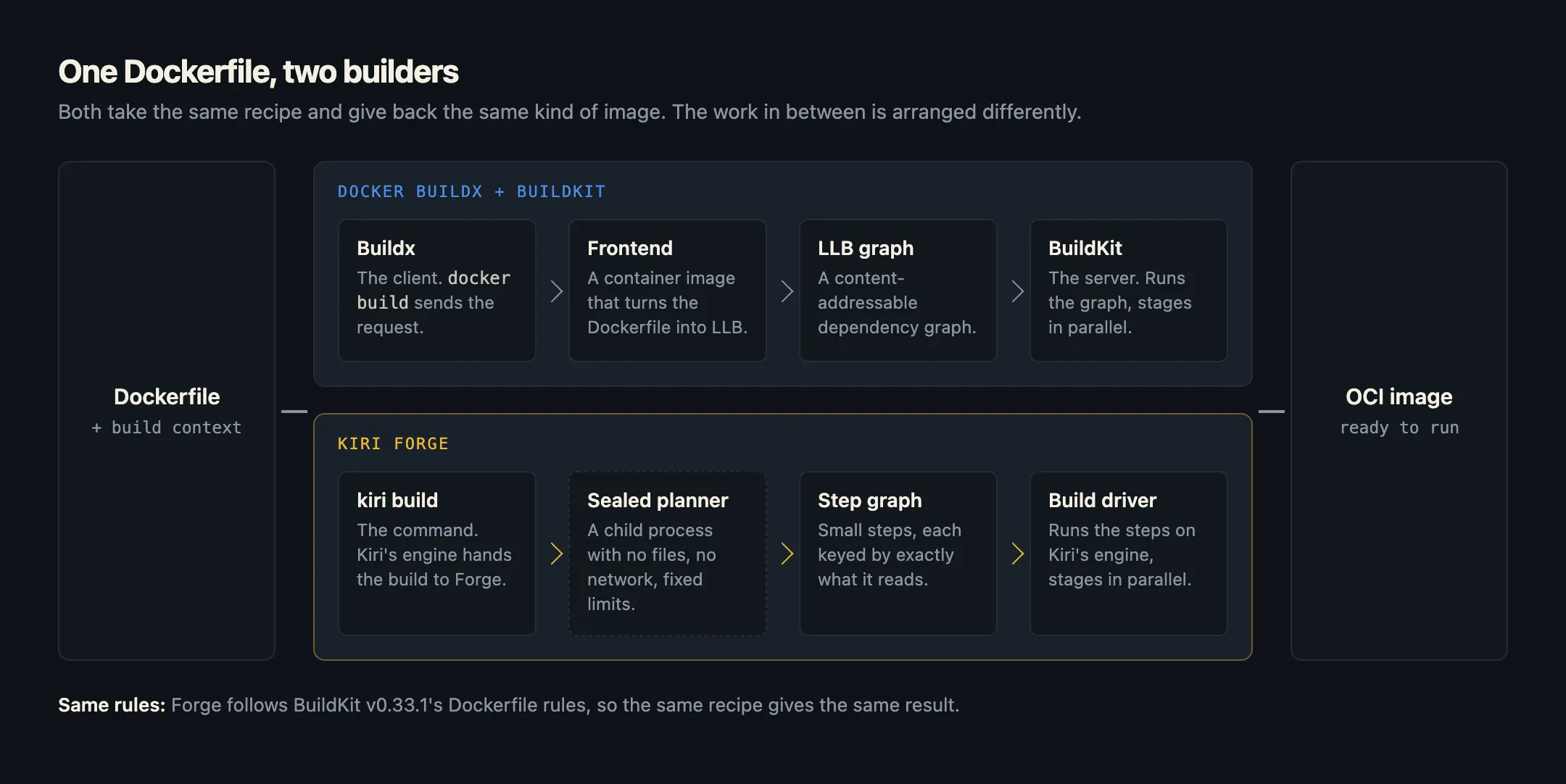
Inside BuildKit, a build goes through three stages:
- A frontend reads the Dockerfile and converts it into LLB, BuildKit’s own low-level format. The frontend is itself a container image, and a
# syntax=line at the top of a Dockerfile picks which one to load. - LLB “defines a content-addressable dependency graph”. Each node is one piece of work, and the graph says what depends on what.
- BuildKit runs the graph. It can “detect and skip executing unused build stages” and “parallelize building independent build stages”.
BuildKit is a large, mature project under the Apache-2.0 licence. It has build drivers for a local daemon, a container, Kubernetes and remote builders, and it can send its cache to a registry, a local folder, GitHub Actions and other stores.
What is Kiri Forge?
Kiri Forge is Kiri’s own build engine, written in Rust. Its idea is short: you give Forge a recipe, and it gives back something to run. Today the recipe is a Dockerfile and what comes back is an OCI image. WebAssembly is next, and Kiri’s own recipe format, the Kirifile, is planned after that.
Forge comes in two forms: a standalone program, kiri-forge, and a Rust library that other programs can embed. In Kiri, kiri build stays the command you type, and Forge is the engine behind it.
A build in Forge also goes through a graph:
- The Dockerfile is planned in a sealed child process. That process has no files, no network, and fixed limits on memory, stack and time.
- The plan is a graph of small steps. Each step carries the image config and history it produces.
- A build driver runs the steps, in parallel where stages do not depend on each other. Running a step, storing layers and pulling base images are done by the program Forge is built into. In Kiri, that is Kiri’s own engine.
Forge’s code is on GitHub under the Apache-2.0 licence.
The two side by side
| Docker Buildx + BuildKit | Kiri Forge | |
|---|---|---|
| What you type | docker build, docker buildx build |
kiri build (or kiri-forge build on its own) |
| Who does the work | BuildKit, a server | Forge, a program and a library |
| Reads | Dockerfiles, and other formats through frontends | Dockerfiles today |
| Middle form | LLB, a dependency graph | A graph of small steps |
| Independent stages | Built in parallel | Built in parallel |
| Written in | Go | Rust |
| Licence | Apache-2.0 | Apache-2.0 |
| State | Stable, the default in Docker | In development, not in a released Kiri |
Where they are the same on purpose
Forge does not invent its own Dockerfile rules. It follows BuildKit’s, at version 0.33.1, “so that a build gives the same result as docker build does, byte for byte where it can”. Forge’s tests compare its output with BuildKit’s on about 990 cases.
Parts of Forge are direct translations of BuildKit and related projects into Rust, made for exactly this reason. Each one is credited, with its licence, in the repository’s NOTICE file.
That is the point for you as a user: the Dockerfile you already have is the input to both. You should not need to change it to move between them.
Where they differ
How the recipe is read. BuildKit loads a frontend, a container image, to read the Dockerfile. That design is what lets # syntax= swap in a newer or a custom Dockerfile syntax. Forge reads the Dockerfile itself, in a child process that is sealed off from files and the network and has fixed budgets. A hostile recipe can only fail its own build; the program running Forge carries on.
What a step is keyed by. Both builders reuse work that has not changed, and in both, once a step changes, the steps after it in that stage run again. Docker’s docs describe its rules as: for RUN, “just the command string itself is used to find a match”; for COPY and ADD, a checksum of the files, in which the modification time “is not taken into account”. Forge’s key for a step is the step itself, its parent, and the content of the files it takes in.
Where it runs. BuildKit is a server with its own storage and workers. Forge leaves running steps, storing layers and pulling images to its host program through three plug-in points, so in Kiri a build uses the same engine and the same image store as your containers.
How much it covers. This one favours BuildKit, plainly. It has remote and Kubernetes drivers, several cache stores, custom frontends and years of use. Forge reads Dockerfiles and builds on Linux and macOS, and is still in development.
Which one are you using, and which should you use?
Today, you are using Buildx and BuildKit. That is true on Docker Desktop, on Docker Engine, and on Kiri, where docker build goes through BuildKit.
- If you need custom frontends, remote builders, or a cache shared through a registry or your CI, use Buildx. Forge does not do those.
- If you want to read or try Forge now, the repository has the code and
kiri-forge buildruns on its own, without Kiri. - When Forge arrives in Kiri it will be off by default at first, and
kiri buildwill stay the command either way.
In short
- Buildx is Docker’s build client; BuildKit is the server that does the work. Together they are the default behind
docker build. - Kiri Forge is Kiri’s build engine, in Rust, open source, and not in a released Kiri yet.
- Both turn a Dockerfile into a graph, run independent stages in parallel, and reuse steps that have not changed.
- Forge follows BuildKit’s Dockerfile rules so the same recipe gives the same image.
- They differ in how the recipe is read (a frontend image, or a sealed process), what a step is keyed by, and how much each covers. BuildKit covers far more today.