For local Kubernetes on a Mac you have four practical choices: kind (Kubernetes nodes as Docker containers, made for testing Kubernetes and CI), minikube (a learning and development cluster in a VM or a container, with addons), k3d (the lightweight k3s distribution in Docker containers, quick to make multi-node) and Kiri (a single-node k3s cluster built into a container engine, with LoadBalancer services on localhost). All four give you a real API server that kubectl talks to. They differ in how they run, how many nodes they make, and how traffic from your browser gets in. This post explains each one, then compares them.
New to Kubernetes itself? Start with What is Kubernetes?, which explains the control plane, nodes and pods this post leans on.
How local Kubernetes runs on a Mac
macOS has no Linux kernel, and Kubernetes nodes need one. So every option here runs Linux in a VM somewhere. The question is what sits inside it:
- Containers as nodes. kind, k3d, minikube’s
dockerdriver and Kiri run each Kubernetes node as a container inside the Linux VM of a Docker-compatible engine. Pods then run as containers inside those node containers. - A VM as the node. minikube’s VM drivers (
vfkit,qemuand others) boot a dedicated VM that is the node.
Containers as nodes are lighter and share the engine you already run. A dedicated VM is closer to a real machine and doesn’t need a Docker engine at all.
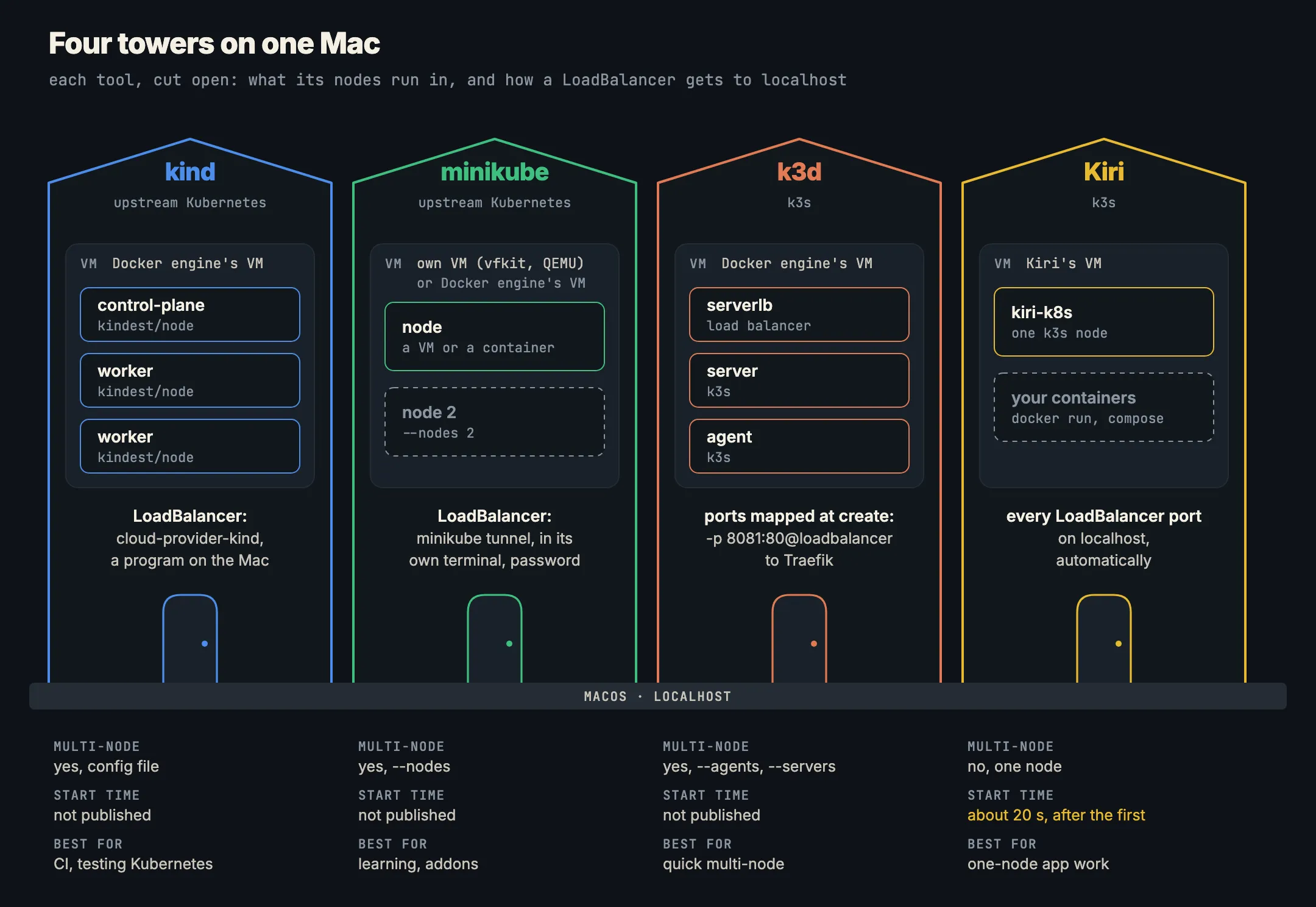
kind
What it is. kind is “a tool for running local Kubernetes clusters using Docker container ‘nodes’”. Its home page says it “was primarily designed for testing Kubernetes itself, but may be used for local development or CI” (kind.sigs.k8s.io).
How it runs. Each node is a container from the kindest/node image, run by Docker, Podman or nerdctl; kind “can auto-detect the docker, podman, or nerdctl installed and choose the available one” (quick start). On a Mac, that means you need a container engine running first.
kind create cluster                 # cluster "kind", context kind-kind
kubectl cluster-info --context kind-kind
kubectl get nodes
Multi-node. Yes, from a config file:
# kind.yaml
kind: Cluster
apiVersion: kind.x-k8s.io/v1alpha4
nodes:
- role: control-plane
- role: worker
- role: worker
kind create cluster --config kind.yamlIngress and LoadBalancer. Not built in. kind’s answer is Cloud Provider KIND, which “runs as a standalone binary in your host”, “provisions new Load Balancer containers for your Services”, and “requires privileges to open ports on the system and to connect to the container runtime” (LoadBalancer). From v0.9.0 it also serves Ingress, so “no third-party ingress controllers are required by default” (Ingress).
go install sigs.k8s.io/cloud-provider-kind@latestLocal images. A cluster doesn’t see your engine’s images; load them in with kind load docker-image my-app:latest.
Best for: CI pipelines, testing against specific Kubernetes versions, and clusters with several nodes that you create and throw away. kind recommends stable tagged releases “for CI usage in particular”.
minikube
What it is. “minikube is local Kubernetes, focusing on making it easy to learn and develop for Kubernetes” (minikube start). It asks for 2 CPUs, 2 GB of free memory and 20 GB of free disk.
How it runs. minikube runs through a driver. On macOS its drivers page marks two as preferred: Docker (the node is a container in your Docker engine’s VM) and vfkit (a VM, which needs macOS 14 and minikube 1.36.0 or later; see vfkit). QEMU, VirtualBox, Parallels and VMware Fusion are there too; Podman and Krunkit are experimental.
minikube start                       # picks a driver
minikube start --driver=vfkit        # its own VM, no Docker engine needed
kubectl get nodes
Multi-node. Yes, with --nodes:
minikube start --nodes 2 -p multinode-demoOne caveat from the multi-node tutorial: the default host-path volume provisioner “doesn’t support multi-node clusters”; use the CSI Hostpath Driver addon instead.
Ingress and LoadBalancer. Ingress is an addon: minikube addons enable ingress. LoadBalancer services need minikube tunnel, which “runs as a process, creating a network route on the host”, “must be run in a separate terminal window”, and asks for your password because adding a route needs root (accessing apps). With the Docker driver on a Mac, minikube service also needs its terminal kept open.
minikube tunnel                      # in its own terminal
kubectl get svc                      # EXTERNAL-IP now filled in
Extras. The richest of the four: minikube addons list shows a catalogue of ready-made services, and minikube dashboard opens the Kubernetes Dashboard.
Best for: learning Kubernetes, and anyone who wants a VM-based node or doesn’t want to run a Docker engine. Also good when the addons save you setup.
k3d
What it is. “k3d is a lightweight wrapper to run k3s (Rancher Lab’s minimal Kubernetes distribution) in docker” (k3d.io). k3s describes itself as “lightweight Kubernetes… all in a binary of less than 100 MB”, and bundles Traefik for ingress, ServiceLB for LoadBalancer services, a local-path volume provisioner, containerd and Flannel (k3s docs).
How it runs. Each k3s server and agent is a container in your Docker engine, and k3d puts a load-balancer container (serverlb) in front of the servers. It needs Docker 20.10.5 or later.
k3d cluster create dev
kubectl get nodes
Multi-node. Yes, and it’s one flag: --agents for workers, --servers for control-plane nodes. For several servers, k3d uses k3s’s embedded etcd and recommends an odd number (multi-server).
k3d cluster create dev --agents 2
k3d cluster create ha --servers 3
Ingress and LoadBalancer. k3s ships Traefik as its ingress controller, so the usual pattern is to map a Mac port to port 80 on the load-balancer container when you create the cluster (exposing services):
k3d cluster create dev --agents 2 -p "8081:80@loadbalancer"
curl localhost:8081/                 # reaches Traefik, then your Ingress
Only the ports you map reach your Mac, so decide them when you create the cluster.
Local images. k3d image import my-app:dev -c dev copies an image from your engine into the cluster.
Best for: fast multi-node clusters, testing high-availability setups, and teams that run k3s in production and want the same distribution locally.
Kiri
What it is. Kiri is an open-source container engine for Mac, Windows and Linux. Its Kubernetes is a built-in single-node k3s cluster, started with one command (Kiri docs: Kubernetes).
How it runs. The cluster is one privileged container, kiri-k8s, running k3s server from the rancher/k3s image in the same VM as your Docker containers. Its state lives in the kiri-k8s volume, so it survives a stop and start.
kiri k8s start
kubectl --context kiri get nodes
Start time. The first start pulls the k3s image; after that, Kiri’s docs say a start takes about 20 seconds.
Multi-node. No. It’s one node, by design.
Ingress and LoadBalancer. k3s’s bundled Traefik is turned off. Instead, every LoadBalancer service gets its port on your Mac’s localhost, TCP or UDP, with no tunnel or port-forward: Kiri checks the cluster’s services every few seconds and adds or removes forwards.
kubectl --context kiri create deployment web --image=nginx:alpine
kubectl --context kiri expose deploy web --type=LoadBalancer \
  --port 8080 --target-port 80
open http://localhost:8080
Extras. Kiri writes a kiri context into your kubeconfig (keeping a backup, and only switching your current context with --use). Its window lists pods and services, and any service or pod can get a public HTTPS address with Kiri Share (see share a local port with a public URL). kiri k8s stop stops the cluster, keeps its state and lets the VM give memory back; the cluster keeps the VM awake while it runs, and the window warns below about 2 GB for Kubernetes.
Best for: everyday app development against one node, when you already use Kiri for Docker and want LoadBalancer services on localhost without extra steps. The Kubernetes on Mac page has a summary.
kind vs minikube vs k3d vs Kiri, side by side
| kind | minikube | k3d | Kiri | |
|---|---|---|---|---|
| Kubernetes | upstream (kindest/node) |
upstream | k3s | k3s |
| Nodes run as | containers | a VM or a container | containers | one container |
| Needs a Docker engine | yes (or Podman, nerdctl) | only with the Docker driver | yes | built in |
| Multi-node | yes, config file | yes, --nodes |
yes, --agents, --servers |
no |
| LoadBalancer | cloud-provider-kind on the host | minikube tunnel in a terminal |
ServiceLB; map ports at create | automatic on localhost |
| Ingress | cloud-provider-kind v0.9.0+ | addons enable ingress |
Traefik, port-mapped | Traefik off; use LoadBalancer |
| Published start time | not given | not given | not given | about 20 s after first start |
None of the kind, minikube and k3d docs publish a start time. In practice it depends on your engine, whether the node image is already pulled, and how many nodes you ask for.
Which should you use?
- You need several nodes (scheduling, pod anti-affinity, node failure, HA control planes): k3d for speed of setup, or kind if you want upstream Kubernetes. Kiri is single-node, so it’s the wrong tool here.
- You’re testing in CI or against a particular Kubernetes version: kind. It’s what it was built for.
- You’re learning, or you want a node in its own VM with no Docker engine: minikube, with the dashboard and addons.
- You’re building an app and want one node next to your Docker containers, with LoadBalancer services in the browser and nothing else to run: Kiri. If you’re also choosing a Docker engine, Docker Desktop alternatives compared puts it next to the others.
kind, k3d and minikube’s Docker driver all sit on top of whichever Docker-compatible engine you run, so picking one doesn’t lock you out of the others. If you’re on Apple silicon and some of your images are x86-only, read running amd64 images on Apple Silicon too: the same rules apply to images your pods pull.
To try Kiri’s cluster, download Kiri and run kiri k8s start.
In short
- Every local Kubernetes on a Mac runs Linux in a VM; the difference is whether nodes are containers (kind, k3d, minikube’s Docker driver, Kiri) or a VM (minikube’s VM drivers).
- kind: upstream Kubernetes in
kindest/nodecontainers, multi-node by config, LoadBalancer through cloud-provider-kind. Best for CI and testing Kubernetes. - minikube: Docker or vfkit on a Mac,
--nodesfor more,minikube tunnelfor LoadBalancer, addons and a dashboard. Best for learning. - k3d: k3s in containers,
--agents/--serversfor more nodes, ports mapped to Traefik at create time. Best for quick multi-node clusters. - Kiri: single-node k3s in one container, about 20 seconds to start, LoadBalancer services on
localhostautomatically. Best for one-node app development next to Docker.