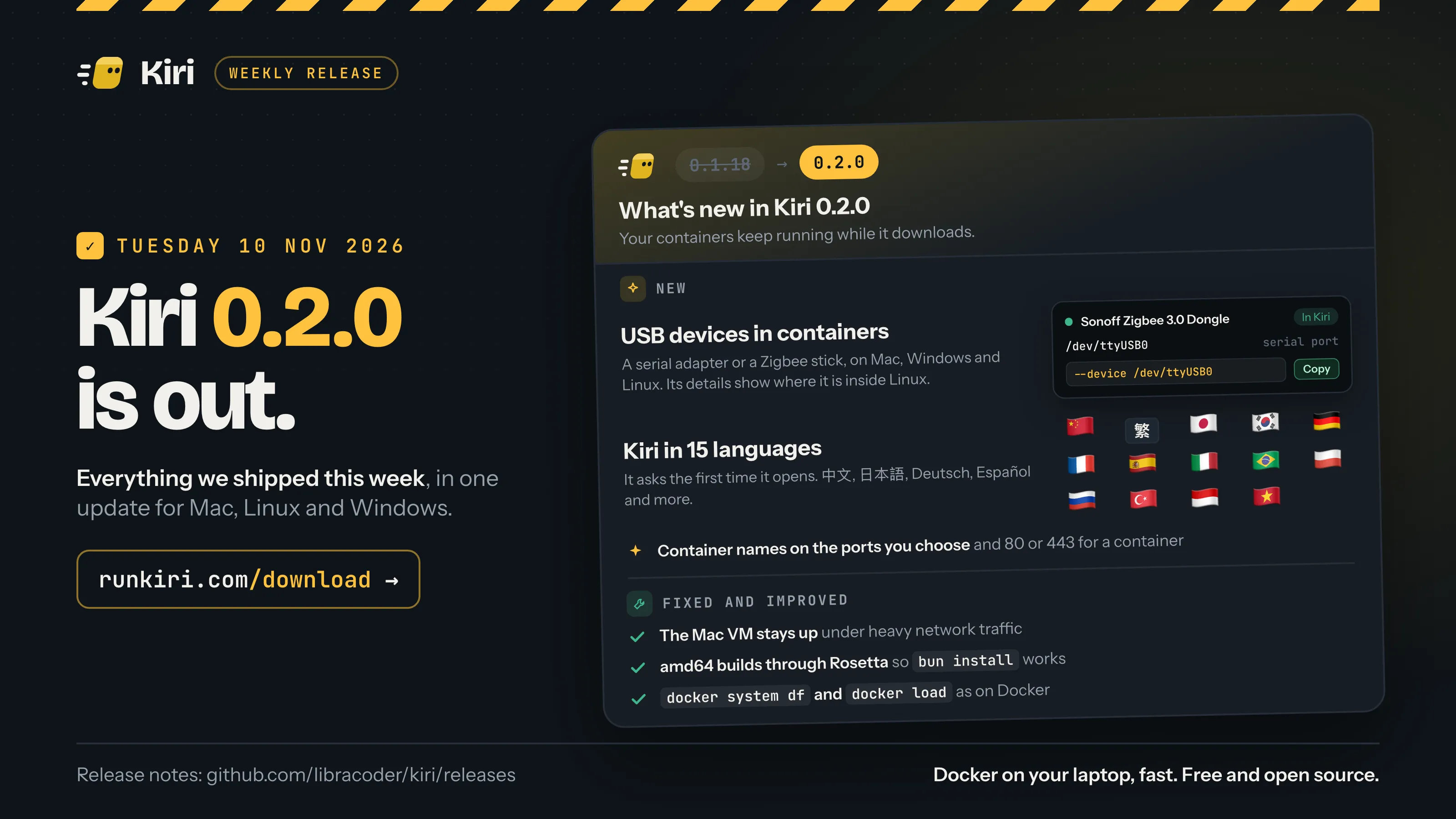
Kiri 0.2.0 is out today, Tuesday 10 November 2026, for Mac, Windows and Linux. It’s the first 0.2 release. Your containers can now use USB devices plugged into your computer, the window speaks 15 languages, and you choose which ports container names answer on. A round of fixes comes with it.
On a Mac and on Windows, Kiri offers the update in its window. New to Kiri? Download it, then see Use your Docker commands with Kiri.
USB devices in containers (beta)
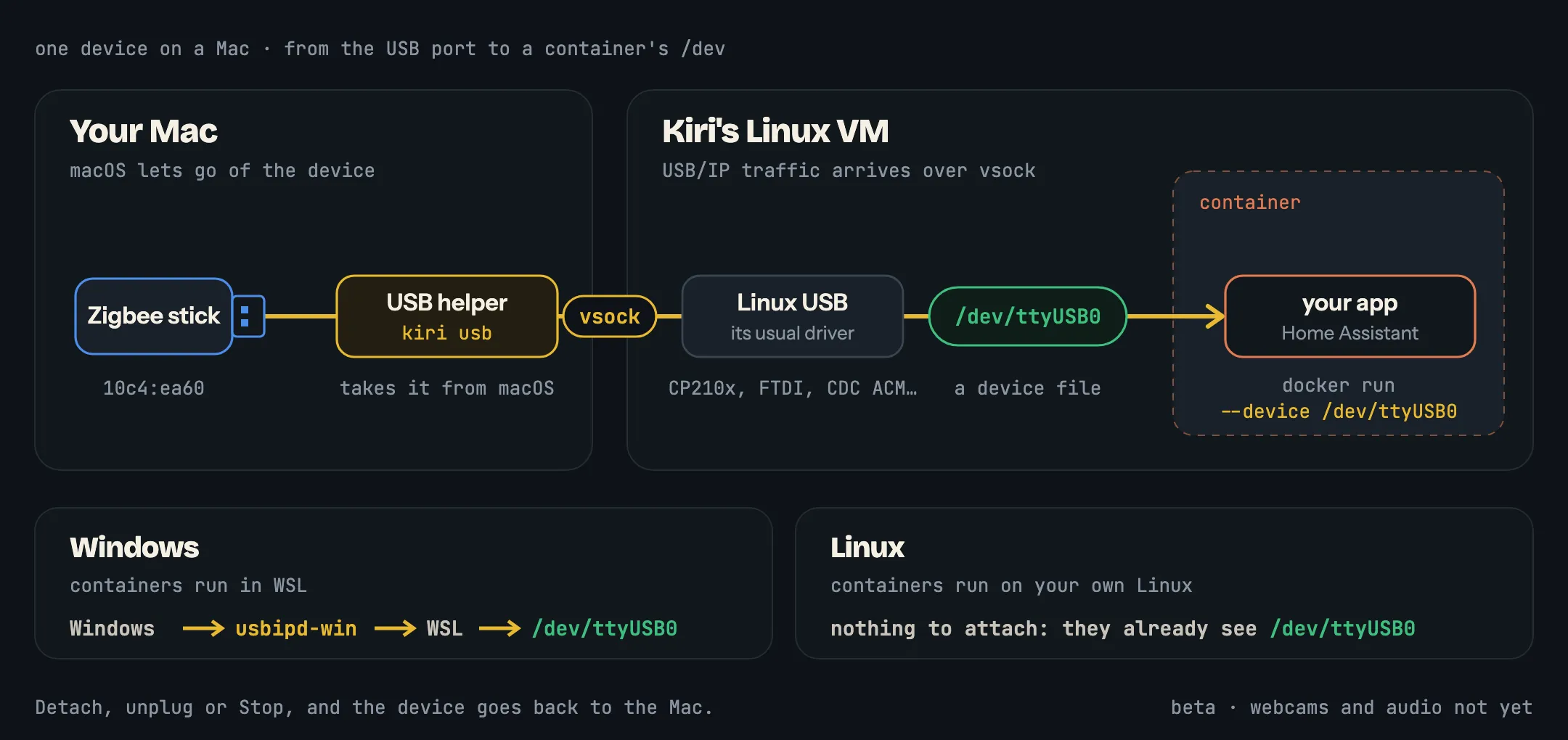
A container can now use a USB device plugged into your computer: a USB serial adapter, a Zigbee or Z-Wave stick for Home Assistant, an Arduino or ESP32, a mouse or a keyboard. Inside the container it’s an ordinary Linux device file, such as /dev/ttyUSB0, that you pass in with docker run --device. It works on Mac, Windows and Linux, and it’s in beta.
On a Mac
Containers on a Mac run in Kiri’s Linux VM, and the VM has no USB port of its own. So Kiri takes the device away from macOS and carries its USB traffic into the VM over vsock, a socket that runs straight between the Mac and the VM. Linux in the VM sees the device as if it were plugged into a Linux PC, loads its usual driver and makes the device file.
To attach a device, open USB in the sidebar of Kiri’s window, under Kiri, and press Attach on it. The row turns to In Kiri. Then pass it to a container:
docker run -d --name homeassistant --device /dev/ttyUSB0 \
  ghcr.io/home-assistant/home-assistant:stable
The first attach asks for your administrator password, once, to install Kiri’s USB helper. While a device is attached, only Kiri can use it: a mouse stops moving your cursor, and a serial port disappears from the Mac’s /dev. Detach gives it back to macOS, and so does unplugging it or pressing Stop.
kiri usb does the same from a terminal. You can name a device by its location, its vendor:product ID or part of its name:
kiri usb list
kiri usb attach zigbee
kiri usb detach 10c4:ea60
On Windows and Linux
Windows. Kiri’s containers run in WSL, and WSL gets USB devices through usbipd-win, the tool Microsoft recommends for it. The USB view works as it does on a Mac. If usbipd-win isn’t installed, the view offers to install it, and the first time you attach a device, Windows asks an administrator to let usbipd-win share it.
Linux. Containers run on your own Linux, so they already see your USB devices and there’s nothing to attach. The USB view lists them, with the device file to pass to --device and a button that copies it.
Where it is inside Linux
Click a device to open its details. Inside Linux lists every file and network interface the device made, and what each one is: a serial port, input events, raw HID, a disk, a network interface or the raw USB node. In a container gives the line to use, as a docker run flag or as Compose lines, with Copy. For a Zigbee stick that’s --device /dev/ttyUSB0, or in Compose:
devices: ["/dev/ttyUSB0:/dev/ttyUSB0"]Serial adapters (CP210x, CH340, FTDI, PL2303) and many Zigbee and Z-Wave sticks appear as /dev/ttyUSB0; Arduino and many ESP32 boards as /dev/ttyACM0; mice and keyboards under /dev/input.
Kiri in 15 languages
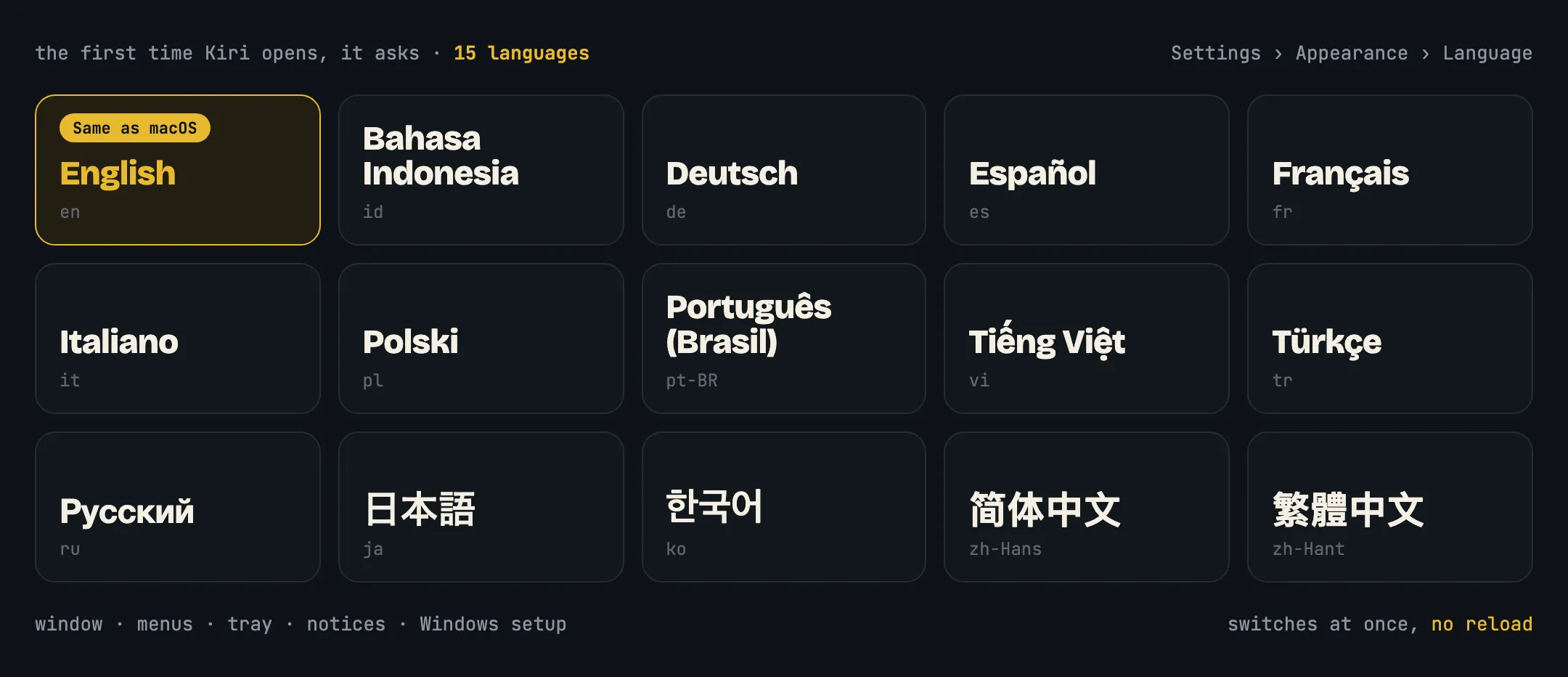
Kiri’s window now speaks English, Bahasa Indonesia, Deutsch, Español, Français, Italiano, Polski, Português (Brasil), Tiếng Việt, Türkçe, Русский, 日本語, 한국어, 简体中文 and 繁體中文. The menus, the tray, notices and Windows setup follow too.
The first time Kiri opens, it asks which language to use, with your computer’s language already picked. To change it later, go to Settings › Appearance › Language: the window switches at once, without reloading. Status text that comes from Docker itself, such as “Up 2 h”, stays in English.
Choose the ports container names answer on
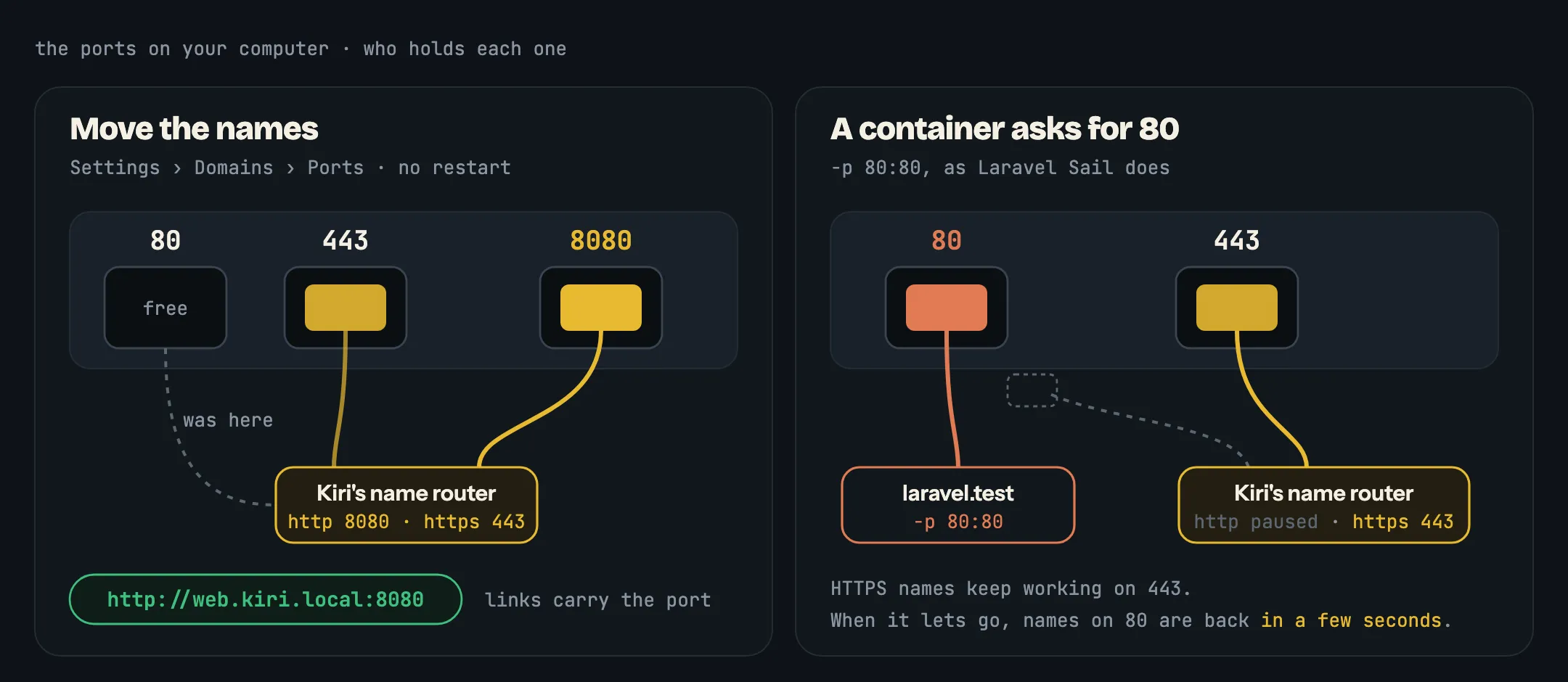
Every running container has a name you can open in the browser, such as http://web.kiri.local. Those names answer on port 80, and 443 for HTTPS. If another program needs those ports, choose others in Settings › Domains › Ports and press Change ports. The move happens at once, with no restart, and Kiri keeps your choice. Links to containers then carry the port, such as http://web.kiri.local:8080.
If a port you pick is already taken, nothing changes and Kiri tells you which port it was. See Domain names for the rest.
Containers can take port 80 or 443
Before 0.2.0, a container that published port 80 failed with “port is already allocated”, because Kiri’s name router held it. Now the container gets the port, as on Docker, so Laravel Sail’s 80:80 works.
Names on that port pause while the container has it, and come back within a few seconds after it lets go. The other port isn’t touched: HTTPS names keep working while a container has port 80.
Fixed and improved
- Mac: the VM no longer stops under heavy network traffic, such as a large download or a copy between containers.
- Mac: the VM’s clock keeps the Mac’s time after sleep. Before, it fell further behind with each sleep, and
apt-get updatein a container could refuse valid signatures. - amd64 builds on Apple silicon run through Rosetta, as
docker run --platform linux/amd64already did. They’re faster, andbun installno longer crashes. docker system dfshows real sizes for images, containers and volumes, so you can see what fills Kiri’s disk.docker loadreads images saved by Podman and by older Docker.- DDEV and Typesense start.
- php-fpm and nginx running as a non-root user can open their logs.
- Mac: the Finder mount never covers your files at
~/Kiri. If that folder already has files in it, or another disk is mounted there, Kiri leaves it alone. - Mac: closing the window hides Kiri’s Dock icon. Kiri stays in the menu bar and your containers keep running.
- Linux: the window no longer flickers.
- Linux: the packages install beside Docker’s own Compose and buildx, for example when Docker Desktop is installed, instead of failing.
- Windows: setup carries on where it stopped when you open Kiri again, and shows why it stopped. When its test pull fails, it says why: the proxy refused, the registry couldn’t be reached, a rate limit, or a login it needs.
What’s new has the complete list for 0.2.0, and Settings covers the new Language and Ports options.
Get Kiri 0.2.0
- Already have Kiri on a Mac or Windows? The window offers the update.
- New to Kiri, or on Linux? Get it from runkiri.com/download.
Then plug something in and open USB.